Discuss Scratch

- Discussion Forums
- » Advanced Topics
- » Leopard: Edit Scratch projects as JavaScript code
![[RSS Feed]](//cdn.scratch.mit.edu/scratchr2/static/__4bc739c53cfd81b94c5e6780b6a19bb8__//djangobb_forum/img/feed-icon-small.png "[RSS Feed]")
![[RSS Feed]](http://cdn.scratch.mit.edu/scratchr2/static/__4bc739c53cfd81b94c5e6780b6a19bb8__//djangobb_forum/img/feed-icon-small.png "[RSS Feed]")
- Forza876
-
 New Scratcher

1 post
Leopard: Edit Scratch projects as JavaScript code
How can I use Leopard on sb3 files?

- _SNIPR-
-
 Scratcher

37 posts
Leopard: Edit Scratch projects as JavaScript code
How can I use Leopard on sb3 files?Not too sure
- ssvbxx2
-
 Scratcher

100+ posts
Leopard: Edit Scratch projects as JavaScript code
There's a bug with the LeopardJS converter. If you set a variable to an empty value, it is converted to zero. I first saw it in this project I made: https://scratch.mit.edu/projects/647292972
- CakeConsumer
-
 Scratcher
5 posts
Leopard: Edit Scratch projects as JavaScript code
?????????????????????
- comunicazione
-
 Scratcher

15 posts
Leopard: Edit Scratch projects as JavaScript code
Projects now run at 30fps by default (the same as Scratch)!
You can still opt-in to 60fps by changing the frameRate option in index.js.
This will ensure that more projects run the same way they do on Scratch. And if you prefer a smoother project, it's easy to make that change yourself!
(This update was not as challenging as I expected.)

I don't see this option in my index.js at https://codesandbox.io/s/e6l7ud?file=/index.js:19-21&resolutionWidth=500&resolutionHeight=400. Am I supposed to add it?
- comunicazione
-
Scratcher
15 posts
Leopard: Edit Scratch projects as JavaScript code
Sprite layering blocks are now supported in Leopard!
That's right! Go to front/back and go forward/backward work now!
As the layering of the sprites of my project https://scratch.mit.edu/projects/649107588/ is different in Leopard I added a “go to front” block to the a3 sprite, but I just found a
/* TODO: Implement looks_gotofrontback */ null;
in the js code. Have I to change this to
this.moveAhead();
manually?
- _SNIPR-
-
Scratcher
37 posts
Leopard: Edit Scratch projects as JavaScript code
When I make a clone and rhen move it off the screen. The clone response back on screen. Why? And how fix??
- Darkmoon9307
-
 Scratcher

14 posts
Leopard: Edit Scratch projects as JavaScript code
I have this project that uses clones to make snow, but the clones don't fall. Help?
- Darkmoon9307
-
Scratcher
14 posts
Leopard: Edit Scratch projects as JavaScript code
Leopard seems so cool but the only thing i can get to work is the example and not even a simple test that i made to try it even when i press edit as jsExactly!when I try to use Leopard :: hat events
(It doesn't work :: sensing)and<I get triggered :: stack> ::stack
if<I am mad> :: control
Rage
Then not really because i'm not a rager :: motion


Leopard's still cool though

- _SNIPR-
-
Scratcher
37 posts
Leopard: Edit Scratch projects as JavaScript code
Leopard seems so cool but the only thing i can get to work is the example and not even a simple test that i made to try it even when i press edit as jsExactly!when I try to use Leopard :: hat events
(It doesn't work :: sensing)and<I get triggered :: stack> ::stack
if<I am mad> :: control
Rage
Then not really because i'm not a rager :: motion
Leopard's still cool though
Ummm leopard does work.
- GalaxyLinus
-
 Scratcher

1 post
Leopard: Edit Scratch projects as JavaScript code
Can I make Leopard run fullscreen?
- ndtrung84
-
 Scratcher

26 posts
Leopard: Edit Scratch projects as JavaScript code
IDK
when I receive [Hello]
add [Bello] to [list of hellos]
- -ElectronicArts-
-
 Scratcher

1000+ posts
Leopard: Edit Scratch projects as JavaScript code
when [ scratch ] button pressed
say [...]
repeat (round (timer))
move (timer) steps
turn cw (timer) degrees

end
dont spam pleaseIDKwhen I receive [Hello]
add [Bello] to [list of hellos]
- Mario5Sonic
-
 Scratcher

49 posts
Leopard: Edit Scratch projects as JavaScript code
I have this project that uses clones to make snow, but the clones don't fall. Help?
Try using a more simple way.
- Minecraft_aa
-
 Scratcher

1 post
Leopard: Edit Scratch projects as JavaScript code
Cannot read property ‘name’ of undefined
what is this error?
what is this error?
define scratch.mit.edu/projects/434614411
- _SNIPR-
-
Scratcher
37 posts
Leopard: Edit Scratch projects as JavaScript code
Cannot read property ‘name’ of undefinedIt means there is a character that leopard cannot understand. Most likely a ! ? : ; ,
what is this error?define scratch.mit.edu/projects/434614411
Try removing those characters from your scratch project and try again
- Horrorfan86
-
 Scratcher

37 posts
Leopard: Edit Scratch projects as JavaScript code
Excuse me… https://scratch.mit.edu/projects/666709931/ is not working,any way to fix it?

- pelofan_251
-
 Scratcher

3 posts
Leopard: Edit Scratch projects as JavaScript code
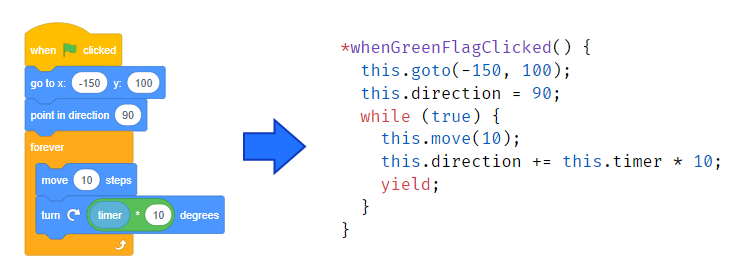
Please use this thread to discuss Leopard, share your projects, and ask for help.
That's right! Translating Scratch to JavaScript is now possible! The tool is called Leopard, and it's available here:Leopard Website – Go here to convert your projects!
Who needs this?
Scratch is amazing. This is the place where I learned to code almost 9 years ago. I love the Scratch community, and the fact that it's so easy to get started with Scratch. However, many of the features that make it easy to start using Scratch also make it underpowered for more experienced programmers.
With a different programming language like JavaScript, you get:If you want to try a different programming language but find it difficult to get started, Leopard can help.
- More features: You can do cool tricks that simply aren't possible with Scratch.
- Speed: Your projects run faster and lag isn't as problematic.
- Publishing options: Run your projects on any website, not just Scratch.
How is this different than Phosphorus?
Phosphorus is awesome, but it's a little different than Leopard. With Leopard you can view and edit the translated JavaScript code yourself.
What if it doesn't work?
Not every project will translate perfectly.
- Only projects created using Scratch 3.0 can be translated. If you created your project using Scratch 2.0 or older, you'll need to open it up in the Scratch 3.0 editor, make a small change, and then try again.
- Some Scratch blocks are not yet supported. Check the translations page to see which blocks have JavaScript equivalents using Leopard. More blocks will be supported over time.
- Extension blocks won't work (except pen, which works great!)
- Sometimes there are little inconsistencies. We've done our best to make sure Leopard behaves exactly the same as Scratch, but there will always be little cases we haven't considered. It's possible that your scripts will run slightly out of order, be a little too fast, or some other issue. Fortunately, you can edit the JavaScript code to fix those issues, and I'm happy to help.
Upcoming Improvements
Based on the feedback I'm seeing on the forums and in comments, these are the top-priority issues to solve (most important first):
- Sprite layering doesn't work! go to front/back & go forward/backward blocks need to be implemented. Sprite layering now works in Leopard!
- Projects run too fast! Leopard projects currently run at 60fps, but it should also be possible to slow them down to 30fps. Frame rate is now a configuration option, and the default is 30fps–the same as Scratch.
- Variable watchers don't work Variable watchers now work in Leopard!
- If touching edge and if on edge, bounce blocks don't work.
- Lots of little bugs that all add up to cause issues
Thank you so much to the contributors who made Leopard possible!


i tried it with my friday night funkin mod and apparently leopard.com can't support it because it's outdated