Discuss Scratch

- Discussion Forums
- » Questions about Scratch
- » How to make better art on Scratch (and in general too)?
![[RSS Feed]](//cdn.scratch.mit.edu/scratchr2/static/__6e6d008c1f6fa09308b1a53c87250e5f__//djangobb_forum/img/feed-icon-small.png "[RSS Feed]")
![[RSS Feed]](http://cdn.scratch.mit.edu/scratchr2/static/__6e6d008c1f6fa09308b1a53c87250e5f__//djangobb_forum/img/feed-icon-small.png "[RSS Feed]")
- WPONTA
-
 Scratcher

1000+ posts
How to make better art on Scratch (and in general too)?
(I'll use this as a place for storing tips from different artists for my drawing carrer)
I know this isn't the best place to ask about this but since Scratch is also a place to share art and there are quite a lot of artists there, I need some tips or more polished guides to help me get better at art (since it's very important for my future career on Scratch and in general) from all the artists there,
Take a look at some of my art:
https://scratch.mit.edu/projects/1059213549/ (drawn in 2024)
https://scratch.mit.edu/projects/1169281931/ (drawn in 2025)
https://scratch.mit.edu/projects/1365672030/ (the most recent one)
As you can see, the recent one's much better than before; however, I still need some guidance to draw more advanced things (Character designs, and more), as I don't have a direction to go in, and I also don't have much time to draw either. I hope there should be some useful guides from the artists there
Your help contributes a lot to my future <3
*Thanks for some tips from the previous topic as well
I know this isn't the best place to ask about this but since Scratch is also a place to share art and there are quite a lot of artists there, I need some tips or more polished guides to help me get better at art (since it's very important for my future career on Scratch and in general) from all the artists there,
Take a look at some of my art:
https://scratch.mit.edu/projects/1059213549/ (drawn in 2024)
https://scratch.mit.edu/projects/1169281931/ (drawn in 2025)
https://scratch.mit.edu/projects/1365672030/ (the most recent one)
As you can see, the recent one's much better than before; however, I still need some guidance to draw more advanced things (Character designs, and more), as I don't have a direction to go in, and I also don't have much time to draw either. I hope there should be some useful guides from the artists there
Your help contributes a lot to my future <3
*Thanks for some tips from the previous topic as well
Last edited by WPONTA (Aug. 7, 2026 16:48:00)
- ChristianScratcher1
-
 Scratcher

1000+ posts
How to make better art on Scratch (and in general too)?
The below 2 projects have some helpful tips in vector art
https://scratch.mit.edu/projects/668533414/
https://scratch.mit.edu/projects/585853105/
I'll try to post a more in-detail post later but I don't enough time rn
https://scratch.mit.edu/projects/668533414/
https://scratch.mit.edu/projects/585853105/
I'll try to post a more in-detail post later but I don't enough time rn
- AdaVesta_
-
 Scratcher

1000+ posts
How to make better art on Scratch (and in general too)?
try different styles.. see which one suits you..?
- Emswirli
-
 Scratcher

100+ posts
How to make better art on Scratch (and in general too)?
try different styles.. see which one suits you..?yeah, you should try this, I'm currently doing it too! you can experiment with styles, mix and match, and eventually find one you're comfortable with
 I don't really have a drawing style I like right now. I sometimes try to draw in a (sort of?) realistic way for fun when I'm bored
- ChristianScratcher1
-
Scratcher
1000+ posts
How to make better art on Scratch (and in general too)?
So for Scratch projects I usually do either of the below two:
Vector (easier to change on Scratch)
or I use external tools like Kleki since it looks better but will be much harder to change on scratch
Some of the below images are from a art tips project I'm still working on.
Also try using references since it helps a lot with drawing.
PROPORTIONS:
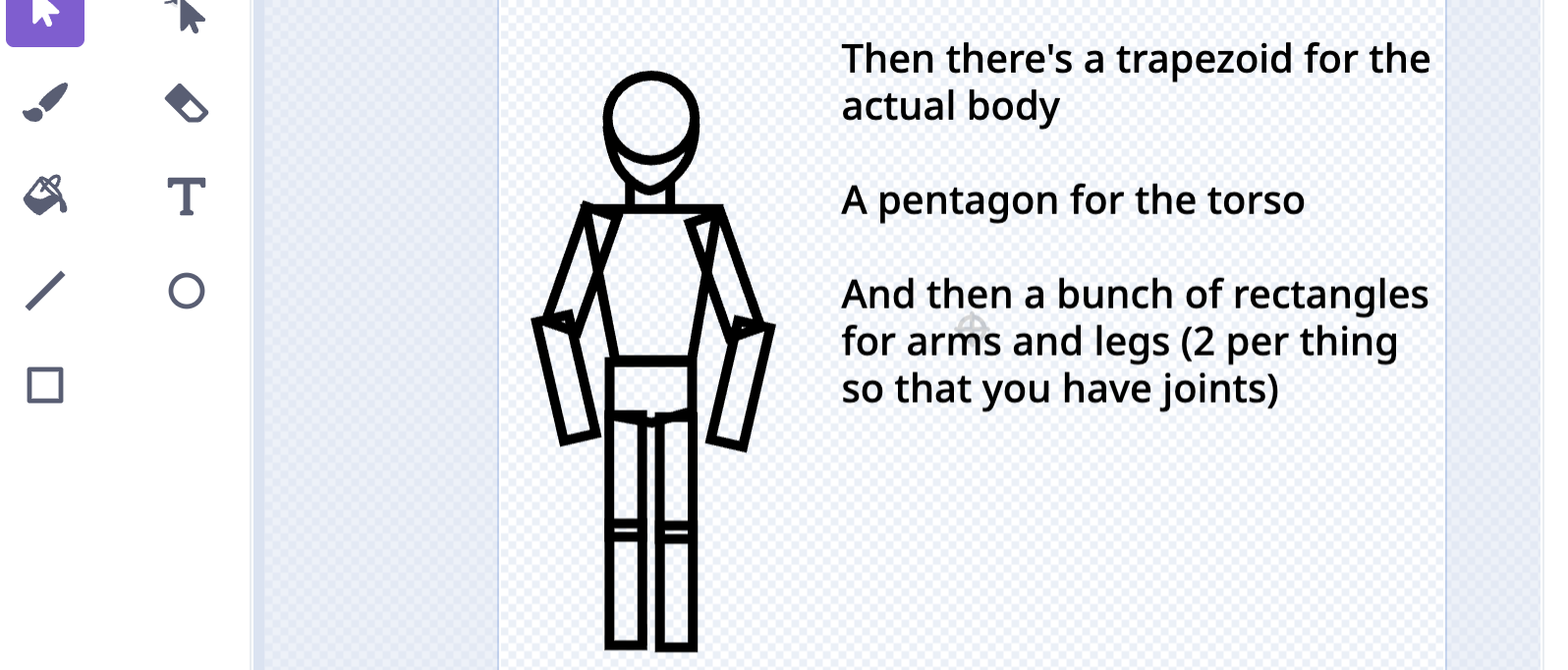
For art, I reccomend trying to identify simple shapes from what kind of things you want to draw. In the below image you can notice a lot of simple shapes arranged in a way that looks like a person. Identifying and drawing the shapes in other art helps you figure out rough proportions. Nearly every drawing I do starts with a circle as you can see in the heads. After that I build off from there and add more shapes to make the pose I'm trying to draw
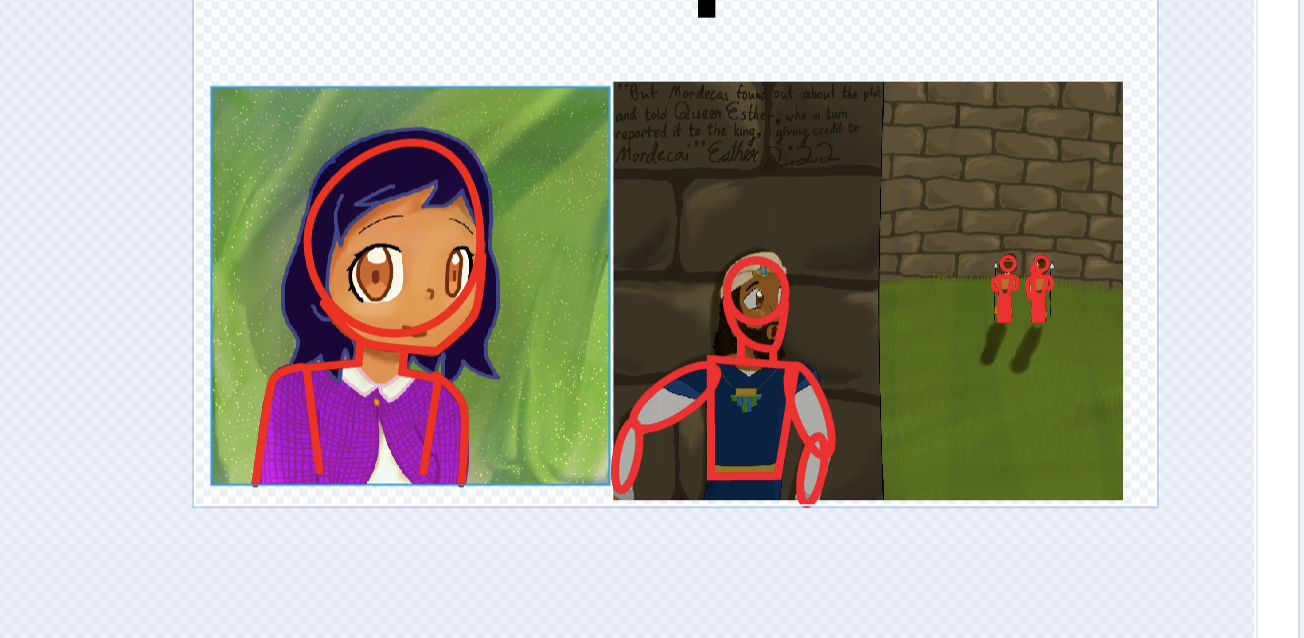
Here's an image with full body proportions. As you can see, it's really just a bunch of shapes, but it looks like a rough shape on a person
LINEART:
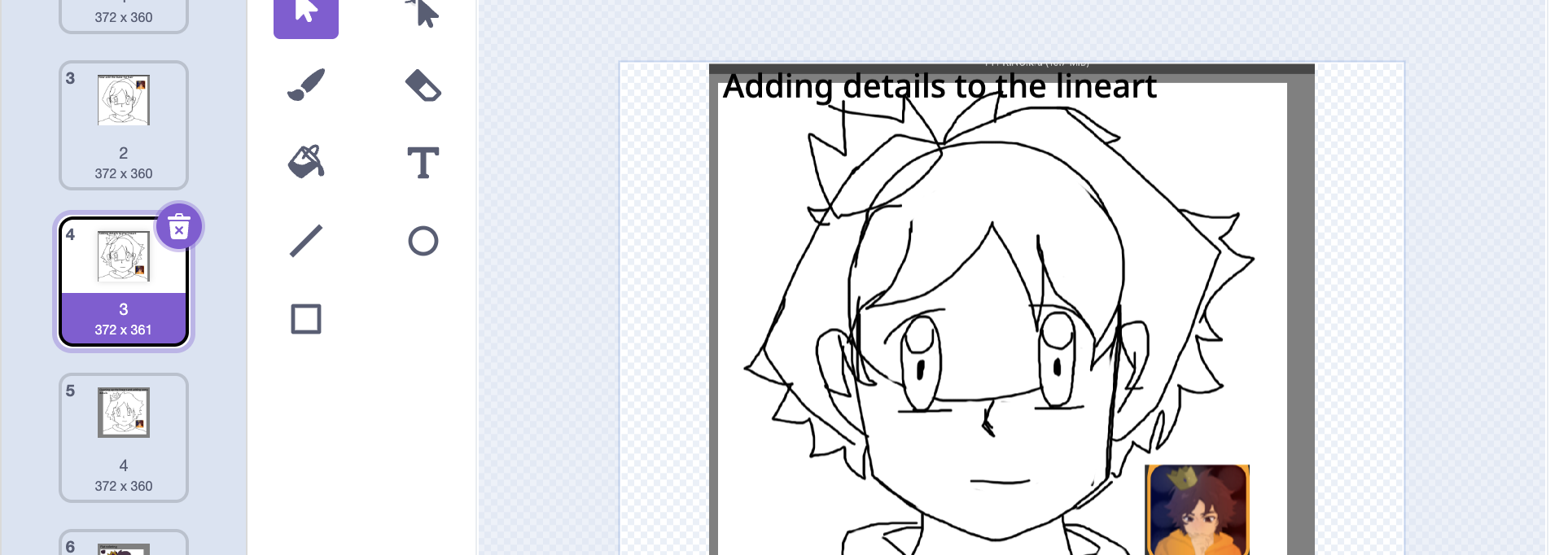
Once you get the proportions down, you can start drawing the lineart. Based on the proportions, it makes adding details on the lineart more easier since you have a rough shape done. Try to draw based on the proportions. images below are from DeKing's pfp
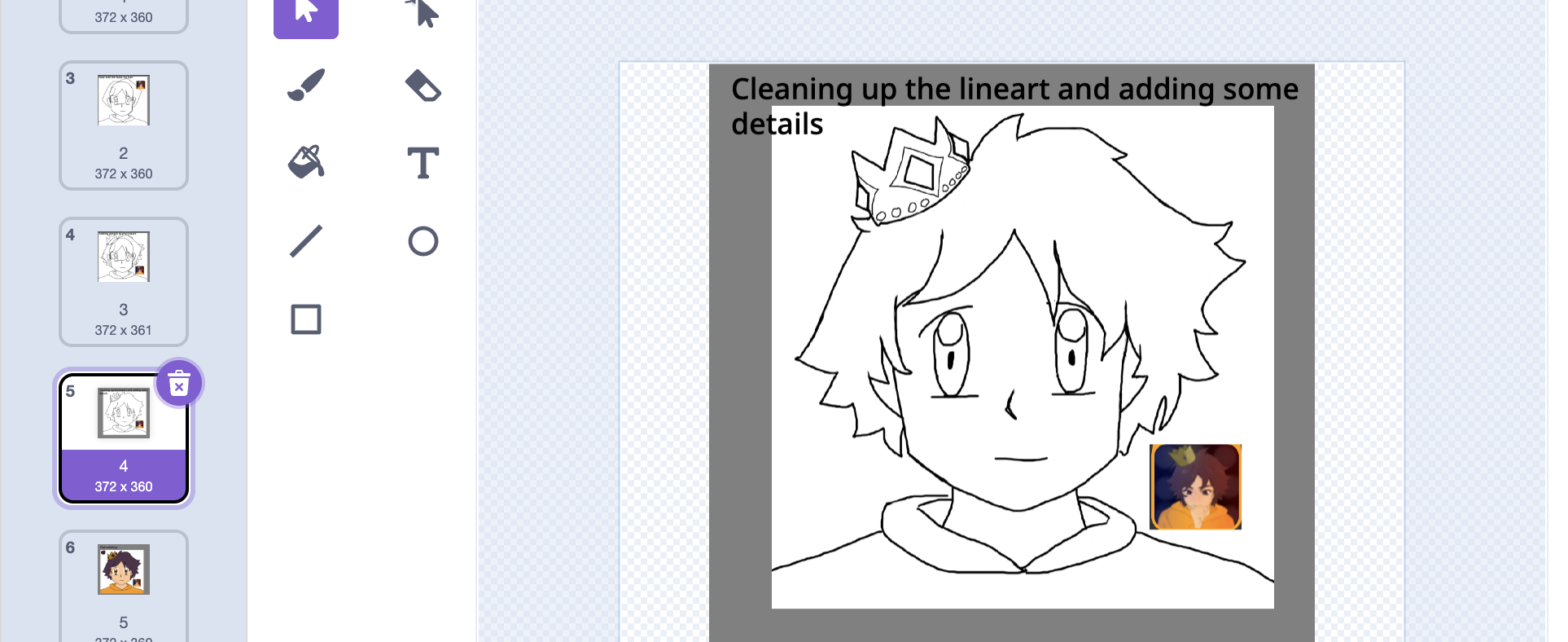
Then after you're done with that, you can erase the proportion lines you don't really need and basically clean up the lineart. It makes it look much less messy. Then you can add more smaller details since the art has been cleaned like the gems you see in the crown.
COLORING AND RENDERING
This is probably the most time consuming part depending on how much you want to render. First try flat coloring (basically fill in the drawing with colors) If you are using references, you can use the pipette color tool to choose the colors from the references that you want, or just figure out the colors yourself.
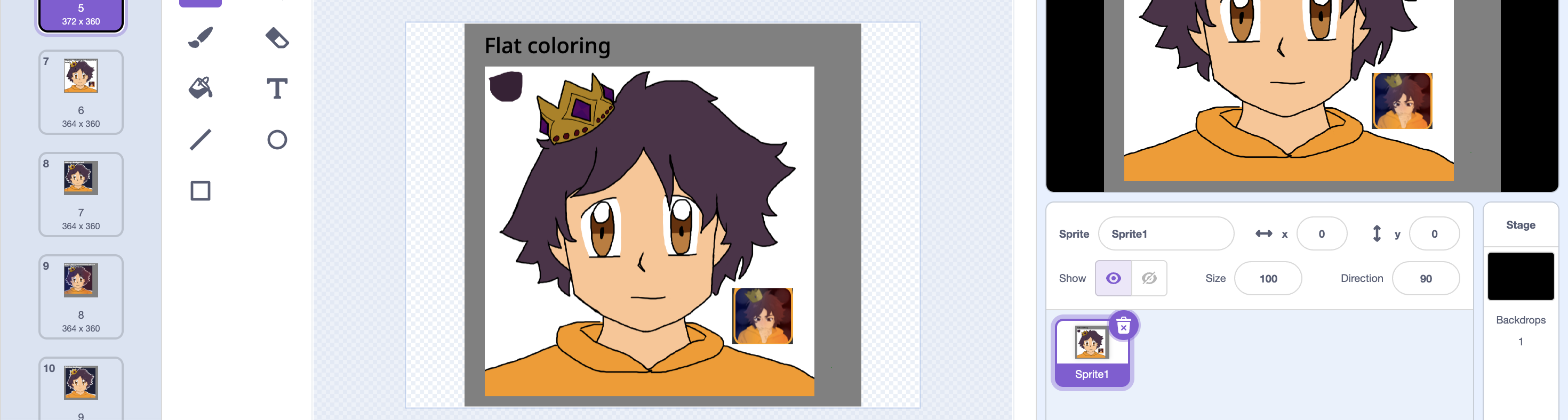
after that, you can add highlights and shading. First identify, where the light is coming from. Whatever parts of the art would theoretically be hit by the light source would be where the highlights would be placed. The parts that's wouldn't get as much light gets shaded. Here's a quick example with a 3D model I made on Tinkercad a year ago.
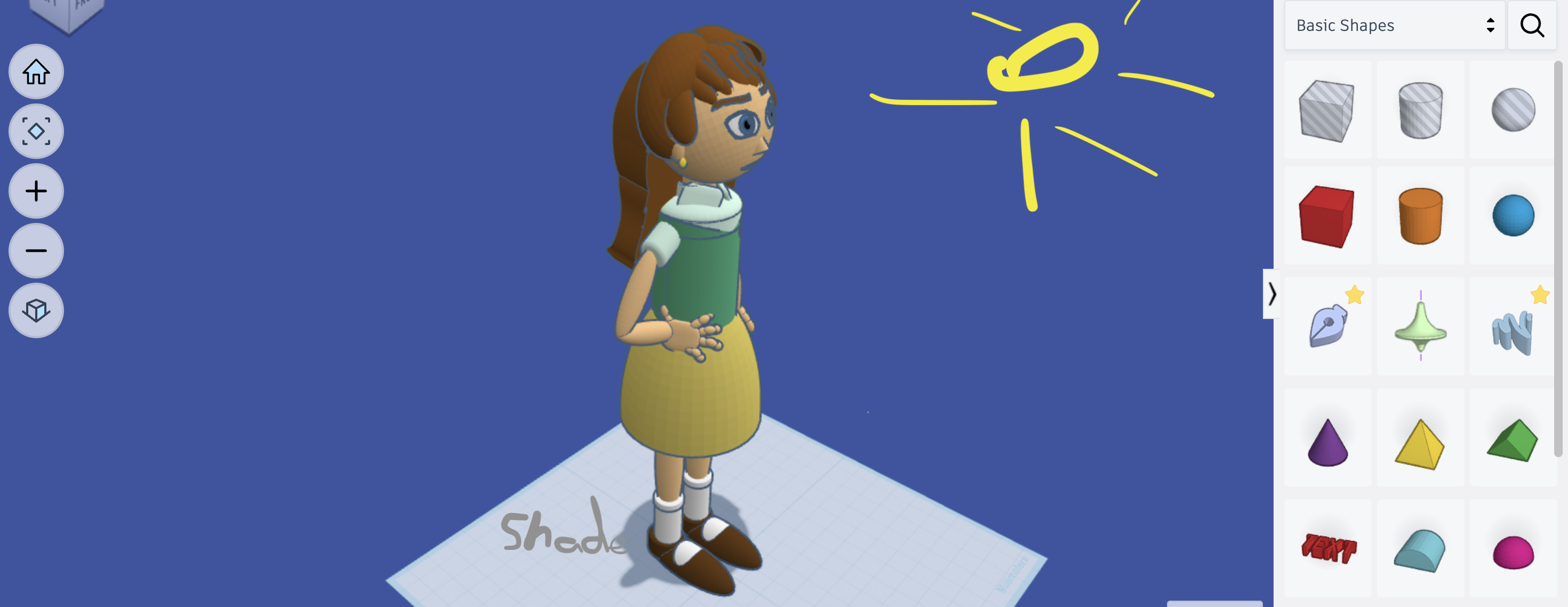
You can sorta see how the light source affects the shades of different parts. Also when choosing colors for highlights and shading, keep in mind it doesn't HAVE to be in the same hue as the part you're shading. A lot of times changing the hue makes it even better. In this drawing, I actually used really dark red airbrushes to do shading and it definitely made it look better than it did with one hue.
Also try using color filters. The image below has a huge brown smudge in color doge for the final result and it made the colors rly pop out. In deking0911's pfp, I added a layer on top which was literally just a huge airbrush with a very blue line to the left and red in the right. Lowering the opacity helped it blend better and made lighting for the pfp look much better.
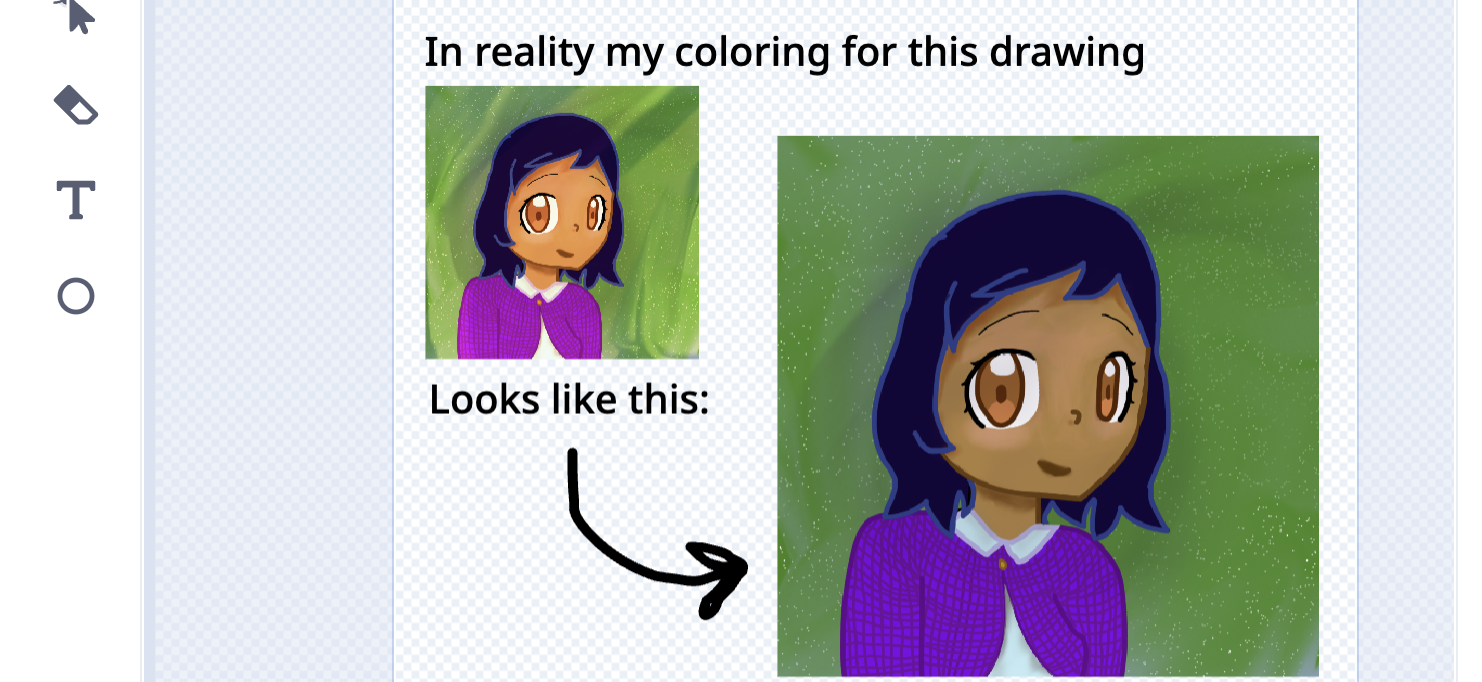
Something I like doing in rendering is legit just adding more highlights and shades and using the smear tool to make it blend better and look more realistic like in the drawing I'm currently working on (rn I'm rendering hair for a picture of David from the movie and the mini-series an so far the hair looks really good)
Other general art tips:
- Use references from the kinds of stuff you want to draw
- don't limit your color palette to a few hues, change it up a bit
- Try experimenting with different artstyles, method, etc to see which one suits you the best
That's all I could think of rn, I'll add more if I can think of any
If anyone quotes me, PLEASE snip the quote out lol
Vector (easier to change on Scratch)
or I use external tools like Kleki since it looks better but will be much harder to change on scratch
Some of the below images are from a art tips project I'm still working on.
Also try using references since it helps a lot with drawing.
PROPORTIONS:
For art, I reccomend trying to identify simple shapes from what kind of things you want to draw. In the below image you can notice a lot of simple shapes arranged in a way that looks like a person. Identifying and drawing the shapes in other art helps you figure out rough proportions. Nearly every drawing I do starts with a circle as you can see in the heads. After that I build off from there and add more shapes to make the pose I'm trying to draw
Here's an image with full body proportions. As you can see, it's really just a bunch of shapes, but it looks like a rough shape on a person
LINEART:
Once you get the proportions down, you can start drawing the lineart. Based on the proportions, it makes adding details on the lineart more easier since you have a rough shape done. Try to draw based on the proportions. images below are from DeKing's pfp
Then after you're done with that, you can erase the proportion lines you don't really need and basically clean up the lineart. It makes it look much less messy. Then you can add more smaller details since the art has been cleaned like the gems you see in the crown.
COLORING AND RENDERING
This is probably the most time consuming part depending on how much you want to render. First try flat coloring (basically fill in the drawing with colors) If you are using references, you can use the pipette color tool to choose the colors from the references that you want, or just figure out the colors yourself.
after that, you can add highlights and shading. First identify, where the light is coming from. Whatever parts of the art would theoretically be hit by the light source would be where the highlights would be placed. The parts that's wouldn't get as much light gets shaded. Here's a quick example with a 3D model I made on Tinkercad a year ago.
You can sorta see how the light source affects the shades of different parts. Also when choosing colors for highlights and shading, keep in mind it doesn't HAVE to be in the same hue as the part you're shading. A lot of times changing the hue makes it even better. In this drawing, I actually used really dark red airbrushes to do shading and it definitely made it look better than it did with one hue.
Also try using color filters. The image below has a huge brown smudge in color doge for the final result and it made the colors rly pop out. In deking0911's pfp, I added a layer on top which was literally just a huge airbrush with a very blue line to the left and red in the right. Lowering the opacity helped it blend better and made lighting for the pfp look much better.
Something I like doing in rendering is legit just adding more highlights and shades and using the smear tool to make it blend better and look more realistic like in the drawing I'm currently working on (rn I'm rendering hair for a picture of David from the movie and the mini-series an so far the hair looks really good)
Other general art tips:
- Use references from the kinds of stuff you want to draw
- don't limit your color palette to a few hues, change it up a bit
- Try experimenting with different artstyles, method, etc to see which one suits you the best

That's all I could think of rn, I'll add more if I can think of any
If anyone quotes me, PLEASE snip the quote out lol
Last edited by ChristianScratcher1 (Aug. 6, 2026 16:58:43)
- WPONTA
-
Scratcher
1000+ posts
How to make better art on Scratch (and in general too)?
Thanks, I'll bump this frequently to get more responses
- Emswirli
-
Scratcher
100+ posts
How to make better art on Scratch (and in general too)?
snippywoah that's really useful *takes advice as well*
If anyone quotes me, PLEASE snip the quote out lol

- Ibukaigan
-
 Scratcher

97 posts
How to make better art on Scratch (and in general too)?
Hmm… To be honest I'm really only good at drawing cats and other animals + Plants and Objects 
Mostly just copying and practice I think?
I also think that everyone has their own style of art too, so others might be good and drawing realistic things while others are good at kawaii and cute stuff.
I would just say to keep practicing and copying and eventually you'll find your own style and techniques.
Hope this helped!

Mostly just copying and practice I think?
I also think that everyone has their own style of art too, so others might be good and drawing realistic things while others are good at kawaii and cute stuff.
I would just say to keep practicing and copying and eventually you'll find your own style and techniques.
Hope this helped!
- mingo-gag
-
 Scratcher

1000+ posts
How to make better art on Scratch (and in general too)?
Practice different art styles on Scratch
- TheGreatDogBird
-
 Scratcher

19 posts
How to make better art on Scratch (and in general too)?
What I do is go in vector and using the reshape tool I reshape an object to what shape I want it to be then I do alt + click to copy the shape in the same position and make the copied shape darker then reshape the copied shape to where you want the shadows to be with the reshape tool. I also try to group objects that are part of the same bigger object. I also don't really do much with proportions, and I just make it into a cartoonish style. It is also to use slightly different colors. For example, in the shadow of a shape, if the main shape is yellow, I would make the shadow slightly orange and darker.
This is how I do my art style, but it may not be suitable for you.
This is how I do my art style, but it may not be suitable for you.
Last edited by TheGreatDogBird (Aug. 10, 2026 03:03:29)
- -twiggy
-
 Scratcher

14 posts
How to make better art on Scratch (and in general too)?
Bump
Experiment with different art styles
Experiment with different art styles
- Silverform
-
 Scratcher

4 posts
How to make better art on Scratch (and in general too)?
I’d recommend looking up art tutorials on Scratch and on the internet! There are lots of tutorials for things like anatomy, shading, perspective, character design, and different art styles. I also recommend copying at first for practice

- aklababuptis128
-
 Scratcher

100+ posts
How to make better art on Scratch (and in general too)?
I'm an artist, animator and just started 3D animation too. First advice I can give is don't use Scratch's costume editor for art, it's just terrible in my opinion. I heavily suggest you use an art app instead like ibis Paint X, and export the art to Scratch. I use ibis paint and it's free and has tons of great features, and also has an animation feature.
Second, use references. Trust me it'll help you a TON.
Third, watch art tip videos from well known artists. This one is obvious but very helpful
Second, use references. Trust me it'll help you a TON.
Third, watch art tip videos from well known artists. This one is obvious but very helpful
- Discussion Forums
- » Questions about Scratch
-
» How to make better art on Scratch (and in general too)?