Discuss Scratch

- Discussion Forums
- » Bugs and Glitches
- » Cloud variable issues...
![[RSS Feed]](//cdn.scratch.mit.edu/scratchr2/static/__4bc739c53cfd81b94c5e6780b6a19bb8__//djangobb_forum/img/feed-icon-small.png "[RSS Feed]")
![[RSS Feed]](http://cdn.scratch.mit.edu/scratchr2/static/__4bc739c53cfd81b94c5e6780b6a19bb8__//djangobb_forum/img/feed-icon-small.png "[RSS Feed]")
- TTXTrick
-
 Scratcher

25 posts
Cloud variable issues...
to check if they're up, just go and check the cloud data history, and if it isn't stuck on a loading screen, the variables are up.
- kammmuschel
-
 Scratcher

32 posts
Cloud variable issues...
I also have an issue with Cloud variables. I believe I am black-listed.
-I can create cloud variables and update them. But when I exit the project without saving, the updated value is lost. So they behave like any other variable.
-In the Cloud monitor I see the last update was made ca. 3-4 weeks ago.
-When I do the same via my son's account, everything works as expected
-I re-named the variable, also created a new one - no difference
So for me it means my user must be black-listed. My theory: I had a mistake in my code, where the “load cloud variable” block was by mistake included in the normal game tick, which runs 30 times a second. That has been fixed many days back, but I wonder if that (reading the variable too many times in too short time) could have caused my user to be black-listed.
Can anyone help me and un-block my user?
Daniel
-I can create cloud variables and update them. But when I exit the project without saving, the updated value is lost. So they behave like any other variable.
-In the Cloud monitor I see the last update was made ca. 3-4 weeks ago.
-When I do the same via my son's account, everything works as expected
-I re-named the variable, also created a new one - no difference
So for me it means my user must be black-listed. My theory: I had a mistake in my code, where the “load cloud variable” block was by mistake included in the normal game tick, which runs 30 times a second. That has been fixed many days back, but I wonder if that (reading the variable too many times in too short time) could have caused my user to be black-listed.
Can anyone help me and un-block my user?
Daniel
Last edited by kammmuschel (June 24, 2026 09:04:39)
- colinmacc
-
 Scratcher

1000+ posts
Cloud variable issues...
I also have an issue with Cloud variables. I believe I am black-listed.
-I can create cloud variables and update them. But when I exit the project without saving, the updated value is lost. So they behave like any other variable.
-In the Cloud monitor I see the last update was made ca. 3-4 weeks ago.
-When I do the same via my son's account, everything works as expected
-I re-named the variable, also created a new one - no difference
So for me it means my user must be black-listed. My theory: I had a mistake in my code, where the “load cloud variable” block was by mistake included in the normal game tick, which runs 30 times a second. That has been fixed many days back, but I wonder if that (reading the variable too many times in too short time) could have caused my user to be black-listed.
Can anyone help me and un-block my user?
Daniel
If you report it to the Scratch Team via the “Contact Us” form they should be able to fix it. (I've been told)
https://scratch.mit.edu/contact-us/
it's quite hidden away, but if you click on “Get Help”, and then scroll down and click on “Help Center”, you can send a message to the Scratch Team.
- gregatku
-
 Scratcher

100+ posts
Cloud variable issues...
I did just that a week ago, and apart from the immediate automated message advising me that my plea had been received, I have received no further feedback, and am still unable to update the Cloud Variables I created in any of my dozen or so, Cloud Variable projects. Hopefully if more people register the same issue, they might actually do something about it?I also have an issue with Cloud variables. I believe I am black-listed.
-I can create cloud variables and update them. But when I exit the project without saving, the updated value is lost. So they behave like any other variable.
-In the Cloud monitor I see the last update was made ca. 3-4 weeks ago.
-When I do the same via my son's account, everything works as expected
-I re-named the variable, also created a new one - no difference
So for me it means my user must be black-listed. My theory: I had a mistake in my code, where the “load cloud variable” block was by mistake included in the normal game tick, which runs 30 times a second. That has been fixed many days back, but I wonder if that (reading the variable too many times in too short time) could have caused my user to be black-listed.
Can anyone help me and un-block my user?
Daniel
If you report it to the Scratch Team via the “Contact Us” form they should be able to fix it. (I've been told)
https://scratch.mit.edu/contact-us/
it's quite hidden away, but if you click on “Get Help”, and then scroll down and click on “Help Center”, you can send a message to the Scratch Team.
- TimothyLawyer
-
 Scratcher

1000+ posts
Cloud variable issues...
the cloud variable in this project keeps resetting each time the project is reloaded even though it is set to a higher value in the cloud data history
- colinmacc
-
Scratcher
1000+ posts
Cloud variable issues...
the cloud variable in this project keeps resetting each time the project is reloaded even though it is set to a higher value in the cloud data history
Rename the cloud variable. It should start working then.
- randomnovice
-
 Scratcher

8 posts
Cloud variable issues...
Could I confirm that cloud variables aren't working?
Here's my test project: https://scratch.mit.edu/projects/1338293115/
Here's my test project: https://scratch.mit.edu/projects/1338293115/
- nembence
-
 Scratcher

1000+ posts
Cloud variable issues...
I've got the read-only cloud variables problem, too
- randomnovice
-
Scratcher
8 posts
Cloud variable issues...
Could I confirm that cloud variables aren't working?
Here's my test project: https://scratch.mit.edu/projects/1338293115/
The issue appears to have resolved itself. Best guess- I was temporarily blacklisted for too many cloud variable calls?
- eikh2
-
 Scratcher

1000+ posts
Cloud variable issues...
IT WORKED?!the cloud variable in this project keeps resetting each time the project is reloaded even though it is set to a higher value in the cloud data history
Rename the cloud variable. It should start working then.
- Player1Jeremy
-
 Scratcher

45 posts
Cloud variable issues...
I don't know if that renaming cloud variables still works anymore.IT WORKED?!the cloud variable in this project keeps resetting each time the project is reloaded even though it is set to a higher value in the cloud data history
Rename the cloud variable. It should start working then.
- colinmacc
-
Scratcher
1000+ posts
Cloud variable issues...
I don't know if that renaming cloud variables still works anymore.IT WORKED?!the cloud variable in this project keeps resetting each time the project is reloaded even though it is set to a higher value in the cloud data history
Rename the cloud variable. It should start working then.
For that particular bug as described, it does.
- kammmuschel
-
Scratcher
32 posts
Cloud variable issues...
My cloud variables have stopped working again after less than 24hrs. Only explanation I have is that I read my 10 cloud variables without wait 0.1s in between. Not often, just a couple of times during debugging. But could that have been enough for getting de-activated? I have waited in between writes, but I missed it in between reads. I have fixed it now, but cloud variables are again not working.
:-(
Daniel
:-(
Daniel
- colinmacc
-
Scratcher
1000+ posts
Cloud variable issues...
My cloud variables have stopped working again after less than 24hrs. Only explanation I have is that I read my 10 cloud variables without wait 0.1s in between. Not often, just a couple of times during debugging. But could that have been enough for getting de-activated? I have waited in between writes, but I missed it in between reads. I have fixed it now, but cloud variables are again not working.
:-(
Daniel
That's really bizarre - I've never put delays into cloud reads.
Also it's really odd that something you can do inside a project would trigger this - the system used to simply ignore requests that were too fast.
- kammmuschel
-
Scratcher
32 posts
Cloud variable issues...
I don't know what happened. But it is working again now. In my cloud monitor I had updates until 23hrs ago and then again for the last 5 minutes. In between nothing. But I am happy. Archie's World can save now  https://scratch.mit.edu/projects/1291313446/
(and I will remove the wait between the reads again!)
 https://scratch.mit.edu/projects/1291313446/
(and I will remove the wait between the reads again!)
- colinmacc
-
Scratcher
1000+ posts
Cloud variable issues...
When he fixed mine there was a delay between when he said they were fixed and when they actually were. Maybe it takes time for the fix to propagate across all the cloud servers. No idea really. But glad it's working for now!
EDIT: oh ignore that, I just read the latest replies on his profile.
EDIT: oh ignore that, I just read the latest replies on his profile.
Last edited by colinmacc (July 8, 2026 16:03:07)
- Bellota_Azul
-
 Scratcher

100+ posts
Cloud variable issues...
Cloud variables are working for me, but I can't access them, even though I'm not a New Scratcher.
I mean, I can add cloud variables, remove them, etc. But i can't change the value in-game.
I mean, I can add cloud variables, remove them, etc. But i can't change the value in-game.
Last edited by Bellota_Azul (July 8, 2026 20:20:25)
- Elijah999999
-
 Scratcher

1000+ posts
Cloud variable issues...
My account has been unable to edit cloud variables for at least a month now. Is this normal?
- Bellota_Azul
-
Scratcher
100+ posts
Cloud variable issues...
My account has been unable to edit cloud variables for at least a month now. Is this normal?I don't think that's normal.
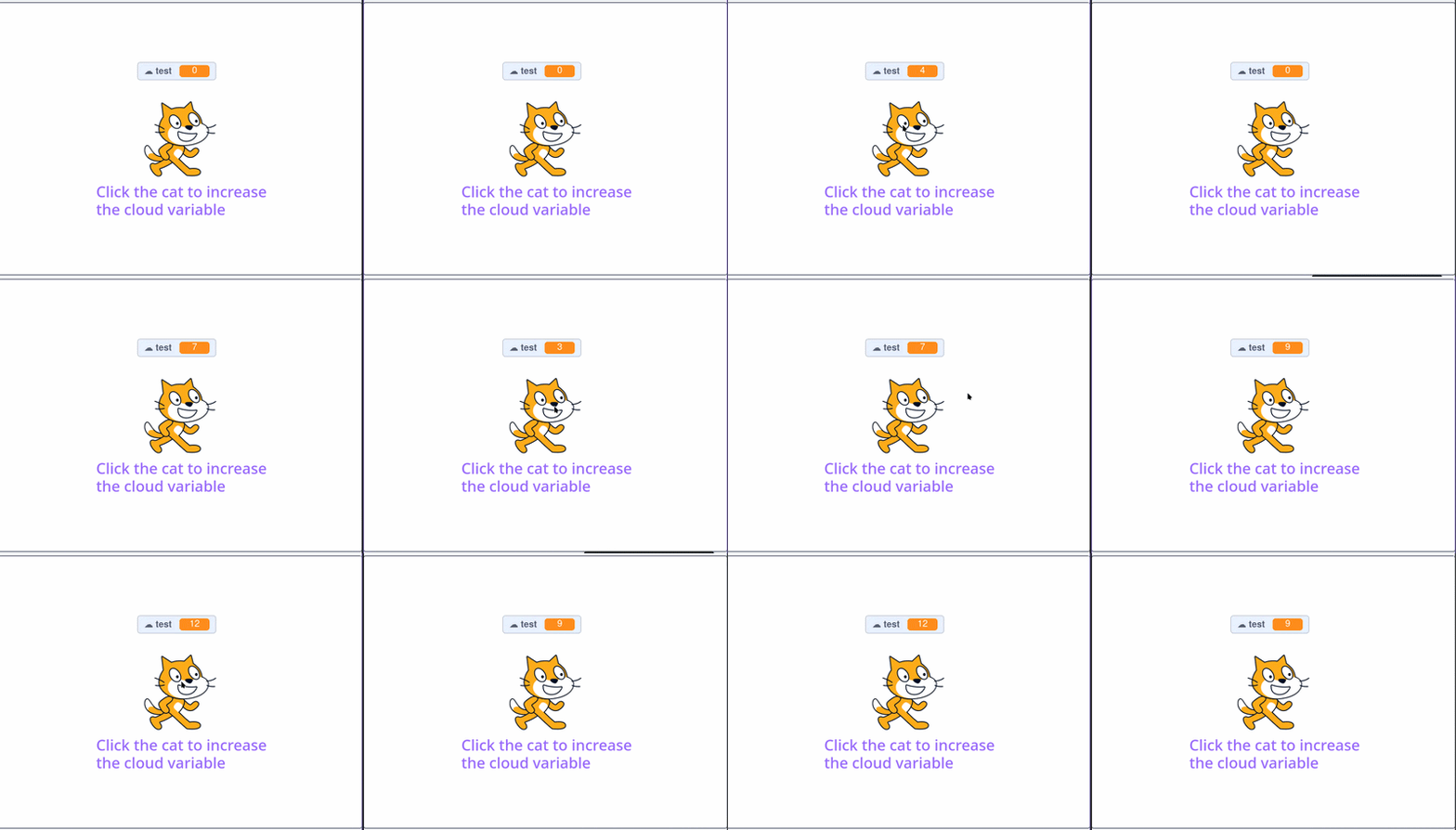
Something similar happened to me:
Last edited by Bellota_Azul (July 9, 2026 00:10:07)
- kamzb_new
-
 Scratcher

5 posts
Cloud variable issues...
Guys, they updated the cloud variables just log out then back in and it should be fixed
- Discussion Forums
- » Bugs and Glitches
-
» Cloud variable issues...