Discuss Scratch

![[RSS Feed]](http://cdn.scratch.mit.edu/scratchr2/static/__d235e7f35585482ca999583499337ccd__//djangobb_forum/img/feed-icon-small.png "[RSS Feed]")
- ajsya
-
 Scratcher

1000+ posts
Linux
Yes, I ran the script and went into the audio mixer settings and set the speakers as the fallback instead of the headphone jack, and my audio has been working since. I'm not sure honestly if it was the script that fixed it, or me modifying the fallback in the audio mixer. It could be both I guess.Installed Lubuntu on my old Thinkpad 11e Chromebook. Functioning audio is a work in progress! Two finger tap with the trackpad is also not currently working.have you tried running this script? It's listed as a post install step in the chrultrabook docs for installing linux on chromebooks, also what audio driver are you using? Also check the trackpad settings if you havent already
My browser / operating system: Ubuntu Linux, Firefox 143.0, No Flash version detected
It's also a little finicky for some reason. A lot of times the main volume control doesn't work, so I go into the audio mixer to turn down the speakers instead. It looks like I'm using snd_soc_avs as my audio driver btw, but I'm not 100% confident on that.
I have also made a trip to the track pad settings and now I can two-finger-tap to get the right click menu on things. If I click with both fingers instead of tapping that doesn't do anything, however.
This has been a pretty fun project. Installing Lubuntu has given this computer more flexibility, but it doesn't change the fact that the hardware still sucks. I did get Minecraft 1.21.11 to run, and I was able to use the computer to do some light picture editing for a school project somewhat successfully.
Sorry for the late reply! I missed this post.
- ajsya
-
Scratcher
1000+ posts
Linux
I gave up on installing mint. My raspberry pi's microSD will melt if I try something like that again, and I don't really mind Debian. When I get a MacBook though, I'm gonna boot macOS for creative things and Mint for gaming things.You can't install Linux Mint on a Raspberry Pi. There isn't an ARM version of Linux Mint available, to my knowledge.
If you want something else fun to do, you could install Ubuntu on the Raspberry Pi. It's what Linux Mint is based off of, and there is a version specifically made for the Raspberry Pi. I have used Ubuntu Server on my Pi many times before.
https://ubuntu.com/download/raspberry-pi
You could also try installing Fedora on your Pi. This is the distribution that the Asahi Linux Project (which you would use to install Linux on a MacBook) is based off of, so it would be similar to that (the performance will just be a lot slower on the Pi). Just make sure you select the For ARM® aarch64 systems download. The other is x86_64, the type of CPU that most PCs use, but not Pis and MacBooks.
Fedora - GNOME
Fedora - KDE Plasma
I included the link to both GNOME and KDE Plasma, which are just two different desktop environments you can chose to use with Fedora. You can just pick the one you think looks cooler.
- catlover841
-
 Scratcher

1000+ posts
Linux
Sick to see you got audio and the trackpad working for the most part. For the main volume control not working try running this in the termYes, I ran the script and went into the audio mixer settings and set the speakers as the fallback instead of the headphone jack, and my audio has been working since. I'm not sure honestly if it was the script that fixed it, or me modifying the fallback in the audio mixer. It could be both I guess.Installed Lubuntu on my old Thinkpad 11e Chromebook. Functioning audio is a work in progress! Two finger tap with the trackpad is also not currently working.have you tried running this script? It's listed as a post install step in the chrultrabook docs for installing linux on chromebooks, also what audio driver are you using? Also check the trackpad settings if you havent already
My browser / operating system: Ubuntu Linux, Firefox 143.0, No Flash version detected
It's also a little finicky for some reason. A lot of times the main volume control doesn't work, so I go into the audio mixer to turn down the speakers instead. It looks like I'm using snd_soc_avs as my audio driver btw, but I'm not 100% confident on that.
I have also made a trip to the track pad settings and now I can two-finger-tap to get the right click menu on things. If I click with both fingers instead of tapping that doesn't do anything, however.
This has been a pretty fun project. Installing Lubuntu has given this computer more flexibility, but it doesn't change the fact that the hardware still sucks. I did get Minecraft 1.21.11 to run, and I was able to use the computer to do some light picture editing for a school project somewhat successfully.
Sorry for the late reply! I missed this post.
pactl list sinks short
pactl set-default-sink (sink name)
Last edited by catlover841 (May 10, 2026 19:27:26)
- temsterriblegames
-
 Scratcher

1000+ posts
Linux
I gave up on installing mint. My raspberry pi's microSD will melt if I try something like that again, and I don't really mind Debian. When I get a MacBook though, I'm gonna boot macOS for creative things and Mint for gaming things.You can't install Linux Mint on a Raspberry Pi. There isn't an ARM version of Linux Mint available, to my knowledge.
theres an ARM version of gentoo… if you feel daring……
- catlover841
-
Scratcher
1000+ posts
Linux
installing gentoo on a pi….. gcc would take several days D: probs just do void or archI gave up on installing mint. My raspberry pi's microSD will melt if I try something like that again, and I don't really mind Debian. When I get a MacBook though, I'm gonna boot macOS for creative things and Mint for gaming things.You can't install Linux Mint on a Raspberry Pi. There isn't an ARM version of Linux Mint available, to my knowledge.
theres an ARM version of gentoo… if you feel daring……
- StudioPangoFan_2000
-
 Scratcher

500+ posts
Linux
There's an Ubuntu topic for your Ubuntu needs now at https://scratch.mit.edu/discuss/topic/883942
- temsterriblegames
-
Scratcher
1000+ posts
Linux
update: nixos is no more, i have gentoo and arch now….
- TechNerd64
-
 Scratcher

500+ posts
Linux
Repost from the Ubuntu Topic:
I've been considering upgrading from Kubuntu 24.xx LTS to the 26.04 LTS. Should I just wait for the stable 26.1 release, or is it fine to upgrade to?
I've been considering upgrading from Kubuntu 24.xx LTS to the 26.04 LTS. Should I just wait for the stable 26.1 release, or is it fine to upgrade to?
- catlover841
-
Scratcher
1000+ posts
Linux
Repost from the Ubuntu Topic:You should be fine, people have ran systems even more unstable. An LTS version of a Debian fork that's labeled as “unstable” basically means there's some edge cases we haven't tested yet. If you're really that worried (or you're potentially one of those edge cases) just wait for the stable release
I've been considering upgrading from Kubuntu 24.xx LTS to the 26.04 LTS. Should I just wait for the stable 26.1 release, or is it fine to upgrade to?
- kkidslogin
-
 Scratcher

1000+ posts
Linux
Repost from the Ubuntu Topic:I upgraded from 25.10 to 26.04 and I've noticed a net improvement in stability (I'm also running a different kernel, though, 7.0.5.070005-mainline rather than the stock 7.0.0-ubuntu or whatever it's called). Wifi performance in particular is a lot better in the 7.0.0 kernel series if you're running the ath12k (certain Wifi 7 adapters) driver.
I've been considering upgrading from Kubuntu 24.xx LTS to the 26.04 LTS. Should I just wait for the stable 26.1 release, or is it fine to upgrade to?
- catlover841
-
Scratcher
1000+ posts
Linux
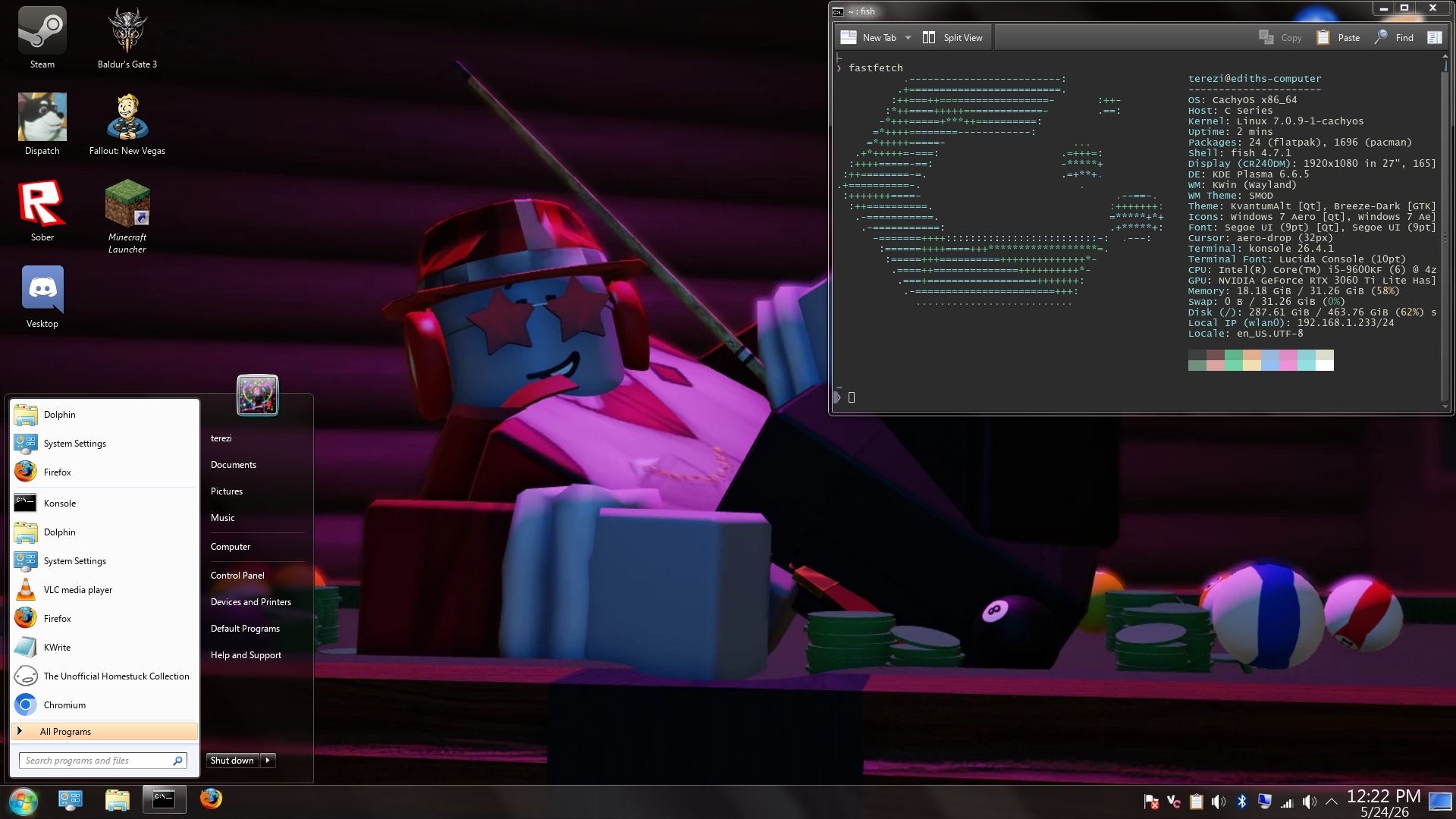
yeah yeah, linux user running cachyOS with a win 7 themed rice, I'm the most basic linux user alive
- TechNerd64
-
Scratcher
500+ posts
Linux
yeah yeah, linux user running cachyOS with a win 7 themed rice, I'm the most basic linux user aliveHonestly had to do a double take lol
- temsterriblegames
-
Scratcher
1000+ posts
Linux
yeah yeah, linux user running cachyOS with a win 7 themed rice, I'm the most basic linux user alivewhat is using 18gb of memory you have nothing open
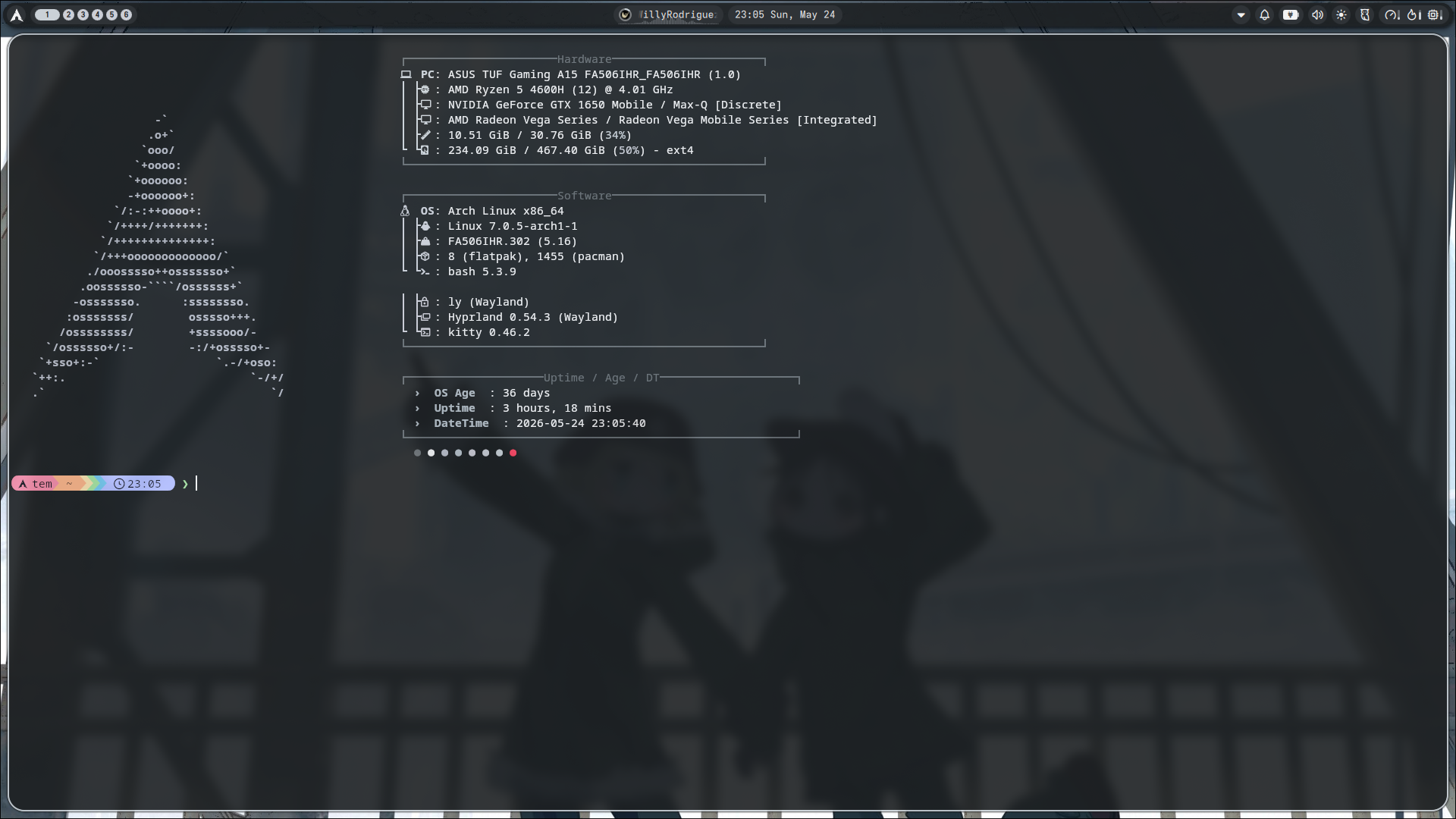
anyway heres my current rice
- catlover841
-
Scratcher
1000+ posts
Linux
I have vesktop opened in the background, you can tell because it's icon is in the system tray, anyways thats a really clean rice! I'm always a sucker for custom hyprland setups and riced term. I would totally do try ricing hyprland but I prefer stacking windowsyeah yeah, linux user running cachyOS with a win 7 themed rice, I'm the most basic linux user alivewhat is using 18gb of memory you have nothing open
anyway heres my current rice