Discuss Scratch

- Discussion Forums
- » Bugs and Glitches
- » ⚙️ List of bugs with the new block editor update (a.k.a. Spork) ⚙️
![[RSS Feed]](//cdn.scratch.mit.edu/scratchr2/static/__b3a0234be9d6cf9c4178ac9bbd21a1bc__//djangobb_forum/img/feed-icon-small.png "[RSS Feed]")
![[RSS Feed]](http://cdn.scratch.mit.edu/scratchr2/static/__b3a0234be9d6cf9c4178ac9bbd21a1bc__//djangobb_forum/img/feed-icon-small.png "[RSS Feed]")
- o97doge
-
 Scratcher

500+ posts
⚙️ List of bugs with the new block editor update (a.k.a. Spork) ⚙️
I am creating this because I am sure there are going to be a flood of bug reports, as a rewrite of the blocks interface has just been released. This list is specifically focusing on the blocks, not any other part of the editor.
This is a living document (for a lack of a better term); please suggest bugs to be added to this list. I used https://github.com/scratchfoundation/scratch-editor/issues/533 as a source for some of these. @redspacecat listed some more bugs — thanks to them!
Bugs:
Editing Bugs:
Block Behaviour Bugs:
Visual Bugs:
Fixed Bugs:
This is a living document (for a lack of a better term); please suggest bugs to be added to this list. I used https://github.com/scratchfoundation/scratch-editor/issues/533 as a source for some of these. @redspacecat listed some more bugs — thanks to them!
Bugs:
Editing Bugs:
- Broadcast block may cause a costume to disappear on a sprite. (Missing link because I pasted the wrong thing, whoops!)
- A broadcast block's dropdown becomes blank after importing a sprite and switching away. (Forum Topic)
- Blocks may disappear. (Forum Topic)
- A pasted block doesn't follow the mouse until places; it duplicates instead. (Forum Topic)
- A custom block added from the backpack doesn't appear in the palette. (Forum Topic)
- “Create new broadcast/message” dialog closes immediately on a touchscreen (Forum Topic)
- Code deletes itself when surrounding a forever loop with another forever loop. (Forum Topic)
- When dragging define blocks, their position changes relative to the mouse. (Forum Topic)
- The system keyboard pops up on number-only inputs on mobile. (Forum Topic)
- Block inputs may be blank and non-editable. (Forum Topic)
- Deleting a block by dragging it over to the palette sometimes makes the workspace shift left. (Noted by @EiskalterYeti)
Block Behaviour Bugs:
- You cannot drag a forever block on a mid-stack block. (Related GitHub issue)
- You cannot connect a hat block above a stack block. (Forum Topic)
- Forever blocks delete capped blocks when dragged on them. (Related Forum Topic)
- Dragging a block to the palette while there are blocks behind the palette will make it attempt to connect to the block. (Noted by @kwurteeqwerty)
Visual Bugs:
- The stop block's dropdown uses the incorrect colour in High Contrast Mode.
- When a comment is attached to a block, the line attaching it doesn't account for comment size. (Related GitHub issue comment)
- When spam clicking on a reporter block, the values can start building up weirdly. (Forum Topic)
- The font may be the system font on Windows. (Is this intentional or not?)
- Boolean blocks may have an outline. (Forum Topic)
- There are padding issues with dropdowns. (Forum Topic)
- Menu popups (variables, etc.) may have a black outline. (Forum Topic)
- Block input text is unnaturally large at full zoom-out. (Forum Topic)
- Dragging a block to the left edge of the palette lights up the stage.
- Zoom snaps back when workspace scrolled past left edge. (Forum Topic)
- Reporter blocks may be off-centered on some systems. (Forum Topic)
- Comments don't expand the workspace while dragging. (Noted by @hotcrystal)
- Sometimes when right clicking a variable block, there can be so many menu items that it goes over the menu bar. (Noted by @EiskalterYeti)
Fixed Bugs:
- A block that targets the sprite that it is in reports the default option instead. (Forum Topic)
Last edited by o97doge (Yesterday 21:53:25)
- redspacecat
-
 Scratcher

1000+ posts
⚙️ List of bugs with the new block editor update (a.k.a. Spork) ⚙️
You cannot drag a forever block on a block in a pre-existing stack. (Related GitHub issue)I thought this was fixed? The issue is closed and I cannot replicate.
- o97doge
-
Scratcher
500+ posts
⚙️ List of bugs with the new block editor update (a.k.a. Spork) ⚙️
The glitch still occurs with a forever block, at least on Zen Browser/Firefox.You cannot drag a forever block on a block in a pre-existing stack. (Related GitHub issue)I thought this was fixed? The issue is closed and I cannot replicate.
- redspacecat
-
Scratcher
1000+ posts
⚙️ List of bugs with the new block editor update (a.k.a. Spork) ⚙️
The glitch still occurs with a forever block, at least on Zen Browser/Firefox.Do you mean like this?

I can't replicate the issue on Windows 11, Chrome or Firefox
- o97doge
-
Scratcher
500+ posts
⚙️ List of bugs with the new block editor update (a.k.a. Spork) ⚙️
No, I mean like this.The glitch still occurs with a forever block, at least on Zen Browser/Firefox.Do you mean like this?
I can't replicate the issue on Windows 11, Chrome or Firefox
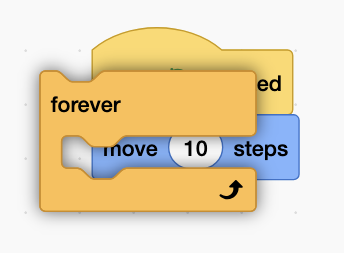
- redspacecat
-
Scratcher
1000+ posts
⚙️ List of bugs with the new block editor update (a.k.a. Spork) ⚙️
No, I mean like this.Oh, yeah I can replicate that
- hotcrystal
-
 Scratcher

500+ posts
⚙️ List of bugs with the new block editor update (a.k.a. Spork) ⚙️
Here’s another one: comments connected to blocks don’t expand the space available to place blocks and stuff. This can easily be reproduced by taking a random block, adding a comment onto it, and then dragging the comment as far right as possible.
- o97doge
-
Scratcher
500+ posts
⚙️ List of bugs with the new block editor update (a.k.a. Spork) ⚙️
Here’s another one: comments connected to blocks don’t expand the space available to place blocks and stuff. This can easily be reproduced by taking a random block, adding a comment onto it, and then dragging the comment as far right as possible.Added!
- pizzafox20109
-
 Scratcher

100+ posts
⚙️ List of bugs with the new block editor update (a.k.a. Spork) ⚙️
As of today, I cannot do anything at all. The green flag does nothing, I can't add anything to lists, I can't click blocks and make them run, be they hat blocks or otherwise; the editor doesn't work at all other than letting me change the posiitons of things.
My browser / operating system: IPad iOS 18.6.2, Unknown Browser, No Flash version detected
My browser / operating system: IPad iOS 18.6.2, Unknown Browser, No Flash version detected
- pizzafox20109
-
Scratcher
100+ posts
⚙️ List of bugs with the new block editor update (a.k.a. Spork) ⚙️
Forgive me for being unaware, but why did Scratch even push this update? It doesn't take a particularly keen eye to realise that on half of every platform ever, almost nothing at all works. I downloaded an entirely new browser on my Mac earlier today thinking that it was a problem with some (also unfortunately broken) update to Firefox. Does “Spork” add anything? Did they even check to make sure it worked?
- gem1001
-
 Scratcher

1000+ posts
⚙️ List of bugs with the new block editor update (a.k.a. Spork) ⚙️
If you trigger the % bug, then try to drag out the
broadcast [ v] and waitblock, the block palette will disappear
- mtnif
-
 Scratcher

1000+ posts
⚙️ List of bugs with the new block editor update (a.k.a. Spork) ⚙️
for the blank inputs bug, users reported it with the color inputs years ago
- Bent_Paper
-
 Scratcher

36 posts
⚙️ List of bugs with the new block editor update (a.k.a. Spork) ⚙️
when i try to add a message it goes “nope, you're not getting any new messages”
honestly i don't know why they changed the block editor
honestly i don't know why they changed the block editor

- UploadVictimX
-
 Scratcher

1 post
⚙️ List of bugs with the new block editor update (a.k.a. Spork) ⚙️
Broadcasts I placed after the update just don't work at all
- TBMTheFunniestPerson
-
 Scratcher

25 posts
⚙️ List of bugs with the new block editor update (a.k.a. Spork) ⚙️
i cant add spacing when i trying to make a broadcast
- apatchogras
-
 Scratcher

66 posts
⚙️ List of bugs with the new block editor update (a.k.a. Spork) ⚙️
when you use the thing of thing block, when you change the second dropdown to a different sprite, it just deletes the block after a short delay. the only way of getting around this is by editing it in the sidebar then dragging it in
this is the block im talking about
([ v] of [Sprite1 v])
this is the block im talking about
- Elijah999999
-
 Scratcher

1000+ posts
⚙️ List of bugs with the new block editor update (a.k.a. Spork) ⚙️
when you use the thing of thing block, when you change the second dropdown to a different sprite, it just deletes the block after a short delay. the only way of getting around this is by editing it in the sidebar then dragging it inMy browser / operating system: Windows NT 10.0, Chrome 147.0.0.0, No Flash version detected([ v] of [Sprite1 v])
this is the block im talking about
The block works fine for me.
- Elijah999999
-
Scratcher
1000+ posts
⚙️ List of bugs with the new block editor update (a.k.a. Spork) ⚙️
Another bug: Creating a new sprite causes it to automatically switch to the “costumes” tab.
Actually, it may have always been like that. My bad.
Actually, it may have always been like that. My bad.
Last edited by Elijah999999 (April 17, 2026 17:06:08)
- medians
-
 Scratcher
1000+ posts
⚙️ List of bugs with the new block editor update (a.k.a. Spork) ⚙️
My browser / operating system: Windows 7, Chrome 149.0.0.0, No Flash versions detected
lol it has the older Segoe UI font
lol it has the older Segoe UI font
- Discussion Forums
- » Bugs and Glitches
-
» ⚙️ List of bugs with the new block editor update (a.k.a. Spork) ⚙️