Discuss Scratch
- Discussion Forums
- » Suggestions
- » Scratch Workaround Guide VII
![[RSS Feed]](//cdn.scratch.mit.edu/scratchr2/static/__6e6d008c1f6fa09308b1a53c87250e5f__//djangobb_forum/img/feed-icon-small.png "[RSS Feed]")
![[RSS Feed]](http://cdn.scratch.mit.edu/scratchr2/static/__6e6d008c1f6fa09308b1a53c87250e5f__//djangobb_forum/img/feed-icon-small.png "[RSS Feed]")
- The_Cool_Scratch_Guy
-
 Scratcher

100+ posts
Scratch Workaround Guide VII
After comparing various methods for a perfect wait time, these are the results!// Tested for a 0.5 second wait time in a 100x loop using the built-in timer
// #1 contender - 99.7% accuracy
define wait1 (secs) // don't run without screen refresh
rest for ((secs) * ((tempo) / [60])) beats
// #2 contender - 99.7% accuracy
define wait2 (secs) // don't run without screen refresh
set [time v] to ((days since 2000) * [86400])
wait until <((days since 2000) * [86400]) > ((time) + (secs))>
// #3 contender
// version 1 - 99.4% accuracy
define wait3 (secs) // run without screen refresh
if <(secs) < (0.025)> then
rest for ((secs) * ((tempo) / [60])) beats
else
rest for ((0.025) * ((tempo) / [60])) beats
wait2 ((secs) - (0.025))
// version 2 - 99.4% accuracy
define wait3 (secs) // run without screen refresh
set [time v] to [0]
repeat until <not <((secs) - (time)) > [0.025]>>
rest for ([0.025] * ((tempo) / [60])) beats
change [time v] by [0.025]
end
rest for (((secs) - (time)) * ((tempo) / [60])) beats
// #4 contender - run without screen refresh for wait1 gives 99.3% accuracy
// #5 contender - run without screen refresh for wait2 gives 99.3% accuracy
// #6 contender - 99.2% accuracy
define wait5 (secs) // run without screen refresh
set [time v] to (timer)
wait [0] seconds
wait (((secs) - ((timer) - (time))) - ([1] / [30])) seconds
// #7 contender - 99.2% accuracy
define wait6 (secs) // run without screen refresh
set [time v] to (timer)
wait until <(timer) > ((time) + (secs))>
// #8 contender - when not run without screen refresh, wait5 gives 99.0% accuracy.
// #9 contender - when not run without screen refresh, wait6 gives 94.4% accuracy.
// #10 contender - when not run without screen refresh, wait3 version 1 gives 68.0% accuracy, wait3 version 2 gives 67.8% accuracy.
// On this test, the usual wait [] seconds block gives 94.4% accuracy.
OK, wait3 definitely needs some explaining. The reason this method even exists is because while the rest for [] beats usually causes a screen refresh* like the wait [] seconds block does, it seems not to cause the refresh if the input is less than or equal to 0.025. All of these except #9 and #10 score much higher than scratch's own wait [] seconds block, which is quite interesting.
*Seems to work differently though given it scored at the top, will have to look into it more….
- jagero4
-
 New Scratcher

10 posts
Scratch Workaround Guide VII
youre talking to yourselfAfter comparing various methods for a perfect wait time, these are the results!// Tested for a 0.5 second wait time in a 100x loop using the built-in timer
// #1 contender - 99.7% accuracy
define wait1 (secs) // don't run without screen refresh
rest for ((secs) * ((tempo) / [60])) beats
// #2 contender - 99.7% accuracy
define wait2 (secs) // don't run without screen refresh
set [time v] to ((days since 2000) * [86400])
wait until <((days since 2000) * [86400]) > ((time) + (secs))>
// #3 contender
// version 1 - 99.4% accuracy
define wait3 (secs) // run without screen refresh
if <(secs) < (0.025)> then
rest for ((secs) * ((tempo) / [60])) beats
else
rest for ((0.025) * ((tempo) / [60])) beats
wait2 ((secs) - (0.025))
// version 2 - 99.4% accuracy
define wait3 (secs) // run without screen refresh
set [time v] to [0]
repeat until <not <((secs) - (time)) > [0.025]>>
rest for ([0.025] * ((tempo) / [60])) beats
change [time v] by [0.025]
end
rest for (((secs) - (time)) * ((tempo) / [60])) beats
// #4 contender - run without screen refresh for wait1 gives 99.3% accuracy
// #5 contender - run without screen refresh for wait2 gives 99.3% accuracy
// #6 contender - 99.2% accuracy
define wait5 (secs) // run without screen refresh
set [time v] to (timer)
wait [0] seconds
wait (((secs) - ((timer) - (time))) - ([1] / [30])) seconds
// #7 contender - 99.2% accuracy
define wait6 (secs) // run without screen refresh
set [time v] to (timer)
wait until <(timer) > ((time) + (secs))>
// #8 contender - when not run without screen refresh, wait5 gives 99.0% accuracy.
// #9 contender - when not run without screen refresh, wait6 gives 94.4% accuracy.
// #10 contender - when not run without screen refresh, wait3 version 1 gives 68.0% accuracy, wait3 version 2 gives 67.8% accuracy.
// On this test, the usual wait [] seconds block gives 94.4% accuracy.
OK, wait3 definitely needs some explaining. The reason this method even exists is because while the rest for [] beats usually causes a screen refresh* like the wait [] seconds block does, it seems not to cause the refresh if the input is less than or equal to 0.025. All of these except #9 and #10 score much higher than scratch's own wait [] seconds block, which is quite interesting.
*Seems to work differently though given it scored at the top, will have to look into it more….
- medians
-
 Scratcher

1000+ posts
Scratch Workaround Guide VII
Yeah, greatest integer function is the same as floor in math because the floor function is defined as the greatest integer less than or equal to the number.I have a workaround for greatest integer. It isThis looks like it does the same thing as((x) - ((x) mod (1)))
I used it on one of my projects: https://scratch.mit.edu/projects/1215431037/. Even though it is simple, it can be really useful.([floor v] of (x)::operators)
The dropdown also has ceiling
Last edited by medians (Oct. 30, 2025 18:09:44)
- The_Cool_Scratch_Guy
-
Scratcher
100+ posts
Scratch Workaround Guide VII
youre talking to yourself
No, I was bringing up that specific post as it had been a page and it seemed that it wasn't noticed earlier.
- _nix
-
 Scratcher

1000+ posts
Scratch Workaround Guide VII
yeah we noticed we just forgot, we're unreliable like thatyoure talking to yourselfNo, I was bringing up that specific post as it had been a page and it seemed that it wasn't noticed earlier.
if we don't edit or make a follow-up post in a minute here then we lost track again
- _nix
-
Scratcher
1000+ posts
Scratch Workaround Guide VII
hokay so JUST to refresh ourselves, it looks like the original context for figuring out a really accurate “wait (n) seconds” block was to use that in a “fast-forward (time) seconds of sound” block: https://scratch.mit.edu/discuss/post/8747730/
ive still got this separate note we wrote to do with the particular proposed workaround, just writing it down so i remember
HOWEVER it's also clear that these are just higher accuracy than scratch's built-in “wait…seconds” block, which makes them reasonable for use in any context, instead of just in a “fast-forward” block (even though you expect accuracy to be really good in that block)
so just to be sure, if you're combining it with “fast-forward”, you still have to do the exact same calculation as normal, right, which yup you showed and explained back in your main workaround post… emphasis mine
i have a question that im only thinking about because of a note we left on a different project that we just got a comment on, lol
also, if we restore the volume after the fact (meaning “set volume to 0” then “set volume to old volume”) then do we actually need to wait 2/30 seconds instead of 1/30 seconds O_O
these questions are totally just resting on like, assuming our old notes from five years ago are correct about “set volume” always waiting one frame, which i AM NOT SURE is correct, but i wanted to ask about in case it was something you were or weren't specifically considering
ive still got this separate note we wrote to do with the particular proposed workaround, just writing it down so i remember
it's understandable to restore volume to the previous value because you can, but i think it may be better to just mention it as a caveat, next to code that simply “resets” it to 100%. why? because we can't restore the previous value of the pitch effect… unless someone is using a workaround for sounds analogous to the looks-category “color effect reporter” workaround. we could maybe do a “method 2” which shows how to do that.
HOWEVER it's also clear that these are just higher accuracy than scratch's built-in “wait…seconds” block, which makes them reasonable for use in any context, instead of just in a “fast-forward” block (even though you expect accuracy to be really good in that block)
so just to be sure, if you're combining it with “fast-forward”, you still have to do the exact same calculation as normal, right, which yup you showed and explained back in your main workaround post… emphasis mine
The math here first divides our time by 8. On the wiki, I found that any increase by 10 is a semitone and 120 is an octave. The latter of these is important, because an octave doubles the speed of the sound. Increasing by 3 octaves, which is our max, makes the speed 2^3, or 8, times faster. After this, we simply account for the screen refresh to maintain accuracy. 1/30 isn't exactly a screen refresh, but it's a good enough approximation. … Speaking of waits, I've been investigating the rest () beats block and think I have the answer to a perfect wait time. Workaround coming soon!
i have a question that im only thinking about because of a note we left on a different project that we just got a comment on, lol
i was originally gonna try the volume block for easier resolution, but that block literally always waits one frame each time it is ran.so does that mean the “we account for the screen refresh” thing deliberately accounting for this? like, do you remember if that was the point of subtracting 1/30? if so (and i think yes) then does that mean in our “accurate fast-forward” block, where we're using an “accurate wait-seconds” block with the best-picked workaround, would we still be subtracting 1/30 from the number we give there?
also, if we restore the volume after the fact (meaning “set volume to 0” then “set volume to old volume”) then do we actually need to wait 2/30 seconds instead of 1/30 seconds O_O
these questions are totally just resting on like, assuming our old notes from five years ago are correct about “set volume” always waiting one frame, which i AM NOT SURE is correct, but i wanted to ask about in case it was something you were or weren't specifically considering
- CodeComet6161
-
 Scratcher

1000+ posts
Scratch Workaround Guide VII
Possible workaround for adding up all the items in a list:
set [add v] to [0]
set [item number v] to [1]
repeat (length of [list v] :: list)
set [add v] to ((add) + (item ( item number) of [list v] :: list))
change [item number v] by (1)
end

- nembence
-
 Scratcher

1000+ posts
Scratch Workaround Guide VII
…The set volume block does a smooth transition to the target volume (and the transition starts instantly). Because of this we should reset the pitch effect before setting the volume, otherwise an audio glitch occurs. If the sound plays at normal speed then 1/30 second doesn't matter that much.
these questions are totally just resting on like, assuming our old notes from five years ago are correct about “set volume” always waiting one frame, which i AM NOT SURE is correct, but i wanted to ask about in case it was something you were or weren't specifically considering
Any wait block can only wait in 1/30 second increments (or larger if there is lag) which is 8/30=0.27s increments in sound position if the sound plays at 8x speed. If we want better precision we should slow the sound down when it's close to the target position (or use spin-wait but that causes lag).
By the way the set pitch effect block sets the effect instantly despite it blocking the thread for 1 frame:
start sound (Meow v)so it's possible to do something like this to reset the pitch+volume quicker
set [effect v] to ((100) * <(effect) = [0]>)
set [pitch v] effect to (effect) // no audio glitch occurs
broadcast (reset volume v) // the broadcast starts while the "set pitch effect" is still blocking the thread
set [pitch v] effect to (0)
- nembence
-
Scratcher
1000+ posts
Scratch Workaround Guide VII
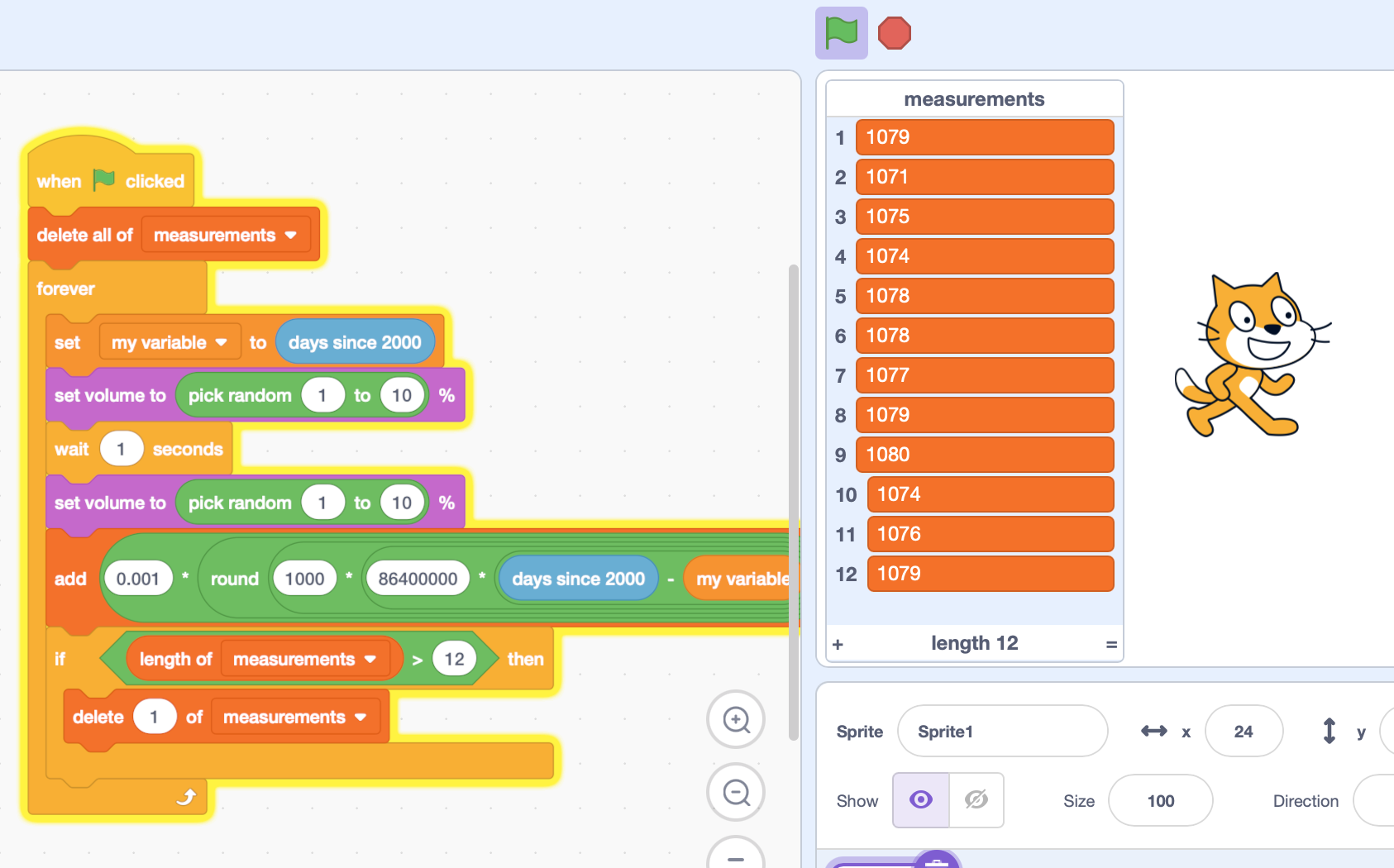
After comparing various methods for a perfect wait time, these are the results!The repeat block waits a bit after each cycle, and this wait time can vary when there is lag or using spin-wait (things that use run without screen refresh, which is actually controlled lag). Also, the “timer” block only updates once per frame so it can't measure the effect of lag and spin-wait.// Tested for a 0.5 second wait time in a 100x loop using the built-in timer…
I think it's better to measure the wait time like this:
set [start v] to (days since 2000)
wait::custom
set [end v] to (days since 2000)
set [time v] to (((((end)-(start))*(24))*(60))*(60))
- Bitebite12
-
 Scratcher

1000+ posts
Scratch Workaround Guide VII
-5 squared is 25. Math is easy.Ok…? Now answer me, what is the square root of -5?
- projectkrish
-
 Scratcher
53 posts
Scratch Workaround Guide VII
It is 2.23606798 i
i is (the imaginary number which is the sqrt of -1)
If you say i doesnt exist then the answer is NAN
i is (the imaginary number which is the sqrt of -1)
If you say i doesnt exist then the answer is NAN
- Bitebite12
-
Scratcher
1000+ posts
Scratch Workaround Guide VII
It is 2.23606798 iYes, the limits of the real number line cannot conform to this use. So you must open up to the imaginary line to be able to create imaginaries and complex numbers. I find it likely you looked up the answer, though, because lets be honest, you can't recall the sqrt of 5 down to decimal accuracy.
i is (the imaginary number which is the sqrt of -1)
If you say i doesnt exist then the answer is NAN
- CodeComet6161
-
Scratcher
1000+ posts
Scratch Workaround Guide VII
-5 squared is 25. Math is easy.
-5 squared is 25. Math is easy.Ok…? Now answer me, what is the square root of -5?
It is 2.23606798 i
i is (the imaginary number which is the sqrt of -1)
If you say i doesnt exist then the answer is NAN
Can we get back to the subject of workarounds now?It is 2.23606798 iYes, the limits of the real number line cannot conform to this use. So you must open up to the imaginary line to be able to create imaginaries and complex numbers. I find it likely you looked up the answer, though, because lets be honest, you can't recall the sqrt of 5 down to decimal accuracy.
i is (the imaginary number which is the sqrt of -1)
If you say i doesnt exist then the answer is NAN
- The_Cool_Scratch_Guy
-
Scratcher
100+ posts
Scratch Workaround Guide VII
i have a question that im only thinking about because of a note we left on a different project that we just got a comment on, loli was originally gonna try the volume block for easier resolution, but that block literally always waits one frame each time it is ran.so does that mean the “we account for the screen refresh” thing deliberately accounting for this? like, do you remember if that was the point of subtracting 1/30? if so (and i think yes) then does that mean in our “accurate fast-forward” block, where we're using an “accurate wait-seconds” block with the best-picked workaround, would we still be subtracting 1/30 from the number we give there?
also, if we restore the volume after the fact (meaning “set volume to 0” then “set volume to old volume”) then do we actually need to wait 2/30 seconds instead of 1/30 seconds O_O
The point of the wait is that scratch's wait block waits around a little extra until the next screen refresh, in addition to the actual wait time, which causes the inaccuracy. The -1/30 was just a crude estimation of how much that would take on average, and the new workarounds mean that we shouldn't have to worry about this for just the wait anymore. But I kinda forgot that the volume blocks also caused a screen refresh so we might want to rethink that. (Or we could forget about it and get away with a slight inaccuracy.)
- _nix
-
Scratcher
1000+ posts
Scratch Workaround Guide VII
just tested and the two “set volume” blocks do cause a predictable 2-frame / 1/15s delay, which we should be accounting for. “set pitch” has the same delayi have a question that im only thinking about because of a note we left on a different project that we just got a comment on, loli was originally gonna try the volume block for easier resolution, but that block literally always waits one frame each time it is ran.so does that mean the “we account for the screen refresh” thing deliberately accounting for this? like, do you remember if that was the point of subtracting 1/30? if so (and i think yes) then does that mean in our “accurate fast-forward” block, where we're using an “accurate wait-seconds” block with the best-picked workaround, would we still be subtracting 1/30 from the number we give there?
also, if we restore the volume after the fact (meaning “set volume to 0” then “set volume to old volume”) then do we actually need to wait 2/30 seconds instead of 1/30 seconds O_O
The point of the wait is that scratch's wait block waits around a little extra until the next screen refresh, in addition to the actual wait time, which causes the inaccuracy. The -1/30 was just a crude estimation of how much that would take on average, and the new workarounds mean that we shouldn't have to worry about this for just the wait anymore. But I kinda forgot that the volume blocks also caused a screen refresh so we might want to rethink that. (Or we could forget about it and get away with a slight inaccuracy.)
as far as i understand, the real question, if we rule out spin-lag, is simply “how many frames should we wait to get the closest we can to the target wait time?” if we assume there's no lag so we may choose a precise whole multiple of 1/30sec, then ostensibly the answer is just to start with the 8x speed of pitch 360 and the target duration to skip—multiply 1/8 times 30 times duration, pass to the most accurate “wait # of frames” workaround, which i think(??) is just “repeat (n): wait 0 seconds”
the problem is this overshoots or undershoots because 30/8x is rarely a whole number. our accuracy is ±1/60sec around the real target number of frames, representing ±8/60sec of real skipped audio, or 0.13 real-world seconds. (of course this is assuming we're accounting for any delays from “volume” blocks)
—
i did a bunch of digging into timings and realized i was making some incorrect conclusions about broadcasts and timings. the scratched-over post is here if anyone wants to learn from my struggling. ^^;
i don't have the capacity to go further but the discussion of timings there is hopefully a good place to continue and account for all from-scratch delays. if your eyes glaze over reading it it's fine. you-anyone can reach the same conclusions testing these blocks yourself and/or following with nembence's posts.
i never got around to it but wanted to suggest my hunch, that we can do a more accurate fast-forward if we don't go at 360 pitch / 8x speed the entire time. go 8x as long as possible, then switch to some slower speed, wait a minimum of time to align accurately, then switch back to 1x speed. of course i had no idea how to do any of the math for that without working out the timings, and still haven't gotten all the way there. but it feels possible.
- projectkrish
-
Scratcher
53 posts
Scratch Workaround Guide VII
Are there any other blocks that wait exactly one frame in the motion, sensing, looks, and extensions category?
I am making a platformer with only those stuff.
I am making a platformer with only those stuff.

- Scyth3d
-
 Scratcher

500+ posts
Scratch Workaround Guide VII
where isIdk what you mean by that but its really simple justif on edge, bounce
forever

if <touching [edge v] ?> then
turn cw (180) degrees
end
end
- ispretty
-
 Scratcher

500+ posts
Scratch Workaround Guide VII
it's not, it's way more complicatedwhere isIdk what you mean by that but its really simple justif on edge, bounceforever
if <touching [edge v] ?> then
turn cw (180) degrees
end
end
- Discussion Forums
- » Suggestions
-
» Scratch Workaround Guide VII