Discuss Scratch

- Discussion Forums
- » Help with Scripts
- » My Bézier curve project is not working (solved)
![[RSS Feed]](//cdn.scratch.mit.edu/scratchr2/static/__d235e7f35585482ca999583499337ccd__//djangobb_forum/img/feed-icon-small.png "[RSS Feed]")
![[RSS Feed]](http://cdn.scratch.mit.edu/scratchr2/static/__d235e7f35585482ca999583499337ccd__//djangobb_forum/img/feed-icon-small.png "[RSS Feed]")
- josueart
-
 Scratcher

500+ posts
My Bézier curve project is not working (solved)
So, hey. I've been working on this project for quite a long time. It's basically a plotter that uses the pen to draw a Bézier curve from a set of control points.
Now, I got some Python code working, and it displays the curve correctly.
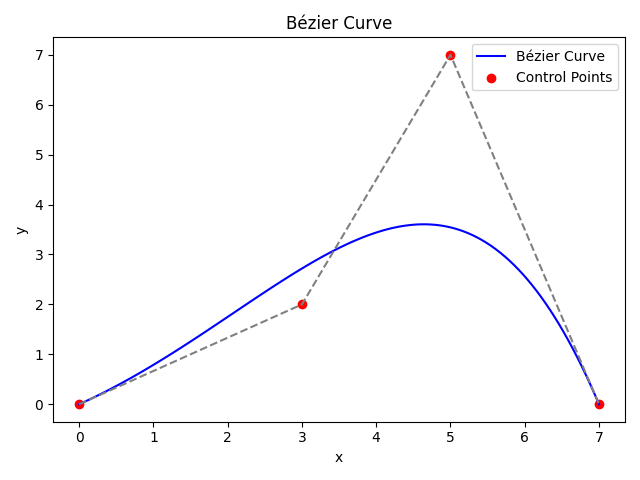
Code: https://dpaste.org/ZRSG9
Then, I began translating that code into Scratch and got a half-working project.
For some reason, it keeps merging at the center of the screen. I've tried multiplying the values by 100, rechecking three times to ensure I copied the formula correctly, redoing everything from scratch, going back to the drawing board, and questioning my intelligence many times. Yet, I still can't get it to work. The values generated by the Python code and Scratch are far off.
So, as a last resort, I decided to reach out, hoping some kind soul would help me solve this madness.
Open this project (https://turbowarp.org/1122256681/editor) on TurboWarp (not on Scratch, since it contains returns and thus will not load on Scratch), go into full screen, and try moving the black dots around. You'll see the issue then.
Thanks in advance. :)
(also, this should be okay to post here and not in ATs, right?)
Now, I got some Python code working, and it displays the curve correctly.
Code: https://dpaste.org/ZRSG9
Then, I began translating that code into Scratch and got a half-working project.
For some reason, it keeps merging at the center of the screen. I've tried multiplying the values by 100, rechecking three times to ensure I copied the formula correctly, redoing everything from scratch, going back to the drawing board, and questioning my intelligence many times. Yet, I still can't get it to work. The values generated by the Python code and Scratch are far off.
So, as a last resort, I decided to reach out, hoping some kind soul would help me solve this madness.
Open this project (https://turbowarp.org/1122256681/editor) on TurboWarp (not on Scratch, since it contains returns and thus will not load on Scratch), go into full screen, and try moving the black dots around. You'll see the issue then.
Thanks in advance. :)
(also, this should be okay to post here and not in ATs, right?)
Last edited by josueart (Feb. 18, 2025 16:34:36)
- nembence
-
 Scratcher

500+ posts
My Bézier curve project is not working (solved)
I found these bugs in the Bezier block:
- the loop runs n+1 times instead of n
- the control points are 0-indexed but Scratch lists should be 1-indexed
- (1-t) is on the same power regardless of i
- binom coeff uses n instead of n-1
- josueart
-
Scratcher
500+ posts
My Bézier curve project is not working (solved)
I found these bugs in the Bezier block:Oh my god, it works now! Thank you! I really don't know how I missed that three times—my eyesight is definitely getting worse
- the loop runs n+1 times instead of n
- the control points are 0-indexed but Scratch lists should be 1-indexed
- (1-t) is on the same power regardless of i
- binom coeff uses n instead of n-1

Truly, thank you for taking the time to help out!
Cheers!
- Discussion Forums
- » Help with Scripts
-
» My Bézier curve project is not working (solved)