Discuss Scratch

- Discussion Forums
- » Advanced Topics
- » scratch 2.0? in MY ruffle?!
![[RSS Feed]](//cdn.scratch.mit.edu/scratchr2/static/__d235e7f35585482ca999583499337ccd__//djangobb_forum/img/feed-icon-small.png "[RSS Feed]")
![[RSS Feed]](http://cdn.scratch.mit.edu/scratchr2/static/__d235e7f35585482ca999583499337ccd__//djangobb_forum/img/feed-icon-small.png "[RSS Feed]")
- busybuddie1234
-
 Scratcher

100+ posts
scratch 2.0? in MY ruffle?!
scratch 2.0 now has (some) optimal functions in ruffle!
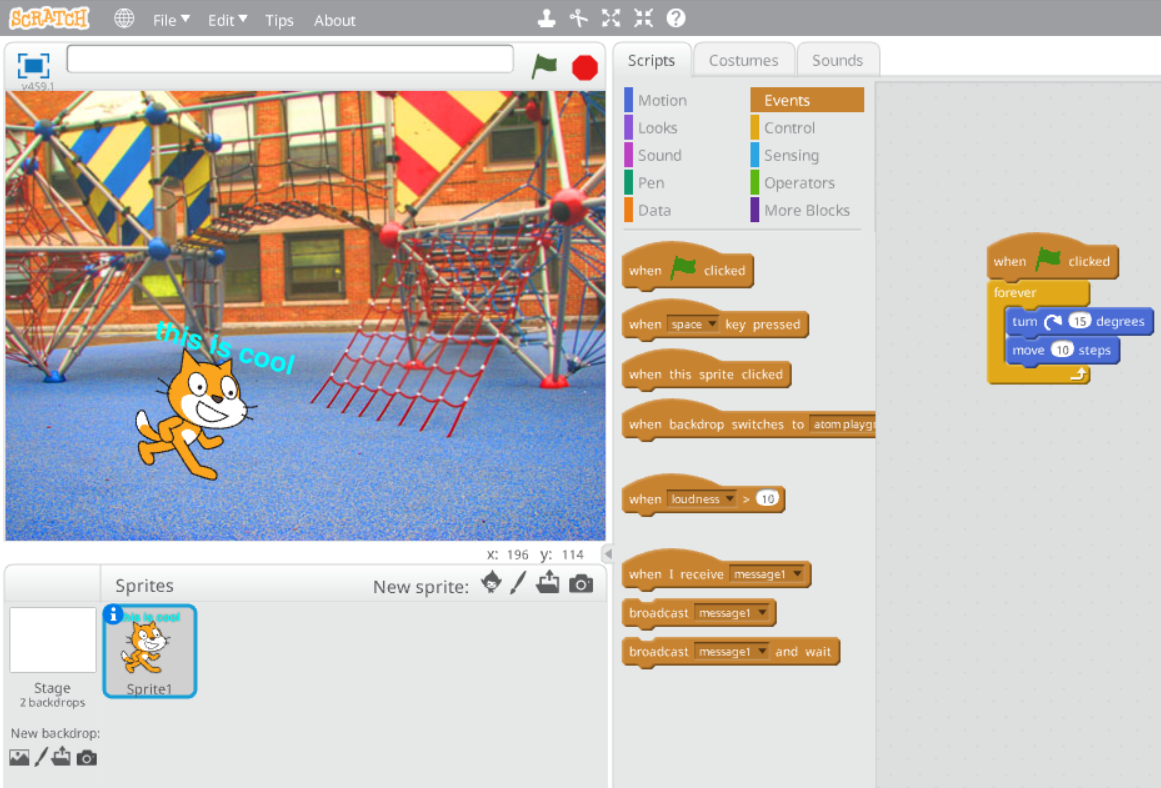
pros:
* both bitmap and vector editors work
* runs smoothly
* all of the included backdrops and sprites are there, but they take some time to import
cons:
* no sounds
* text tool works in vector editor, but the bitmap editor absolutely destroys it
——————————————————————————————————————————-
what are you waiting for? try it NOOOOOW
(please don't mention the 2.0 offline editor i am aware of it and have installed it on multiple PCs)
pros:
* both bitmap and vector editors work
* runs smoothly
* all of the included backdrops and sprites are there, but they take some time to import
cons:
* no sounds
* text tool works in vector editor, but the bitmap editor absolutely destroys it
——————————————————————————————————————————-
what are you waiting for? try it NOOOOOW
(please don't mention the 2.0 offline editor i am aware of it and have installed it on multiple PCs)
Last edited by busybuddie1234 (Feb. 28, 2026 18:17:46)
- medians
-
 Scratcher

1000+ posts
scratch 2.0? in MY ruffle?!
Wait, so the paint editors actually work now?
Edit: this is one of the captures where the library works :D
Edit: this is one of the captures where the library works :D
Last edited by medians (May 25, 2024 12:13:13)
- DifferentDance8
-
 Scratcher

1000+ posts
scratch 2.0? in MY ruffle?!
It's more likely than you think.
Okay, all jokes aside, this is actually really cool! Even though I already have Scratch 2.0 offline installed on the PC i share with my sister, and I can just use Pale Moon on my surface go, it's still nice to know that it can run entirely using Ruffle better than it used to.
Okay, all jokes aside, this is actually really cool! Even though I already have Scratch 2.0 offline installed on the PC i share with my sister, and I can just use Pale Moon on my surface go, it's still nice to know that it can run entirely using Ruffle better than it used to.
- exsaerxsds112
-
 Scratcher

58 posts
scratch 2.0? in MY ruffle?!
scratch 2.0 now has (some) optimal functions in ruffle!There's another con:
pros:
* both bitmap and vector editors work
* runs smoothly
* all of the included backdrops and sprites are there, but they take some time to import
cons:
* no sounds
* text tool works in vector editor, but the bitmap editor absolutely destroys it
* every effect except brightness and ghost does not work (stage3D issue maybe)
* importing images from your computer does not function
——————————————————————————————————————————-
what are you waiting for? try it NOOOOOW
(please don't mention the 2.0 offline editor i am aware of it and have installed it on multiple PCs)
Blocks that have a color input do not work at all. Also, my internet can't support the Wayback Machine anymore.
- TheCreatorOfUnTV
-
 Scratcher

1000+ posts
scratch 2.0? in MY ruffle?!
What's that? (Not Scratch 2.0, I know what that is, I'm talking about the other thing)
Last edited by TheCreatorOfUnTV (July 20, 2024 02:32:39)
- DifferentDance8
-
Scratcher
1000+ posts
scratch 2.0? in MY ruffle?!
What's that? (Not Scratch 2.0, I know what that is, I'm talking about the other thing)Ruffle is a Flash emulator. Because Flash shut down a while ago, and the only browser to still support it natively is Pale Moon (and even then you need something like Clean Flash), people have begun making Flash emulators.
- busybuddie1234
-
Scratcher
100+ posts
scratch 2.0? in MY ruffle?!
please snip long quotes to prevent spam-snip-There's another con:
Blocks that have a color input do not work at all. Also, my internet can't support the Wayback Machine anymore.
- busybuddie1234
-
Scratcher
100+ posts
scratch 2.0? in MY ruffle?!
bump
ruffle got a huge update for AS3 content, i didn't notice any differences but if anyone finds any let me know
ruffle got a huge update for AS3 content, i didn't notice any differences but if anyone finds any let me know

- alboxer2000
-
 Scratcher
1000+ posts
scratch 2.0? in MY ruffle?!
There's another con: if you export it and open it on the new scratch, it won't work.

- busybuddie1234
-
Scratcher
100+ posts
scratch 2.0? in MY ruffle?!
effects now work but make the sprite undraggable for some reason, pressing CTRL+M fixes it
dragging sprites is erratic on the web (i don't remember it being like that) but it works fine on the ruffle desktop app
dragging sprites is erratic on the web (i don't remember it being like that) but it works fine on the ruffle desktop app
- Discussion Forums
- » Advanced Topics
-
» scratch 2.0? in MY ruffle?!