Discuss Scratch

- Discussion Forums
- » Questions about Scratch
- » Is there a way to disconnect vector nodes in the 3.0 editor?
![[RSS Feed]](//cdn.scratch.mit.edu/scratchr2/static/__d235e7f35585482ca999583499337ccd__//djangobb_forum/img/feed-icon-small.png "[RSS Feed]")
![[RSS Feed]](http://cdn.scratch.mit.edu/scratchr2/static/__d235e7f35585482ca999583499337ccd__//djangobb_forum/img/feed-icon-small.png "[RSS Feed]")
- awsome_guy_360
-
 Scratcher

1000+ posts
Is there a way to disconnect vector nodes in the 3.0 editor?
For context; in 2.0 you were able to “delete” nodes by shift-clicking them. For example, if you had a square shape, shift-clicking one of the nodes would turn the shape into a line that was in the shape of a square (making it an open shape).
I looked through the QaS directories, and couldn't find anyone who asked about this. Saying that apologies if this is a common question.
With that context, I was wondering if there is a way to do this in the 3.0 editor? I've tried a couple of things, such as ctrl-click and fn-click, but neither of them appeared to work. Is this even a feature in 3.0, or only something available in the 2.0 editor?
I looked through the QaS directories, and couldn't find anyone who asked about this. Saying that apologies if this is a common question.
With that context, I was wondering if there is a way to do this in the 3.0 editor? I've tried a couple of things, such as ctrl-click and fn-click, but neither of them appeared to work. Is this even a feature in 3.0, or only something available in the 2.0 editor?
- 7salad3salad
-
 Scratcher

1000+ posts
Is there a way to disconnect vector nodes in the 3.0 editor?
You can just click it, and press the “Backspace” key
I assume that clicking it and pressing the “Delete” key also works, but I don't have that right now.
Is that what you are asking?
And don't take advice from @medians (they are stuck in 2.0)
I assume that clicking it and pressing the “Delete” key also works, but I don't have that right now.
Is that what you are asking?
And don't take advice from @medians (they are stuck in 2.0)
- Za-Chary
-
 Scratcher
1000+ posts
Is there a way to disconnect vector nodes in the 3.0 editor?
You're asking about completely removing the node and the corresponding line with it. For instance, if you had a line drawn with three nodes in it (two of which are the endpoints of the line), you'd like to remove the middle node and in turn create two disconnected lines.
I remember this existing in Scratch 2.0, but as far as I know I don't think it's possible in Scratch 3.0. Pressing backspace on the middle node will remove it, but then you still have one single line, not two disconnected lines.
I remember this existing in Scratch 2.0, but as far as I know I don't think it's possible in Scratch 3.0. Pressing backspace on the middle node will remove it, but then you still have one single line, not two disconnected lines.
- awsome_guy_360
-
Scratcher
1000+ posts
Is there a way to disconnect vector nodes in the 3.0 editor?
You can just click it, and press the “Backspace” key
I assume that clicking it and pressing the “Delete” key also works, but I don't have that right now.
Is that what you are asking?
Not exactly. While that does delete the node, it doesn't really “separate” the shape, if that makes any sense (unless I performed the function wrong, which is equally possible).
So, by just merely deleting, I was able to do this:
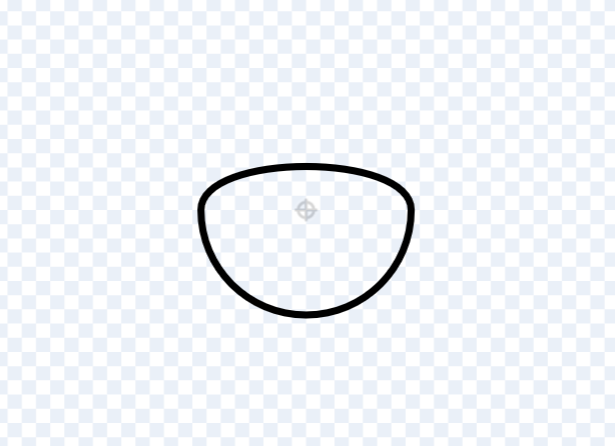
The shape is still connected, it's just that the node is deleted.
Usually, in the older editor, by shift-clicking a node, you were able to do things like this:
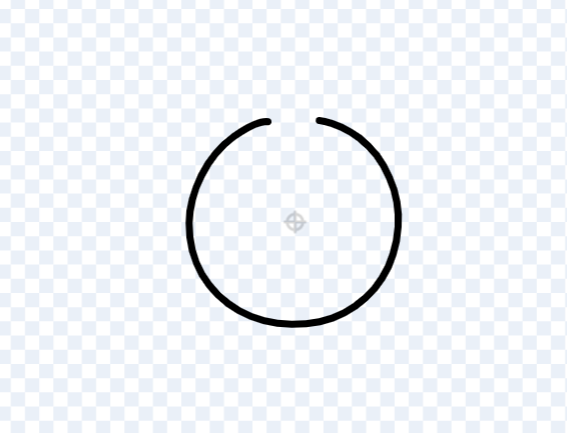
Poor mockup of what you'd be able to do in 2.0 if my memory serves me correctly. I may see if I could download the 2.0 offline editor later to see if it still works
The shape is no longer connected and instead converted into a line.
I do appreciate your answer though. The delete button does perform the same function as the backspace button.
__________________
Edit: Just saw this-, apologies
You're asking about completely removing the node and the corresponding line with it. For instance, if you had a line drawn with three nodes in it (two of which are the endpoints of the line), you'd like to remove the middle node and in turn create two disconnected lines.
I remember this existing in Scratch 2.0, but as far as I know I don't think it's possible in Scratch 3.0. Pressing backspace on the middle node will remove it, but then you still have one single line, not two disconnected lines.
Ah! I see. Thank you. Yeah, that's what I was afraid of. Thank you for your response.
Last edited by awsome_guy_360 (May 3, 2023 18:43:48)
- MeIzAwezomeDede
-
 Scratcher

1000+ posts
Is there a way to disconnect vector nodes in the 3.0 editor?
I figured out some kind of workaround (which hopefully does what you're asking for)
If you create a vector circle with the circle tool, and make sure that there is no color filled (so there's only the outline), you can then use the eraser tool to disconnect the circle
Then after you've done that, you can then select the circle and then fill in a color- the line will still be disconnected but you'll now have the color inside (re-reading your post, you don't have to fill it back in with a color if you don't want to)
I hope I explained this well enough, test it to see if it does what you're asking
If you create a vector circle with the circle tool, and make sure that there is no color filled (so there's only the outline), you can then use the eraser tool to disconnect the circle
Then after you've done that, you can then select the circle and then fill in a color- the line will still be disconnected but you'll now have the color inside (re-reading your post, you don't have to fill it back in with a color if you don't want to)
I hope I explained this well enough, test it to see if it does what you're asking
Last edited by MeIzAwezomeDede (May 3, 2023 18:44:59)
- awsome_guy_360
-
Scratcher
1000+ posts
Is there a way to disconnect vector nodes in the 3.0 editor?
If you create a vector circle with the circle tool, and make sure that there is no color filled (so there's only the outline), you can then use the eraser tool to disconnect the circle
Then after you've done that, you can then select the circle and then fill in a color- the line will still be disconnected but you'll now have the color inside (re-reading your post, you don't have to fill it back in with a color if you don't want to)
Hey! Just tested it out! It works, lol. To be frank, I completely forgot about the eraser in vector.
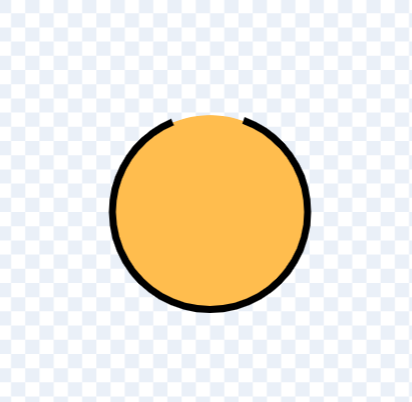
(I used two shapes in this example, but using the fill selector also worked just as fine)
Thank you so much for the workaround! It honestly really helps. :D
Last edited by awsome_guy_360 (May 3, 2023 18:51:28)
- medians
-
 Scratcher

1000+ posts
Is there a way to disconnect vector nodes in the 3.0 editor?
Hold on, you can't do this anymore?
And don't take advice from @medians (they are stuck in 2.0)LOL
Hey! Just tested it out! It works, lol. To be frank, I completely forgot about the eraser in vector.Welcome to my world.
Last edited by medians (May 3, 2023 20:18:14)

- MeIzAwezomeDede
-
Scratcher
1000+ posts
Is there a way to disconnect vector nodes in the 3.0 editor?
noBut we found a workaround to do it?
- Discussion Forums
- » Questions about Scratch
-
» Is there a way to disconnect vector nodes in the 3.0 editor?