Discuss Scratch

- Discussion Forums
- » Advanced Topics
- » Cannot use "npm install" in a HP Laptop (scratch-gui)
![[RSS Feed]](//cdn.scratch.mit.edu/scratchr2/static/__d235e7f35585482ca999583499337ccd__//djangobb_forum/img/feed-icon-small.png "[RSS Feed]")
![[RSS Feed]](http://cdn.scratch.mit.edu/scratchr2/static/__d235e7f35585482ca999583499337ccd__//djangobb_forum/img/feed-icon-small.png "[RSS Feed]")
- WojtekGame
-
 Scratcher
1000+ posts
Cannot use "npm install" in a HP Laptop (scratch-gui)
After using git clone (at least it went good  ) i tried npm install on a crappy WLAN connection, and it broke, but i tried solutions (because NPM was targeting socket connection errors), but this seems new (and yes i made the registry go to the HTTP one):
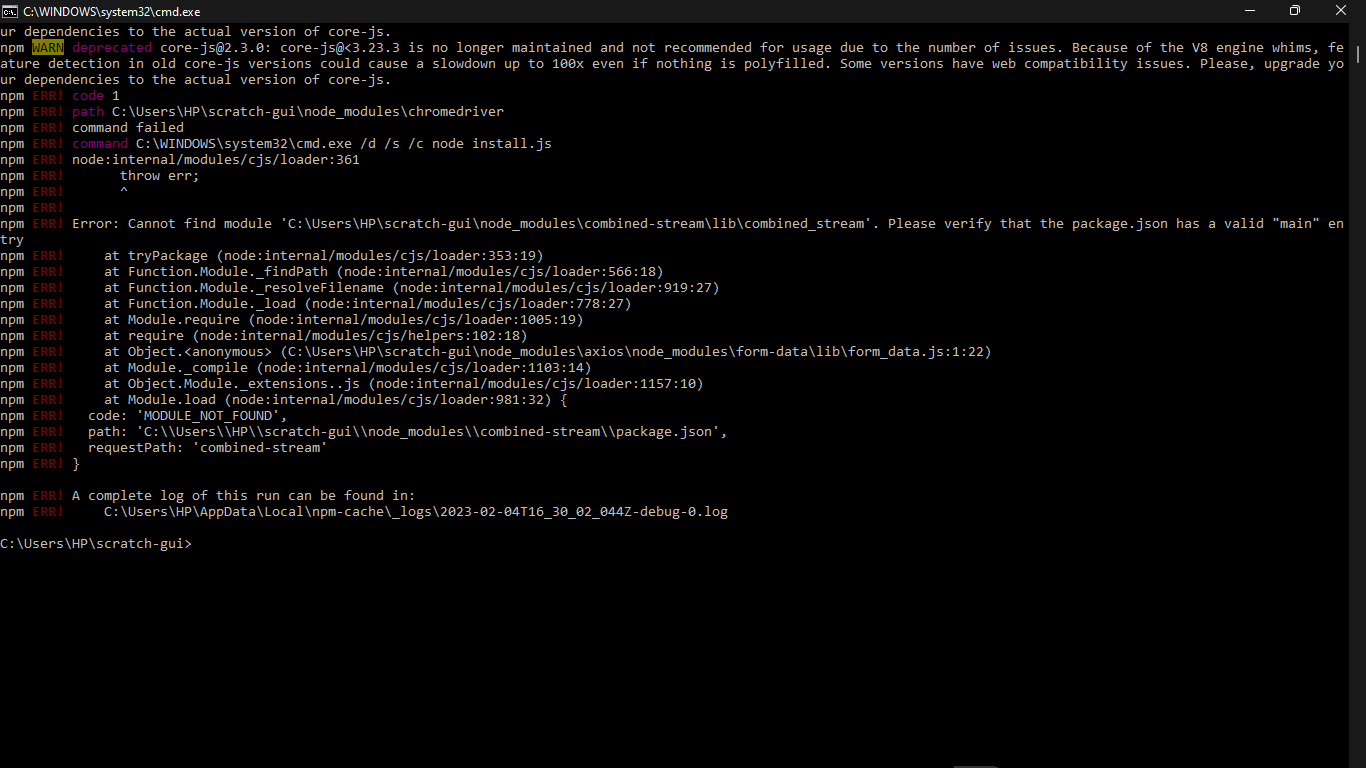
How do i fix this without moving the scratch-gui?
 ) i tried npm install on a crappy WLAN connection, and it broke, but i tried solutions (because NPM was targeting socket connection errors), but this seems new (and yes i made the registry go to the HTTP one):
How do i fix this without moving the scratch-gui?
- WojtekGame
-
Scratcher
1000+ posts
Cannot use "npm install" in a HP Laptop (scratch-gui)
bump
Last edited by WojtekGame (Feb. 4, 2023 18:16:49)
- uwv
-
 Scratcher

1000+ posts
Cannot use "npm install" in a HP Laptop (scratch-gui)
delete the node modules folder then try and npm install again
- WojtekGame
-
Scratcher
1000+ posts
Cannot use "npm install" in a HP Laptop (scratch-gui)
Delete the node modules folder then try ‘npm install’ again.(fixed quote)
OK!
- MagicCrayon9342
-
 Scratcher

1000+ posts
Cannot use "npm install" in a HP Laptop (scratch-gui)
in my experience, you absolutely MUST downgrade your npm version to v16.x in order to modify Scratch. (why does everyone let their code become so hard to work with?)
- WojtekGame
-
Scratcher
1000+ posts
Cannot use "npm install" in a HP Laptop (scratch-gui)
in my experience, you absolutely MUST downgrade your npm version to v16.x in order to modify Scratch. (why does everyone let their code become so hard to work with?)too bad i upgraded npm and node.js version is 16
- WojtekGame
-
Scratcher
1000+ posts
Cannot use "npm install" in a HP Laptop (scratch-gui)
in my experience, you absolutely MUST downgrade your npm version to v16.x in order to modify Scratch. (why does everyone let their code become so hard to work with?)imma get node 16.0.0 because it should get me the tools i need.
- ZZC12345
-
 Scratcher

500+ posts
Cannot use "npm install" in a HP Laptop (scratch-gui)
Just use Corepack and NVS/NVM.in my experience, you absolutely MUST downgrade your npm version to v16.x in order to modify Scratch. (why does everyone let their code become so hard to work with?)imma get node 16.0.0 because it should get me the tools i need.
Corepack:
Corepack is an experimental tool to help with managing versions of your package managers. It exposes binary proxies for each supported package manager that, when called, will identify whatever package manager is configured for the current project, transparently install it if needed, and finally run it without requiring explicit user interactions.
This feature simplifies two core workflows:
It eases new contributor onboarding, since they won't have to follow system-specific installation processes anymore just to have the package manager you want them to.
It allows you to ensure that everyone in your team will use exactly the package manager version you intend them to, without them having to manually synchronize it each time you need to make an update.
me@computername MSYS ~
$ corepack --help
━━━ Corepack - 0.14.2 ━━━━━━━━━━━━━━━━━━━━━━━━━━━━━━━━━━━━━━━━━━━━━━━━━━━━━━━━━━━

  $ corepack <command>

━━━ General commands ━━━━━━━━━━━━━━━━━━━━━━━━━━━━━━━━━━━━━━━━━━━━━━━━━━━━━━━━━━━━

  corepack disable [--install-directory #0] ...
    Remove the Corepack shims from the install directory

  corepack enable [--install-directory #0] ...
    Add the Corepack shims to the install directories

  corepack hydrate [--activate] <fileName>
    Import a package manager into the cache

  corepack prepare [--activate] [--all] [--json] [-o,--output] ...
    Generate a package manager archive

You can also print more details about any of these commands by calling them with
the `-h,--help` flag right after the command name.
NVS is a cross-platform utility for switching between different versions and forks of Node.js. NVS is itself written in node JavaScript.
This tool is obviously inspired by other node version manager tools, especially nvm, from which it borrows a lot of ideas and some command-line syntax.
me@computername MSYS ~
$ nvs --help
NVS (Node Version Switcher) usage

nvs help <command>             Get detailed help for a command
nvs install                    Initialize your profile for using NVS
nvs --version                  Display the NVS tool version

nvs menu                       Launch an interactive menu

nvs add <version>              Download and extract a node version
nvs rm <version>               Remove a node version
nvs migrate <fromver> [tover]  Migrate global modules
nvs upgrade [fromver]          Upgrade to latest patch of major version

nvs use [version]              (Not available, source nvs.sh instead)
nvs auto [on/off]              (Not available, source nvs.sh instead)
nvs run <ver> <js> [args...]   Run a script using a node version
nvs exec <ver> <exe> [args...] Run an executable using a node version
nvs which [version]            Show the path to a node version binary

nvs ls [filter]                List local node versions
nvs ls-remote [filter]         List node versions available to download
nvs outdated                   List local node versions and available updates

nvs link [version]             Link a version as the default
nvs unlink [version]           Remove links to a default version

nvs alias [name] [value]       Set or recall aliases for versions
nvs remote [name] [uri]        Set or recall download base URIs

A version string consists of a semantic version number or version label
("lts" or "latest"), optionally preceeded by a remote name, optionally
followed by an architecture, separated by slashes.
Examples: "lts", "4.6.0", "6.3.1/x86", "node/6.7.0/x64"
Aliases may also be used anywhere in place of a version string.
- WojtekGame
-
Scratcher
1000+ posts
Cannot use "npm install" in a HP Laptop (scratch-gui)
I used the option of TurboWarp. And it workedJust use Corepack and NVS/NVM.in my experience, you absolutely MUST downgrade your npm version to v16.x in order to modify Scratch. (why does everyone let their code become so hard to work with?)imma get node 16.0.0 because it should get me the tools i need.
Corepack:Corepack is an experimental tool to help with managing versions of your package managers. It exposes binary proxies for each supported package manager that, when called, will identify whatever package manager is configured for the current project, transparently install it if needed, and finally run it without requiring explicit user interactions.
This feature simplifies two core workflows:
It eases new contributor onboarding, since they won't have to follow system-specific installation processes anymore just to have the package manager you want them to.
It allows you to ensure that everyone in your team will use exactly the package manager version you intend them to, without them having to manually synchronize it each time you need to make an update.NVS:me@computername MSYS ~
$ corepack --help
━━━ Corepack - 0.14.2 ━━━━━━━━━━━━━━━━━━━━━━━━━━━━━━━━━━━━━━━━━━━━━━━━━━━━━━━━━━━
$ corepack <command>
━━━ General commands ━━━━━━━━━━━━━━━━━━━━━━━━━━━━━━━━━━━━━━━━━━━━━━━━━━━━━━━━━━━━
corepack disable [--install-directory #0] ...
Remove the Corepack shims from the install directory
corepack enable [--install-directory #0] ...
Add the Corepack shims to the install directories
corepack hydrate [--activate] <fileName>
Import a package manager into the cache
corepack prepare [--activate] [--all] [--json] [-o,--output] ...
Generate a package manager archive
You can also print more details about any of these commands by calling them with
the `-h,--help` flag right after the command name.NVS is a cross-platform utility for switching between different versions and forks of Node.js. NVS is itself written in node JavaScript.
This tool is obviously inspired by other node version manager tools, especially nvm, from which it borrows a lot of ideas and some command-line syntax.You don't have to uninstall the newer Node. I run Node experimental and stable on the same machine and manage pnpm via Corepack.me@computername MSYS ~
$ nvs --help
NVS (Node Version Switcher) usage
nvs help <command> Get detailed help for a command
nvs install Initialize your profile for using NVS
nvs --version Display the NVS tool version
nvs menu Launch an interactive menu
nvs add <version> Download and extract a node version
nvs rm <version> Remove a node version
nvs migrate <fromver> [tover] Migrate global modules
nvs upgrade [fromver] Upgrade to latest patch of major version
nvs use [version] (Not available, source nvs.sh instead)
nvs auto [on/off] (Not available, source nvs.sh instead)
nvs run <ver> <js> [args...] Run a script using a node version
nvs exec <ver> <exe> [args...] Run an executable using a node version
nvs which [version] Show the path to a node version binary
nvs ls [filter] List local node versions
nvs ls-remote [filter] List node versions available to download
nvs outdated List local node versions and available updates
nvs link [version] Link a version as the default
nvs unlink [version] Remove links to a default version
nvs alias [name] [value] Set or recall aliases for versions
nvs remote [name] [uri] Set or recall download base URIs
A version string consists of a semantic version number or version label
("lts" or "latest"), optionally preceeded by a remote name, optionally
followed by an architecture, separated by slashes.
Examples: "lts", "4.6.0", "6.3.1/x86", "node/6.7.0/x64"
Aliases may also be used anywhere in place of a version string.
- Discussion Forums
- » Advanced Topics
-
» Cannot use "npm install" in a HP Laptop (scratch-gui)