Discuss Scratch

- Discussion Forums
- » Help with Scripts
- » script shortening
![[RSS Feed]](//cdn.scratch.mit.edu/scratchr2/static/__686c43b630f1b1d1d9fd96912eceff34__//djangobb_forum/img/feed-icon-small.png "[RSS Feed]")
![[RSS Feed]](http://cdn.scratch.mit.edu/scratchr2/static/__686c43b630f1b1d1d9fd96912eceff34__//djangobb_forum/img/feed-icon-small.png "[RSS Feed]")
- PayPayFriday
-
 Scratcher

48 posts
script shortening
i need help on shortening my script for checking if the circles are correct or not here: https://scratch.mit.edu/projects/715000734/editor/. you will find the script in the check/reset button sprite.
- abcde1234qwe
-
 Scratcher

500+ posts
script shortening
//Without adding any variables.
when this sprite clicked
if <not <<(item (1) of [list v] :: list) contains (col1) ?::operators> or <<(item (2) of [list v] :: list) contains (col2) ?> or <(item (3) of [list v] :: list) contains (col3) ?>>>> then
broadcast [reset pattern v]
stop [this script v]
end
if <not <<(item (4) of [list v] :: list) contains (row1) ?::operators> or <<(item (5) of [list v] :: list) contains (row2) ?> or <(item (6) of [list v] :: list) contains (row3) ?>>>> then
broadcast [reset pattern v]
stop [this script v]
end
//With an added variable.

(condition)//For this sprite only.

when this sprite clicked
set [condition v] to <not <(item (1) of [list v] :: list) contains (col1) ?::operators>>
if <(condition) = [true]> then
broadcast [reset pattern v]
stop [this script v]
end
set [condition v] to <not <(item (2) of [list v] :: list) contains (col2) ?::operators>>
if <(condition) = [true]> then
broadcast [reset pattern v]
stop [this script v]
end
set [condition v] to <not <(item (3) of [list v] :: list) contains (col3) ?::operators>>
if <(condition) = [true]> then
broadcast [reset pattern v]
stop [this script v]
end
. . .//And so on.
Last edited by abcde1234qwe (July 20, 2022 02:48:57)
- cIoudyness
-
 Scratcher

500+ posts
script shortening
further compaction: throw the repeated scripts into custom blocks with number inputs//Without adding any variables.
when this sprite clicked
if <not <<(item (1) of [list v] :: list) contains (col1) ?::operators> or <<(item (2) of [list v] :: list) contains (col2) ?> or <(item (3) of [list v] :: list) contains (col3) ?>>>> then
broadcast [reset pattern v]
stop [this script v]
end
if <not <<(item (4) of [list v] :: list) contains (row1) ?::operators> or <<(item (5) of [list v] :: list) contains (row2) ?> or <(item (6) of [list v] :: list) contains (row3) ?>>>> then
broadcast [reset pattern v]
stop [this script v]
end//With an added variable.
(condition)//For this sprite only.
when this sprite clicked
set [condition v] to <not <(item (1) of [list v] :: list) contains (col1) ?::operators>>
if <(condition) = [true]> then
broadcast [reset pattern v]
stop [this script v]
end
set [condition v] to <not <(item (2) of [list v] :: list) contains (col2) ?::operators>>
if <(condition) = [true]> then
broadcast [reset pattern v]
stop [this script v]
end
set [condition v] to <not <(item (3) of [list v] :: list) contains (col3) ?::operators>>
if <(condition) = [true]> then
broadcast [reset pattern v]
stop [this script v]
end
. . .//And so on.
- abcde1234qwe
-
Scratcher
500+ posts
script shortening
further compaction: throw the repeated scripts into custom blocks with number inputsThe thing is that if you try stopping a custom block by using the stop this script block, it only stops the custom block and not the entire script.
Last edited by abcde1234qwe (July 20, 2022 03:08:43)
- cIoudyness
-
Scratcher
500+ posts
script shortening
ah I’m sure that’s workaroundablefurther compaction: throw the repeated scripts into custom blocks with number inputsThe thing is that if you try stopping a custom block by using the stop this script block, it only stops the custom block and not the entire script.
like after every check if a variable has been set to true, stop this script
and even if you didn’t want that extra bit of pain you could just toss the set variable block into a custom and make your code look nice
- Alberknyis
-
 Scratcher

1000+ posts
script shortening
If the “correct” pattern will always be the same, make a second list with that correct pattern which never changes. Every time you want to see if the current pattern is correct, use a loop and a variable for iteration to compare each row of the “pattern” list with the “correct pattern” list. If any are wrong, the whole thing is wrong. If not, the pattern is solved.
Additionally, you might want to redo how you store your data. Storing the pattern like this:
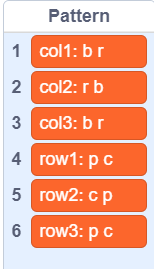
Is easy to read but hard for a computer to analyse because:

It may use three times the lists but it's far easier for your code to check and change things, and additionally with a list for naming the rows and columns it's still clear what everything refers to. The only thing you'll be hurting is the block palette scrollbar.
Additionally, you might want to redo how you store your data. Storing the pattern like this:
Is easy to read but hard for a computer to analyse because:
- Garbage data - “col1” “row1” etc are useful to you as the programmer, but now you have to code the scripts to skip those parts because the script never needs to use them to know which row and column they're looking at.
- Data inefficiently combined together. Again, having letters like “b” and “r” together to make “b r” is easy for you to read, but now in your code you have to manually split them apart, because it can't analyse it the way it is.
It may use three times the lists but it's far easier for your code to check and change things, and additionally with a list for naming the rows and columns it's still clear what everything refers to. The only thing you'll be hurting is the block palette scrollbar.
- PayPayFriday
-
Scratcher
48 posts
script shortening
If the “correct” pattern will always be the same, make a second list with that correct pattern which never changes. Every time you want to see if the current pattern is correct, use a loop and a variable for iteration to compare each row of the “pattern” list with the “correct pattern” list. If any are wrong, the whole thing is wrong. If not, the pattern is solved.That is a good idea, but i dont have room on the area to fit them.
Additionally, you might want to redo how you store your data. Storing the pattern like this:
Is easy to read but hard for a computer to analyse because:Even worse is that to change one of the items in the list, you will have to separate the words and letters apart, swap them, then put even more effort to combine all the words and letters back together. I suggest you separate the “pattern” list(and “correct pattern” list if you choose to make one) into three separate lists:
- Garbage data - “col1” “row1” etc are useful to you as the programmer, but now you have to code the scripts to skip those parts because the script never needs to use them to know which row and column they're looking at.
- Data inefficiently combined together. Again, having letters like “b” and “r” together to make “b r” is easy for you to read, but now in your code you have to manually split them apart, because it can't analyse it the way it is.
It may use three times the lists but it's far easier for your code to check and change things, and additionally with a list for naming the rows and columns it's still clear what everything refers to. The only thing you'll be hurting is the block palette scrollbar.
- PayPayFriday
-
Scratcher
48 posts
script shortening
maybe using a stop other scripts block you can stop the script thats running the blockah I’m sure that’s workaroundablefurther compaction: throw the repeated scripts into custom blocks with number inputsThe thing is that if you try stopping a custom block by using the stop this script block, it only stops the custom block and not the entire script.
like after every check if a variable has been set to true, stop this script
and even if you didn’t want that extra bit of pain you could just toss the set variable block into a custom and make your code look nice
- Alberknyis
-
Scratcher
1000+ posts
script shortening
That is a good idea, but i dont have room on the area to fit them.
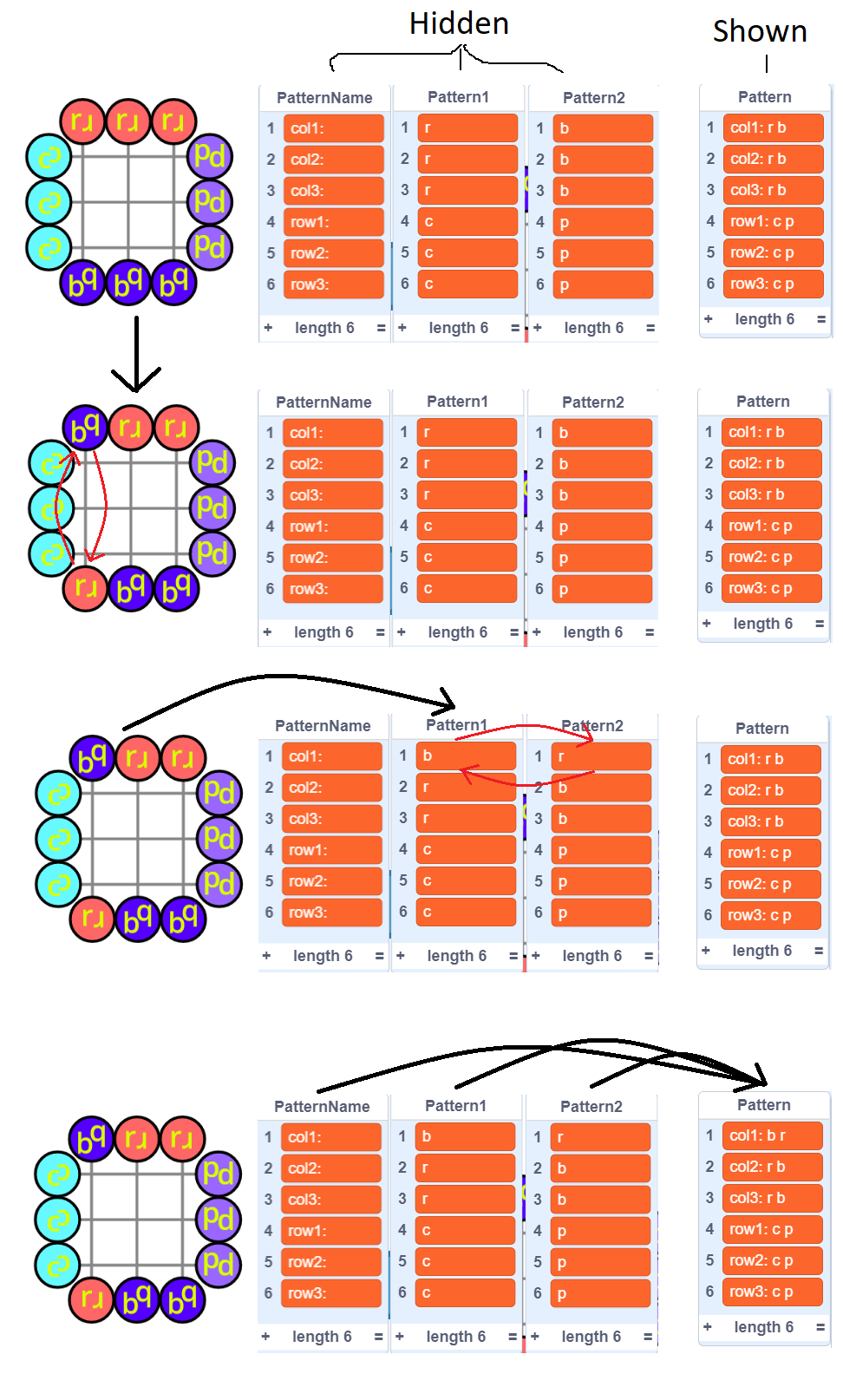
Do you want the lists to be shown? I'd imagine once the project is finished there will be no need to see them because the player will be looking at the game, but if you want you can keep the original “pattern” list you already have. However, instead of “reading” from that pattern list, you only “write” to it, and instead read from the other three lists like so:
- PayPayFriday
-
Scratcher
48 posts
script shortening
good idea alberknyisThat is a good idea, but i dont have room on the area to fit them.
Do you want the lists to be shown? I'd imagine once the project is finished there will be no need to see them because the player will be looking at the game, but if you want you can keep the original “pattern” list you already have. However, instead of “reading” from that pattern list, you only “write” to it, and instead read from the other three lists like so:
- Discussion Forums
- » Help with Scripts
-
» script shortening