Discuss Scratch

- Discussion Forums
- » Advanced Topics
- » The story of 'Windows 12' and it's stupidity
![[RSS Feed]](//cdn.scratch.mit.edu/scratchr2/static/__b3a0234be9d6cf9c4178ac9bbd21a1bc__//djangobb_forum/img/feed-icon-small.png "[RSS Feed]")
![[RSS Feed]](http://cdn.scratch.mit.edu/scratchr2/static/__b3a0234be9d6cf9c4178ac9bbd21a1bc__//djangobb_forum/img/feed-icon-small.png "[RSS Feed]")
- LandonHarter
-
 Scratcher

1000+ posts
The story of 'Windows 12' and it's stupidity
LOL horrible grammarThem need too spel verry gooder.
- MagicCrayon9342
-
 Scratcher

1000+ posts
The story of 'Windows 12' and it's stupidity
I have, but my brain dies after trying to use it.Ever tried GIMP though? That's all i shall say.I have used that before, I much prefer a better UI thoI do not own Photoshop, and the only other tool I have or can use is ms paint. Hasn't been updated in years functionally, and most of the time for me lowers the resolution quite a bit.download paint.net's portable version
it doesn't require any installation

- god286
-
 Scratcher

1000+ posts
The story of 'Windows 12' and it's stupidity
On my device GIMP is the worlds most laggy software. Apparently it has something to do with macOS Big Sur, I hope Monterey fixes itI have, but my brain dies after trying to use it.Ever tried GIMP though? That's all i shall say.I have used that before, I much prefer a better UI thoI do not own Photoshop, and the only other tool I have or can use is ms paint. Hasn't been updated in years functionally, and most of the time for me lowers the resolution quite a bit.download paint.net's portable version
it doesn't require any installation
- MagicCrayon9342
-
Scratcher
1000+ posts
The story of 'Windows 12' and it's stupidity
Hackintoshing (MacOS on non-apple devices) is the only way for me to use MacOS. It hasn't evolved much since 2015. Still can't use MacOS Catalina with my graphics card, I'll find a way someday though. Plus, not sure if I should mention this on scratch forums. May be against the rules.On my device GIMP is the worlds most laggy software. Apparently it has something to do with macOS Big Sur, I hope Monterey fixes itI have, but my brain dies after trying to use it.Ever tried GIMP though? That's all i shall say.I have used that before, I much prefer a better UI thoI do not own Photoshop, and the only other tool I have or can use is ms paint. Hasn't been updated in years functionally, and most of the time for me lowers the resolution quite a bit.download paint.net's portable version
it doesn't require any installation
MacOS out of the box, has the workflow that works best for me. Dock at the bottom, and all the stuff I need right at the top accessible with keyboard shortcuts. The features are great as well, but I just can't use it. Until I can get Catalina on here with my GPU working.
Last edited by MagicCrayon9342 (Oct. 21, 2021 20:59:20)
- kccuber
-
 Scratcher

1000+ posts
The story of 'Windows 12' and it's stupidity
“GIMP is open source bloatware” ~ potatophant 2021Ever tried GIMP though? That's all i shall say.I have used that before, I much prefer a better UI thoI do not own Photoshop, and the only other tool I have or can use is ms paint. Hasn't been updated in years functionally, and most of the time for me lowers the resolution quite a bit.download paint.net's portable version
it doesn't require any installation
- _omitted_Clausewitz
-
 Scratcher

500+ posts
The story of 'Windows 12' and it's stupidity
ASDFASDFGSFDHSGFDHGSF THIS IS SO CURSED I LOVE IT AND HATE IT
- abcde26
-
 Scratcher

1000+ posts
The story of 'Windows 12' and it's stupidity
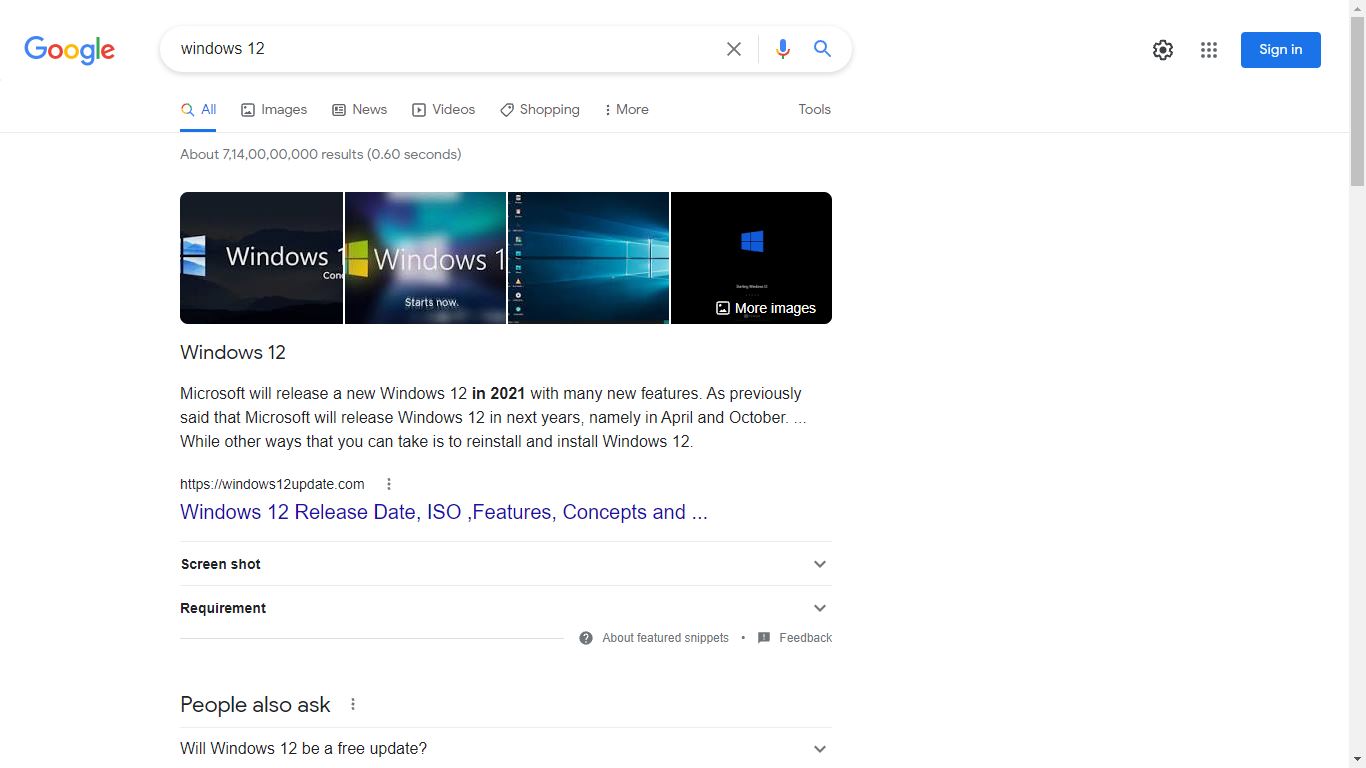
Bruh, Search Windows 12 on Google:
- MagicCrayon9342
-
Scratcher
1000+ posts
The story of 'Windows 12' and it's stupidity
Bruh, Search Windows 12 on Google:o h
g o d
n o
- god286
-
Scratcher
1000+ posts
The story of 'Windows 12' and it's stupidity
BRUHH… LOL (and the site is windows12update dot com lol)Bruh, Search Windows 12 on Google:o h
g o d
n o
- modesties
-
 Scratcher

100+ posts
The story of 'Windows 12' and it's stupidity
Bruh, Search Windows 12 on Google:If you are smart, then you’ll know Windows 11 was released recently.
- modesties
-
Scratcher
100+ posts
The story of 'Windows 12' and it's stupidity
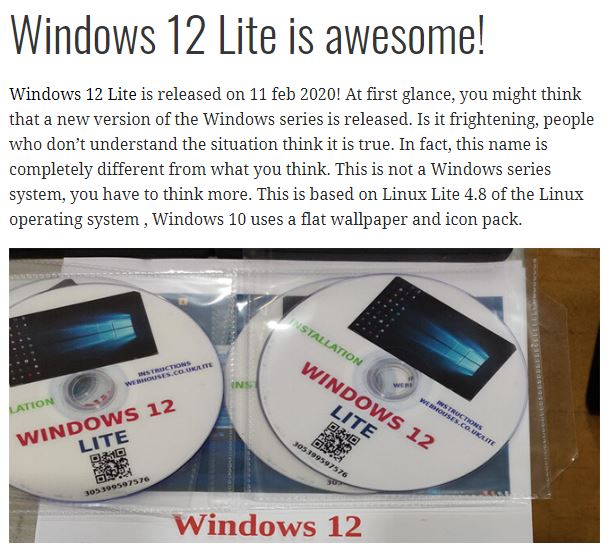
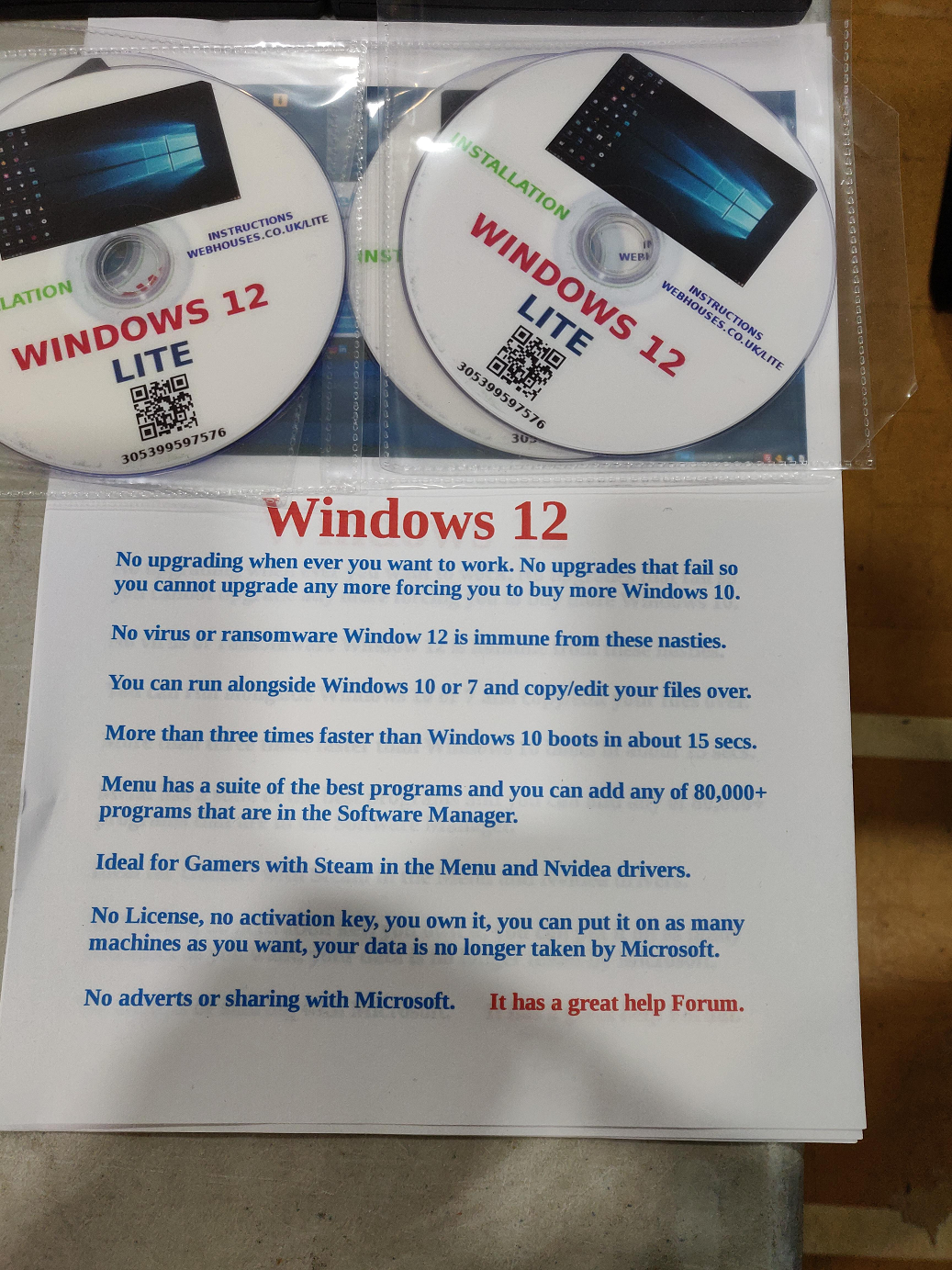
“No upgrading when ever yes not whenever when ever you want to work
source: source

No upgrades that fail so you cannot upgrade any more forcing you to buy more Windows 10.
No virus or ransomware Window 12 yes Window not Windows the new operating system is immune from these nasties
You can run alongside Windows 10 or 7 and copy/edit your files over.
More than three times faster than Windows 10 boots in about 15 secs.
Ideal for Gamers with Steam in the Menu and Nvidea drivers.
No adverts or sharing with microsoft.
”
1. It’s Windows 12, not Window.
2. It’s whenever, not when ever.
3. What does the 2nd line mean?
4. Nasties
5. Why Windows 10? Why not Windows 11?
6. The last line makes no sense,
7. It’s Nvidia.
8. There is a reason why they put a license.
9. There is a reason why they take your data.
- abcde26
-
Scratcher
1000+ posts
The story of 'Windows 12' and it's stupidity
ඞ The website is SUS ඞBRUHH… LOL (and the site is windows12update dot com lol)Bruh, Search Windows 12 on Google:o h
g o d
n o
Here is what they say (hope I don't get a alert):
1. Dark Mode File Explorer (bruh, This is already a feature in Windows 10 and 11)
If in previous versions of Windows 12 the Dark Mode feature on the Windows 12 theme includes Settings, Microsoft Edge, Groove Music, Calculator, and other Windows 12 default applications. However, On Windows 12 Update, Microsoft complements this shortcoming by adding the Dark Mode feature to File Explorer. The presence of Dark Mode on Windows 12 This update certainly complements the Dark Mode experience on Windows 12. In addition, for those of you who like to use dark mode and work at night, then this can be one of the superior features that will definitely be much liked. You can do file processing and execute files through the context menu (right click on the mouse) with a dark background display with light writing.
2. Windows 12 Clipboard History (another thing that is in Windows 10 and 11)
The next new feature brought by Windows 12 Update is the addition of Clipboard History. If you do the Copy or Cut command, the data will be stored in the Clipboard. During this time, if you copy or cut, only the last data can be pasted. With the presence of this Clipboard History feature, the law will no longer apply. The Clipboard History feature allows you to view all data in the form of text or files that you have copied or cut. Not only limited to just seeing, you also freely can choose which one you want to Paste. So, you can copy text in sequence and then Paste in the order that you want. Not only that, if you have devices that are connected using a Microsoft account, then you can Paste data from one device on another device. The way is very easy, you just simply press Windows + V to display the Clipboard History window and all the lists that you have copied or cut will appear.
3. windows 12 iso Snip & Sketch (uhhh….. they updated it on Windows 11 maybe?)
New features Windows 12 The next update is Snip & Sketch. This feature is a feature that allows you to edit or scribble on the screenshot that you just captured. Activities that you can do from Cropping, Marking, Scribbling, even you can also draw using the crossbar and bow. How to use this feature is also very easy, you only need to press Windows + Shift + S to do a screenshot. After that, please click on the image that appears in the Floating Window. Then you can then edit and sketch the Screenshot results according to taste.
4. Texting from the Laptop (pffft…. what? Apple already offers this lol)
On Windows 12 Update, you can send and read SMS directly from the laptop. This version of Windows 12 allows you to synchronize Windows 12 on a laptop with your Android Smartphone. So, you can immediately see the SMS contained on your Android Smartphone and also reply using a Laptop. Not only viewing and sending SMS, you can also view photos contained on your Smartphone. So, every time you take a new photo using a Smartphone, then you can immediately see the photo through a laptop. However, to be able to use this feature, you must install the Microsoft Launcher or Your Phone Companion application on an Android Smartphone. Then, please log in using the Microsoft account used on the laptop.
5. windows 12 Search Preview (already in Windows 10 and 11)
New features Windows 12 The next update is the look of Windows Search that has been overhauled by adding previews. So, if you type certain keywords then a preview of the search results you choose will be displayed. For example, if you type in a song title, the song title will be displayed in full, file location and other information. In addition, if you are looking for an application, you will also be shown several actions that you can use.
6. Microsoft Edge Updates (okay, are u serious now, that is availability of that is earlier as WINDOWS 7)
The next new feature is the changes given to Microsoft Edge. Among these changes is the shadow which makes the depth effect of the display become more pronounced? Then all the settings on Microsoft Edge are grouped in categories which of course make it easy for users to find the settings sought. Not only that, you can also now set the auto play media to set whether a video will play automatically or not. When you read PDFs using Edge Browser, you can now add notes and annotations. This of course would be interesting if you want to add certain notes when reading an eBook. Then, if you open the reading view, currently available Learning Tools with Text Options that can be adjusted to look and color. Then there is also Line Focus, to make the text focus on one, three, or five lines according to the settings.
7. Power Usage in Task Manager (is this turning into a Windows 12 blog or a Windows 10 one?)
New feature Windows 12 the next update is the addition of information related to Power Usage in the Task Manager. Not only Power Usage, Power Usage Trend is also added to make it easier for you to monitor power usage on Windows 12. Both of which you can use to monitor any application that uses high power to low. Thus, you can see a list of applications that make the Laptop battery run out quickly.
8. HDR Support (MAN, THIS IS IN WINDOWS 10 AND 11)
The next new feature is the HDR support on laptops that use the latest version of Windows 12. Of course this will be very useful if you enjoy using a large-screen monitor, for example 4K with HDR support. Windows 12 Update now has special options for setting HDR in Settings> Display> Windows HD Color. This setting will display the screen that you use HDR support for anything, starting from video streams, games, applications, etc.
9. Windows Security (umm…. Windows 11 has this.)
Another change that came with Windows 12 Update was the change of name from Windows Defender to Windows Security. This default Windows antivirus also adds several new security features. For example, the anti-ransom ware feature is Controlled Folder Access that you can easily set any application that has access to that folder. Of course this will make it easier for you to protect your data from ransom ware and still allow certain applications to access it.
——-
end
———
See, Don't trust this source!
- os_player
-
 Scratcher

100+ posts
The story of 'Windows 12' and it's stupidity
mistake word of nvidia is “Nvidea”
also “no virus and ransomeware” are truth but the false was, it was from linux and getting make up it and looked like windows 12
also is windows 12 lite scams was used for concept by using linux?
also “no virus and ransomeware” are truth but the false was, it was from linux and getting make up it and looked like windows 12
also is windows 12 lite scams was used for concept by using linux?
Last edited by os_player (Oct. 23, 2021 04:43:44)
- _omitted_Clausewitz
-
Scratcher
500+ posts
The story of 'Windows 12' and it's stupidity
9. There is a reason why they take your data.Thaaaat's right, guys! Your data isn't going to Microsoft! It's going to some random, I dunno, office in a continent that's suuuuper far away (assuming you're in the US)!
- ScratchCatHELLO
-
 Scratcher

1000+ posts
The story of 'Windows 12' and it's stupidity
yes, and I still don’t know how to draw a circle.Ever tried GIMP though? That's all i shall say.I have used that before, I much prefer a better UI thoI do not own Photoshop, and the only other tool I have or can use is ms paint. Hasn't been updated in years functionally, and most of the time for me lowers the resolution quite a bit.download paint.net's portable version
it doesn't require any installation
- Jeffalo
-
 Scratcher

1000+ posts
The story of 'Windows 12' and it's stupidity
gimp is pretty nice once you get to know it
- Capitan_Florida_2
-
 Scratcher

100+ posts
The story of 'Windows 12' and it's stupidity
gimp is pretty nice once you get to know itso you have to learn for 6 years straight how to use it
- MagicCrayon9342
-
Scratcher
1000+ posts
The story of 'Windows 12' and it's stupidity
eek! this is a Windows 12 topic after all. Gimp? Wut!? we dont do that here 

- abcde26
-
Scratcher
1000+ posts
The story of 'Windows 12' and it's stupidity
eek! this is a Windows 12 topic after all. Gimp? Wut!? we dont do that hereYes, WE TALK WINDOWS 12 HERE, I will make a forum topic for GIMP.
- Discussion Forums
- » Advanced Topics
-
» The story of 'Windows 12' and it's stupidity