Discuss Scratch

- Discussion Forums
- » Connecting to the Physical World
- » I can not connect Lego WeDo with Scratch
![[RSS Feed]](//cdn.scratch.mit.edu/scratchr2/static/__d235e7f35585482ca999583499337ccd__//djangobb_forum/img/feed-icon-small.png "[RSS Feed]")
![[RSS Feed]](http://cdn.scratch.mit.edu/scratchr2/static/__d235e7f35585482ca999583499337ccd__//djangobb_forum/img/feed-icon-small.png "[RSS Feed]")
- AshTR87
-
 Teacher

3 posts
I can not connect Lego WeDo with Scratch
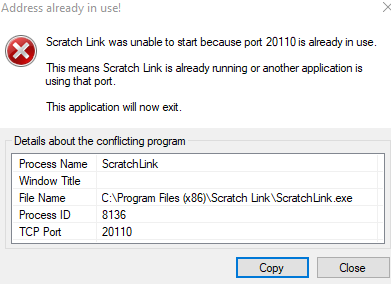
I connect with bluetooth and Scracth link seems like working in the system tray. When I click on Scratch link program it always gives the same error: “Scratch link was unable to start because port 20110 is already in use. This means Scratch link is already running or another application is using that port”.
It doesnt give the error first when i start scratch link. When i first click, it opens in system tray and starts running. If i try the second time it gives this error. So, maybe it doesnt matter as it seems like running.
I follow exactly the same steps in my laptop and lab computers. It works on my computer but doesnt work in lab computers. it already has bluetooh and scratch link connections. I have to teach Lego WeDo in lab and I coudlnt solve this problem. I need help
It doesnt give the error first when i start scratch link. When i first click, it opens in system tray and starts running. If i try the second time it gives this error. So, maybe it doesnt matter as it seems like running.
I follow exactly the same steps in my laptop and lab computers. It works on my computer but doesnt work in lab computers. it already has bluetooh and scratch link connections. I have to teach Lego WeDo in lab and I coudlnt solve this problem. I need help

- Lilibeth1927
-
 Scratcher

1 post
I can not connect Lego WeDo with Scratch
I'm having a SIMILAR issue it says I need certain things and I am pretty sure I have them,however I don't no how to check if I have those things do you know??

- bnathanael
-
New Scratcher
1 post
I can not connect Lego WeDo with Scratch
I'm using MacOs Catalina and having the issue where Scratch cannot detect the Wedo hub, previously on Mojave it worked, but now on another Mac Mojave, it won't work as well though it works well on ipad and android. Not sure where's the failure.
- BaddoDaddo
-
New Scratcher
7 posts
I can not connect Lego WeDo with Scratch
bnathanael I also cannot seem to connect to the WeDo 2.0 hub with Scratch 3.0 and MacOS Catalina, with Scratch Link on a new Macbook Pro. I can connect the computer and the WeDo directly using Lego's own software, but with Scratch - no worky. At least I am not the only one!
Last edited by BaddoDaddo (July 1, 2020 19:38:08)
- BaddoDaddo
-
New Scratcher
7 posts
I can not connect Lego WeDo with Scratch
I had an email from one of the Scratch team. Also someone else has posted confirming that the developers are aware that Scratch Link is broken and are working on a fix.
Last edited by BaddoDaddo (July 3, 2020 08:27:52)
- AshTR87
-
Teacher
3 posts
I can not connect Lego WeDo with Scratch
I had an email from one of the Scratch team. Also someone else has posted confirming that the developers are aware that Scratch Link is broken and are working on a fix.Thank you
- BaddoDaddo
-
New Scratcher
7 posts
I can not connect Lego WeDo with Scratch
This from speakvisually on the announcements discussion:
Update 7/10/20
The issue has been resolved! The “direct download” versions of Scratch Link have been updated on our website. However, the Mac App Store and Microsoft Store versions are still in review. So that will take a bit more time to get out. Thanks for your patience, everyone.
Last edited by speakvisually (Yesterday 17:13:14)
I can confirm that, having reinstalled Scratch and Scratch Link today using the direct downloads, it now works interfacing with WeDo2.0 on my MacBook Pro with MacOS Catalina. Thanks Scratch team!
Update 7/10/20
The issue has been resolved! The “direct download” versions of Scratch Link have been updated on our website. However, the Mac App Store and Microsoft Store versions are still in review. So that will take a bit more time to get out. Thanks for your patience, everyone.
Last edited by speakvisually (Yesterday 17:13:14)
I can confirm that, having reinstalled Scratch and Scratch Link today using the direct downloads, it now works interfacing with WeDo2.0 on my MacBook Pro with MacOS Catalina. Thanks Scratch team!
- abakaros
-
Scratcher
1 post
I can not connect Lego WeDo with Scratch
I reinstalled scratch link using direct download, but still it doesnt work on Windows 10 laptop. I use Scratch 3.0 online editor (it worked normally before 10-15 days). We have a small robocup competition tomorrow in our summer camp but unfortunately now we have to postpone it…. Do you have any suggestion?
- Mihaaai
-
 Scratcher

1 post
I can not connect Lego WeDo with Scratch
Hi everyone ,
I also have a problem with Scratch Link . I am using a HP Pavilion + Win10 and the Bluetooth 4.0 driver is ok and working properly. After installing Scratch Link to connect to Lego Wedo , the Bluetooth 4.0 is not starting anymore and the Scratch Ling gives the error of :“Scratch link was unable to start because port 20110 is already in use.” - Any solutions for this?
I also have an iPAD - Scratch Link is not available for iPAD.
I also have a problem with Scratch Link . I am using a HP Pavilion + Win10 and the Bluetooth 4.0 driver is ok and working properly. After installing Scratch Link to connect to Lego Wedo , the Bluetooth 4.0 is not starting anymore and the Scratch Ling gives the error of :“Scratch link was unable to start because port 20110 is already in use.” - Any solutions for this?
I also have an iPAD - Scratch Link is not available for iPAD.
- Anne_Carlill
-
 Scratcher

5 posts
I can not connect Lego WeDo with Scratch
Hi everyone,
At last we have Scratch 3.0 (web version) working with Lego WeDo 2.0. We uninstalled the version of Scratch Link we had (1.3.57.0) and installed the latest version, 1.3.66.0 . That seemed to help but we also held down the WeDo SmartHub button at the same time as trying to connect it. The combination of both these things seemed to make it work and the motor turned. Hooray!
At last we have Scratch 3.0 (web version) working with Lego WeDo 2.0. We uninstalled the version of Scratch Link we had (1.3.57.0) and installed the latest version, 1.3.66.0 . That seemed to help but we also held down the WeDo SmartHub button at the same time as trying to connect it. The combination of both these things seemed to make it work and the motor turned. Hooray!
- AshTR87
-
Teacher
3 posts
I can not connect Lego WeDo with Scratch
now the same problem with microbit. maybe my scratch link program have a problem? II tried to install from many diffirent sources but always have the same problem
- pipilotapancusiskova
-
 Scratcher

2 posts
I can not connect Lego WeDo with Scratch
After hours of searching i finally fured it out.
As some posted before everything works in MS Edge. Because edge is terribly unsecure.
But in Firefox and chorme (or chromium) now it does not work because there is something wrong with the security certificate of scratch.
So until they fix it you have to add an exception manually
Go to: https://device-manager.scratch.mit.edu:20110/
There you get a warning (in chromium, firefox something similar)
Your connection is not fully secure
This site uses an outdated security configuration, which may expose your information (for example, passwords, messages, or credit cards) when it is sent to this site.
NET::ERR_SSL_OBSOLETE_VERSION
Click Advanced button, then click Proceed to device-manager.scratch.mit.edu (unsafe)
you get: This page isn’t workingdevice-manager.scratch.mit.edu didn’t send any data.
ERR_EMPTY_RESPONSE
but that's ok and is expected.
Now if you go back to a project and tryto connect again everything works and you can connect.
–
edit: I figured it out by stumblink on a project discussing scratchlink for linux where was the first time a mention of the https://device-manager.scratch.mit.edu:20110/ link
This is the project: https://github.com/kawasaki/pyscrlink
As some posted before everything works in MS Edge. Because edge is terribly unsecure.
But in Firefox and chorme (or chromium) now it does not work because there is something wrong with the security certificate of scratch.
So until they fix it you have to add an exception manually
Go to: https://device-manager.scratch.mit.edu:20110/
There you get a warning (in chromium, firefox something similar)
Your connection is not fully secure
This site uses an outdated security configuration, which may expose your information (for example, passwords, messages, or credit cards) when it is sent to this site.
NET::ERR_SSL_OBSOLETE_VERSION
Click Advanced button, then click Proceed to device-manager.scratch.mit.edu (unsafe)
you get: This page isn’t workingdevice-manager.scratch.mit.edu didn’t send any data.
ERR_EMPTY_RESPONSE
but that's ok and is expected.
Now if you go back to a project and tryto connect again everything works and you can connect.
–
edit: I figured it out by stumblink on a project discussing scratchlink for linux where was the first time a mention of the https://device-manager.scratch.mit.edu:20110/ link
This is the project: https://github.com/kawasaki/pyscrlink
Last edited by pipilotapancusiskova (Oct. 28, 2020 17:57:57)
- pedrodrocafranco
-
 Scratcher

500+ posts
I can not connect Lego WeDo with Scratch
I connect with bluetooth and Scracth link seems like working in the system tray. When I click on Scratch link program it always gives the same error: “Scratch link was unable to start because port 20110 is already in use. This means Scratch link is already running or another application is using that port”.download scratch link for works and add wedo usb for add sensors on
It doesnt give the error first when i start scratch link. When i first click, it opens in system tray and starts running. If i try the second time it gives this error. So, maybe it doesnt matter as it seems like running.
I follow exactly the same steps in my laptop and lab computers. It works on my computer but doesnt work in lab computers. it already has bluetooh and scratch link connections. I have to teach Lego WeDo in lab and I coudlnt solve this problem. I need help

- AppleBanana72
-
Teacher
25 posts
I can not connect Lego WeDo with Scratch
I have the same issue for Scratch with both the online editor and offline editor. I have confirmed that the hardware works, and bluetooth works. (The bundled Lego software works). It is not a battery issue or a firewall issue. I am using Scratch Link, and I have confirmed that the devices are paired. But after hours and hours over several days, there is nothing that can get the software to connect with the hub. If anyone has a simple solution that would be great, because I only got this device to pair with Scratch!
- Nono91190
-
New Scratcher
1 post
I can not connect Lego WeDo with Scratch
Hello,
Have you find something to solve it ?, I have similar trouble with EV3…
Have you find something to solve it ?, I have similar trouble with EV3…
- han614698
-
 Scratcher

1000+ posts
I can not connect Lego WeDo with Scratch
Hello,I just booted mine up, and it works fine…
Have you find something to solve it ?, I have similar trouble with EV3…
My browser / operating system: Windows NT 10.0, Edge, No Flash version detected
- Venatus_123
-
 Scratcher

1000+ posts
I can not connect Lego WeDo with Scratch
My browser / operating system: Android Linux 4.4.4, Opera 56.1.2254.57583, No Flash version detected
- han614698
-
Scratcher
1000+ posts
I can not connect Lego WeDo with Scratch
My browser / operating system: Android Linux 4.4.4, Opera 56.1.2254.57583, No Flash version detectedCan you replicate? Does it work?
- dhuls
-
 Scratcher

1000+ posts
I can not connect Lego WeDo with Scratch
My browser / operating system: Android Linux 4.4.4, Opera 56.1.2254.57583, No Flash version detectedOof. Scratch Link doesn't support Android. It only supports Windows and macOS. Also, Android KitKat is nearly 8 years old.

- Discussion Forums
- » Connecting to the Physical World
-
» I can not connect Lego WeDo with Scratch