Discuss Scratch
- Discussion Forums
- » Suggestions
- » Remove the “set drag mode to draggable”
![[RSS Feed]](//cdn.scratch.mit.edu/scratchr2/static/__d235e7f35585482ca999583499337ccd__//djangobb_forum/img/feed-icon-small.png "[RSS Feed]")
![[RSS Feed]](http://cdn.scratch.mit.edu/scratchr2/static/__d235e7f35585482ca999583499337ccd__//djangobb_forum/img/feed-icon-small.png "[RSS Feed]")
- CoolLionMan
-
 Scratcher

1000+ posts
Remove the “set drag mode to draggable”
edit: stop posting here (I reported it to be closed)
So, we all know what this block is and what it does, right? It’s kind of self-explanatory
in case you don’t know what it looks like here it is why doesn’t the forums have this block, I have to screeshot it now
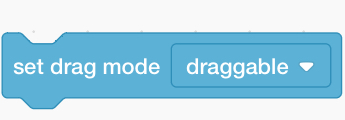
and it makes things EXTREMELY easy, it could be worked around like this if you really needed it
So, we all know what this block is and what it does, right? It’s kind of self-explanatory
in case you don’t know what it looks like here it is why doesn’t the forums have this block, I have to screeshot it now
and it makes things EXTREMELY easy, it could be worked around like this if you really needed it
when green flag clickededit: I’m sorry if this is a dupe, I didn’t check for duplicates
forever
if <<mouse down?> and <touching [ mouse pointer] ?>> then
go to [ mouse pointer]
end
end
Last edited by CoolLionMan (Jan. 31, 2021 16:04:17)
- Za-Chary
-
 Scratcher
1000+ posts
Remove the “set drag mode to draggable”
But the workaround doesn't completely work if you move your mouse quick enough.
Aside from that, I would put this under the category of “It exists, and it's not causing any problems, so why remove it?”
Aside from that, I would put this under the category of “It exists, and it's not causing any problems, so why remove it?”
Last edited by Za-Chary (Jan. 30, 2021 01:35:04)
- CoolLionMan
-
Scratcher
1000+ posts
Remove the “set drag mode to draggable”
But the workaround doesn't completely work if you move your mouse quick enough.isn’t this site about coding? it wouldn’t make sense if it has a block that could solve all of the person’s problems, I think it’s better for users to figure it out
Aside from that, I would put this under the category of “It exists, and it's not causing any problems, so why remove it?”
- the2000
-
 Scratcher

1000+ posts
Remove the “set drag mode to draggable”
And? At least 90% of Scratch blocks are workaroundable. Also, drag mode has been around for a long time. The workaround also doesn't feel nearly as nice as the features does, too; clicking on a sprite will snap the center to your current mouse position instead of having you pick it up in a reasonable way, if you hold your mouse down and run it into a sprite it will still pick it up, and I'm pretty sure you can accidentally drag multiple objects at once like this. No support.But the workaround doesn't completely work if you move your mouse quick enough.isn’t this site about coding? it wouldn’t make sense if it has a block that could solve all of the person’s problems, I think it’s better for users to figure it out
Aside from that, I would put this under the category of “It exists, and it's not causing any problems, so why remove it?”
- gosoccerboy5
-
 Scratcher

1000+ posts
Remove the “set drag mode to draggable”
The workaround you have provided is not sufficient and while there is a complete workaround it's not fun to use, and the removal of it would break some projects.
Yes, it is a coding website where you learn to code. However, it's fine if some of the blocks are workaroundable. We might as well teach kids machine code, if you insist that no workaroundable blocks exist.
Also, many blocks do happen to be workaroundable so why single this one out?
Yes, it is a coding website where you learn to code. However, it's fine if some of the blocks are workaroundable. We might as well teach kids machine code, if you insist that no workaroundable blocks exist.
Also, many blocks do happen to be workaroundable so why single this one out?
- -EmeraldThunder-
-
 Scratcher

1000+ posts
Remove the “set drag mode to draggable”
I like the block. To fully recreate it would be a rather long script.
- dertermenter
-
 Scratcher

1000+ posts
Remove the “set drag mode to draggable”
There is no benefit for everyone if the block was removed entirely.
edit: Also, workarounds can't be used for everything, as a new scratcher will not know the workaround with complex variables.
edit: Also, workarounds can't be used for everything, as a new scratcher will not know the workaround with complex variables.
Last edited by dertermenter (Jan. 30, 2021 13:11:06)
- Maximouse
-
 Scratcher

1000+ posts
Remove the “set drag mode to draggable”
This is the real workaround that behaves the same way as the block:when green flag clicked
forever
if <<mouse down?> and <touching [ mouse pointer] ?>> then
go to [ mouse pointer]
end
end
when green flag clicked
forever
wait until <<mouse down?> and <touching [mouse pointer v]?>>
set [dx v] to ((x position) - (mouse x))
set [dy v] to ((y position) - (mouse y))
repeat until <not <mouse down?>>
go to x: ((mouse x) + (dx)) y: ((mouse y) + (dy))
It's actually quite complex, especially for a beginner, so I don't think the block should be removed.
- E1EVUI
-
 Scratcher

29 posts
Remove the “set drag mode to draggable”
No remove set drag mode draggable
It will be hard for beginners.
It will be hard for beginners.
- PicoMetrics
-
 Scratcher

1000+ posts
Remove the “set drag mode to draggable”
No support.This is the real workaround that behaves the same way as the block:when green flag clicked
forever
if <<mouse down?> and <touching [ mouse pointer] ?>> then
go to [ mouse pointer]
end
endwhen green flag clicked
forever
wait until <<mouse down?> and <touching [mouse pointer v]?>>
set [dx v] to ((x position) - (mouse x))
set [dy v] to ((y position) - (mouse y))
repeat until <not <mouse down?>>
go to x: ((mouse x) + (dx)) y: ((mouse y) + (dy))
It's actually quite complex, especially for a beginner, so I don't think the block should be removed.
- the2000
-
Scratcher
1000+ posts
Remove the “set drag mode to draggable”
This is the real workaround that behaves the same way as the block:Still not perfect. Here's the perfect script:when green flag clicked
forever
wait until <<mouse down?> and <touching [mouse pointer v]?>>
set [dx v] to ((x position) - (mouse x))
set [dy v] to ((y position) - (mouse y))
repeat until <not <mouse down?>>
go to x: ((mouse x) + (dx)) y: ((mouse y) + (dy))
It's actually quite complex, especially for a beginner, so I don't think the block should be removed.
when green flag clickedI think we can all agree it's a pretty simple and convenient workaround
forever
wait until <<(click) = (1)> and <touching [mouse pointer v]?>>
set [dx v] to ((x position) - (mouse x))
set [dy v] to ((y position) - (mouse y))
repeat until <not <mouse down?>>
go to x: ((mouse x) + (dx)) y: ((mouse y) + (dy))
end
when green flag clicked
forever
set [click v] to (0)
wait until <not <mouse down?>>
wait until <mouse down?>
set [click v] to (1)
end

Edit: Turns out I got it wrong on the first try. That's probably because it was so simple that I made a mistake
Last edited by the2000 (Jan. 30, 2021 18:39:22)
- Rendangbike2
-
 Scratcher

1000+ posts
Remove the “set drag mode to draggable”
No support. The Whys:
1.
1.
There is no benefit for everyone if the block was removed entirely.2.
edit: Also, workarounds can't be used for everything, as a new scratcher will not know the workaround with complex variables.
I like the block. To fully recreate it would be a rather long script.3.
The workaround you have provided is not sufficient and while there is a complete workaround it's not fun to use, and the removal of it would break some projects.4.
Yes, it is a coding website where you learn to code. However, it's fine if some of the blocks are workaroundable. We might as well teach kids machine code, if you insist that no workaroundable blocks exist.
Also, many blocks do happen to be workaroundable so why single this one out?
But the workaround doesn't completely work if you move your mouse quick enough.
Aside from that, I would put this under the category of “It exists, and it's not causing any problems, so why remove it?”
- Hearst10
-
 Scratcher

100+ posts
Remove the “set drag mode to draggable”
No support. The Whys:couldn't have said it better myself.
1.There is no benefit for everyone if the block was removed entirely.2.
edit: Also, workarounds can't be used for everything, as a new scratcher will not know the workaround with complex variables.I like the block. To fully recreate it would be a rather long script.3.The workaround you have provided is not sufficient and while there is a complete workaround it's not fun to use, and the removal of it would break some projects.4.
Yes, it is a coding website where you learn to code. However, it's fine if some of the blocks are workaroundable. We might as well teach kids machine code, if you insist that no workaroundable blocks exist.
Also, many blocks do happen to be workaroundable so why single this one out?But the workaround doesn't completely work if you move your mouse quick enough.
Aside from that, I would put this under the category of “It exists, and it's not causing any problems, so why remove it?”
some person: it's workaroundable, so we don't need it.
response: why do we have
next costume?
next backdrop
change [ v] by ()
change x by ()
change y by ()
() + ()
() * ()
answer:
Yes, it is a coding website where you learn to code. However, it's fine if some of the blocks are workaroundable. We might as well teach kids machine code, if you insist that no workaroundable blocks exist.
- Rendangbike2
-
Scratcher
1000+ posts
Remove the “set drag mode to draggable”
snipPlease snip your post like this!
- Robby_Blue
-
 Scratcher

100+ posts
Remove the “set drag mode to draggable”
no support.
most blocks have a workaround.
for example you could workaround
so basically the move 10 steps block is useless but i wouldnt say it should be removed
most blocks have a workaround.
for example you could workaround
move (10) stepsby using
go to x: ((x position) + (([sin v] of (direction)) * (10))) y: ((y position) + (([cos v] of (direction)) * (10)))
so basically the move 10 steps block is useless but i wouldnt say it should be removed
- GoogleInScratch
-
 Scratcher

1000+ posts
Remove the “set drag mode to draggable”
no support.Did you get that from the Scratch Wiki?
most blocks have a workaround.
for example you could workaroundmove (10) stepsby usinggo to x: ((x position) + (([sin v] of (direction)) * (10))) y: ((y position) + (([cos v] of (direction)) * (10)))
so basically the move 10 steps block is useless but i wouldnt say it should be removed
Anyways, no support. Using that workaround doesn't really work if you drag it to fast. Also, beginners might not know this workaround.
- dertermenter
-
Scratcher
1000+ posts
Remove the “set drag mode to draggable”
beginners might not know this workaround.
I agree with this ^
- samq64
-
 Scratcher
1000+ posts
Remove the “set drag mode to draggable”
It's been 24 hours since the topic was created, there should be a Close Topic button under the Submit button.
- Discussion Forums
- » Suggestions
-
» Remove the “set drag mode to draggable”