Discuss Scratch

![[RSS Feed]](http://cdn.scratch.mit.edu/scratchr2/static/__ff7229f036c458728e45c39b0751aa44__//djangobb_forum/img/feed-icon-small.png "[RSS Feed]")
- mica43683
-
 Scratcher

500+ posts
Saturation Block
change [saturation v] effect by (25)I support!
set [saturation v] effect to (0) // Saturation would be useful!

- epicRedHot
-
 Scratcher

500+ posts
Saturation Block
Support, especially with the new color picker using the hue/brightness/saturation setup as well.
- hedgehog_blue
-
 Scratcher

1000+ posts
Saturation Block
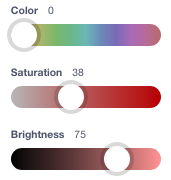
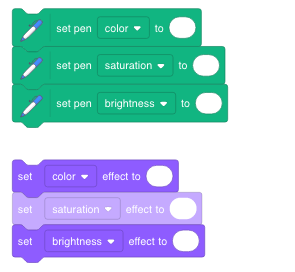
The color picker in the costume editor and blocks with color input have a saturation slider, and now pen also has saturation, so it makes sense for saturation to also be in effects.
- BlueStarPort
-
 Scratcher

100+ posts
Saturation Block
Support. This would be good for projects where a character might go into like a black and white world or something.
- -CodePro-
-
 Scratcher

100+ posts
Saturation Block
We have 2 out of 3 effects for hue, saturation, and lightness values. (HSL):
As far as I know it shouldn't be hard to add.
It would be very good for stamp text engines.
set [color v] effect to (0) // hueSo why not add:
set [brightness v] effect to (0) // lightness
set [saturation v] effect to (0) // saturation
As far as I know it shouldn't be hard to add.
It would be very good for stamp text engines.
- 45afc4td
-
 Scratcher

100+ posts
Saturation Block
Support.
Specifically, take a look at the project at https://scratch.mit.edu/projects/301883876/ . It supports 8 colors. It transforms a single set of foreground overlay sprites to any of the 8 colors. But to have arbitrary colors, there has to be the ability to transform it into any color. Fast Color Replacement is another suggestion that would allow arbitrary color transformation, where 1. find-and-replace of colors on a sprite and 2. linear transformation on RGB values is suggested. However saturation will naturally complete the hue and lightness settings, therefore allowing arbitrary HSL selection. (this is NOT the same as the HSV in the image editor color picker!)
Specifically, take a look at the project at https://scratch.mit.edu/projects/301883876/ . It supports 8 colors. It transforms a single set of foreground overlay sprites to any of the 8 colors. But to have arbitrary colors, there has to be the ability to transform it into any color. Fast Color Replacement is another suggestion that would allow arbitrary color transformation, where 1. find-and-replace of colors on a sprite and 2. linear transformation on RGB values is suggested. However saturation will naturally complete the hue and lightness settings, therefore allowing arbitrary HSL selection. (this is NOT the same as the HSV in the image editor color picker!)
- Haluria_games
-
 Scratcher

100+ posts
Saturation Block
A block idea:
The sprite with bigger layer is shown in front of sprites with lower layer, like in Unity.
set layer of [me v] to (0)

change layer of [me v] by (1)
(layer)
([layer v] of [Sprite1 v])
The sprite with bigger layer is shown in front of sprites with lower layer, like in Unity.
Last edited by Haluria_games (May 9, 2020 07:40:58)
- Haluria_games
-
Scratcher
100+ posts
Saturation Block
The color picker in the costume editor and blocks with color input have a saturation slider, and now pen also has saturation, so it makes sense for saturation to also be in effects.
I really want a transparency slider in editor.
Last edited by Haluria_games (May 9, 2020 07:45:22)
- Huels
-
 Scratcher

5 posts
Saturation Block
You can use certain blocks to change the saturation, but an easier way is to just go into the editor and change the saturation of sed costume
- Haluria_games
-
Scratcher
100+ posts
Saturation Block
You can use certain blocks to change the saturation, but an easier way is to just go into the editor and change the saturation of sed costume
You may need to change saturation in-game to make animations.
- vickicat200
-
 Scratcher

24 posts
Saturation Block
how many times have you posted this???I know, but all the things that this block accomplishes is already in the art editor.I only half support as I did in said duplicate:Duplicate75%, just use the art editor if you want a greyscale game.
Isn't just for greyscale (I realize you know this)
This property is shared by the Brightness and Color effects (And you're also still wrong, the art editor still doesn't have a desaturate button- technically you still have to do that yourself)
We already have the libraries too :^
- KittyFireSt0rm
-
 Scratcher

1000+ posts
Saturation Block
You can use certain blocks to change the saturation, but an easier way is to just go into the editor and change the saturation of sed costume
*coughs in the animators who need to change their part to a grayscale in the middle of their animations* Anyway, I support this suggestion!! I think it's a great idea!!
- garnetluvcookie
-
 Scratcher

1000+ posts
Saturation Block
And I'd like to see saturation control for the pen, too.To make it a pen block, you put :: pen stack // at the end.
(See this project for custom blocks that provide hue, saturation and lightness control for the pen for now, until the Scratch devs give us built-in saturation control… pretty please)
However, I think one of the reasons it's not there now (both pen & sprite effects) is because many Scratchers would not understand what it means.
I'd be tempted to use a word like “greyness” instead, and have it be the reverse of saturation (so zero is the current default, and 100 would be totally grey, at which point the colour plays no part).
So:set pen color to ()Note that the brightness effect is slightly different to the pen's “shade” block, in that it can both brighten (positive values) and darken (negative values) a costume. I wonder if that's why the name is different…?
set pen shade to () // why isn't this "brightness', like below?
set pen greyness to () //category=pen
set [color v] effect to ()
set [brightness v] effect to ()
set [greyness v] effect to ()
 )
)- hedgehog_blue
-
Scratcher
1000+ posts
Saturation Block
An older version of scratchblocks had a different way of changing block colors. When the post was created 6 years ago, it was colored properly.And I'd like to see saturation control for the pen, too.To make it a pen block, you put :: pen stack // at the end.
(See this project for custom blocks that provide hue, saturation and lightness control for the pen for now, until the Scratch devs give us built-in saturation control… pretty please
However, I think one of the reasons it's not there now (both pen & sprite effects) is because many Scratchers would not understand what it means.
I'd be tempted to use a word like “greyness” instead, and have it be the reverse of saturation (so zero is the current default, and 100 would be totally grey, at which point the colour plays no part).
So:set pen color to ()Note that the brightness effect is slightly different to the pen's “shade” block, in that it can both brighten (positive values) and darken (negative values) a costume. I wonder if that's why the name is different…?
set pen shade to () // why isn't this "brightness', like below?
set pen greyness to () //category=pen
set [color v] effect to ()
set [brightness v] effect to ()
set [greyness v] effect to ()
- Xoffhia
-
 Scratcher

500+ posts
Saturation Block
Well, i'm not sure about this idea, because if the saturation was about 100%, it would go off with a grey-ish colour. The grey-ish colour is the colour of saturation so there is already a provided way for it, here are some examples.
Which gives the saturation effect. But I kinda support this idea since it may be a 90% easier way to give the grey-ish effect by using the change ____ block. But you can already “make” your own saturation effect. Drag the dark colour to the right, and then drag the light colour to the left. Then drag the dark colour a little to the left, and you can see your own saturation colour. If you still don't understand me, look at this:
Although there is also a couple of ways to do the effect yourself, other than make the block. I feel like it's easier that way.
set pen color to [#465]

<touching color [#465] ?>
Which gives the saturation effect. But I kinda support this idea since it may be a 90% easier way to give the grey-ish effect by using the change ____ block. But you can already “make” your own saturation effect. Drag the dark colour to the right, and then drag the light colour to the left. Then drag the dark colour a little to the left, and you can see your own saturation colour. If you still don't understand me, look at this:
change [ saturation v] effect by (100) = [#465]
Although there is also a couple of ways to do the effect yourself, other than make the block. I feel like it's easier that way.
- CodingKing259
-
 Scratcher

62 posts
Saturation Block
And I'd like to see saturation control for the pen, too.
(See this project for custom blocks that provide hue, saturation and lightness control for the pen for now, until the Scratch devs give us built-in saturation control… pretty please)
However, I think one of the reasons it's not there now (both pen & sprite effects) is because many Scratchers would not understand what it means.
I'd be tempted to use a word like “greyness” instead, and have it be the reverse of saturation (so zero is the current default, and 100 would be totally grey, at which point the colour plays no part).
So:set pen color to ()Note that the brightness effect is slightly different to the pen's “shade” block, in that it can both brighten (positive values) and darken (negative values) a costume. I wonder if that's why the name is different…?
set pen shade to () // why isn't this "brightness', like below?
set pen greyness to () //category=pen
set [color v] effect to ()
set [brightness v] effect to ()
set [greyness v] effect to ()
 )
)Just saying you can change the colour of a block by adding ‘::’ and then a hex colour or the category in which the block would go in.
For example:
‘ set pen greyness to () ’ gives
set pen greyness to ()Whereas
‘ set pen greyness to ()::pen ’ gives
set pen greyness to ()::penOops, someone has already said that

Last edited by CodingKing259 (May 27, 2020 14:16:26)
- hedgehog_blue
-
Scratcher
1000+ posts
Saturation Block
An older version of scratchblocks had a different way of changing block colors. When the post was created 6 years ago, it was colored properly.And I'd like to see saturation control for the pen, too.
(See this project for custom blocks that provide hue, saturation and lightness control for the pen for now, until the Scratch devs give us built-in saturation control… pretty please
However, I think one of the reasons it's not there now (both pen & sprite effects) is because many Scratchers would not understand what it means.
I'd be tempted to use a word like “greyness” instead, and have it be the reverse of saturation (so zero is the current default, and 100 would be totally grey, at which point the colour plays no part).
So:set pen color to ()Note that the brightness effect is slightly different to the pen's “shade” block, in that it can both brighten (positive values) and darken (negative values) a costume. I wonder if that's why the name is different…?
set pen shade to () // why isn't this "brightness', like below?
set pen greyness to () //category=pen
set [color v] effect to ()
set [brightness v] effect to ()
set [greyness v] effect to ()
Just saying you can change the colour of a block by adding ‘::’ and then a hex colour or the category in which the block would go in.
For example:
‘ set pen greyness to () ’ givesset pen greyness to ()Whereas
‘ set pen greyness to ()::pen ’ givesset pen greyness to ()::penOops, someone has already said that
- Rocket_Development
-
 Scratcher

3 posts
Saturation Block
This can be achieved by doing:
Enjoy!
_____________
Sincerely & Best Regards,
@Rocket_Development
set [color] effect to ((1) / (0))
Enjoy!
_____________
Sincerely & Best Regards,
@Rocket_Development
- Kami-ko
-
 Scratcher

100+ posts
Saturation Block
The color picker in the costume editor and blocks with color input have a saturation slider, and now pen also has saturation, so it makes sense for saturation to also be in effects.
I don't understand why there's no saturation block either: support