Discuss Scratch
- Discussion Forums
- » Suggestions
- » Online block
![[RSS Feed]](//cdn.scratch.mit.edu/scratchr2/static/__686c43b630f1b1d1d9fd96912eceff34__//djangobb_forum/img/feed-icon-small.png "[RSS Feed]")
![[RSS Feed]](http://cdn.scratch.mit.edu/scratchr2/static/__686c43b630f1b1d1d9fd96912eceff34__//djangobb_forum/img/feed-icon-small.png "[RSS Feed]")
- spocite
-
 Scratcher

500+ posts
Online block
I was wondering if you could bring an “online” block on scratch. It would be like this
when green flag clicked
if <online?> then
...
end
Last edited by spocite (April 21, 2020 01:28:42)
- MsFluffyPenguins
-
 Scratcher

1000+ posts
Online block
what data, exactly? and where would they get the information that it is collecting?
- spocite
-
Scratcher
500+ posts
Online block
what data, exactly? and where would they get the information that it is collecting?
oh, the “get data” block doesn't add anything. Actually, I'll remove it right now. And the information is cloud variables. If you are offline, I do NOT want my computer to fetch nothing then break the game.
Last edited by spocite (April 21, 2020 01:30:49)
- fdreerf
-
 Scratcher

1000+ posts
Online block
Does it only report if the user is online?
That's doesn't make sense, the only way to view the project and have cloud data even work is to be online.
That's doesn't make sense, the only way to view the project and have cloud data even work is to be online.
- spocite
-
Scratcher
500+ posts
Online block
Does it only report if the user is online?
That's doesn't make sense, the only way to view the project and have cloud data even work is to be online.
Yeah, but if the cloud data gets nothing the game will break, and or crash

- spocite
-
Scratcher
500+ posts
Online block
When does it return false?
When the player is not connected to the internet
- JackK211424
-
 Scratcher

500+ posts
Online block
pretty good workaround:
this detects if there is no username for the current player.
if somebody is signed off it will return true. when they are in the offline editor, they are signed off.
Edit: made a typo. fixed now
<(username) = []>
this detects if there is no username for the current player.
if somebody is signed off it will return true. when they are in the offline editor, they are signed off.
Edit: made a typo. fixed now
Last edited by JackK211424 (April 21, 2020 18:15:42)
- spocite
-
Scratcher
500+ posts
Online block
pretty good workaround:<(username) = []>
this detects if there is no username for the current player.
if somebody is signed off it will return false. when they are in the offline editor, they are signed off.
Sadly, this does not work on the online editor, as I have just tested.

- lisa_wolfgang
-
 Scratcher

100+ posts
Online block
The only scenario where that wouldn't work is with New Scratchers, in which case this would suffice:pretty good workaround:<(username) = []>
this detects if there is no username for the current player.
if somebody is signed off it will return false. when they are in the offline editor, they are signed off.
Sadly, this does not work on the online editor, as I have just tested.
set [☁ test v] to [1]
if <(☁ test) = [0]> then
say [Could not access cloud data.]
stop [this script v]
end
But one reporter indicating this would be very helpful.
- spocite
-
Scratcher
500+ posts
Online block
The only scenario where that wouldn't work is with New Scratchers, in which case this would suffice:pretty good workaround:<(username) = []>
this detects if there is no username for the current player.
if somebody is signed off it will return false. when they are in the offline editor, they are signed off.
Sadly, this does not work on the online editor, as I have just tested.set [☁ test v] to [1]
if <(☁ test) = [0]> then
say [Could not access cloud data.]
stop [this script v]
end
But one reporter indicating this would be very helpful.
Actually, that wouldn't work, I have tried. If you are offline, it pretends a cloud variable is just a regular variable, and so no loophole there
- JackK211424
-
Scratcher
500+ posts
Online block
pretty good workaround:<(username) = []>
this detects if there is no username for the current player.
if somebody is signed off it will return false. when they are in the offline editor, they are signed off.
Sadly, this does not work on the online editor, as I have just tested.
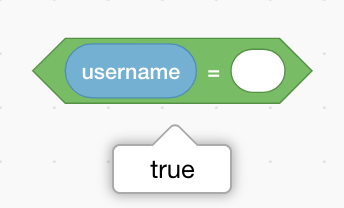
works like a charm. this is in the offline editor.
Edit: I made a typo in the post. it returns true when it is offline
Last edited by JackK211424 (April 21, 2020 18:15:08)
- apple502j
-
 Scratcher
1000+ posts
Online block
Also, if you want to check internet connection, try using translate extension. make sure to input random things otherwise you'll get cached value.
- spocite
-
Scratcher
500+ posts
Online block
Also, if you want to check internet connection, try using translate extension. make sure to input random things otherwise you'll get cached value.
Thanks! I will close this topic
Last edited by spocite (April 21, 2020 18:52:43)
- spocite
-
Scratcher
500+ posts
Online block
pretty good workaround:<(username) = []>
this detects if there is no username for the current player.
if somebody is signed off it will return false. when they are in the offline editor, they are signed off.
Sadly, this does not work on the online editor, as I have just tested.
works like a charm. this is in the offline editor.
Edit: I made a typo in the post. it returns true when it is offline
I am not talking about the offline editor, as previously stated
- space_elephant
-
 Scratcher

500+ posts
Online block
set[☁ cloud works v]to[0]//after you make a change, click this, then save,The project is saved with ☁\ cloud\ works=0, but when scratch first syncs the cloud variables, then it is set to 1. I support, because having to do this every time you save the project is not optimal.
when [u v] key pressed//then press 'u' (can be replaced with any other key)
if <(username)=[space_elephant]>::control//your username
set[☁ cloud works v]to[1]
end
Please use scratchblocks correctly.
<online?::sensing>
<online?::sensing>
- spocite
-
Scratcher
500+ posts
Online block
set[☁ cloud works v]to[0]//after you make a change, click this, then save,The project is saved with ☁\ cloud\ works=0, but when scratch first syncs the cloud variables, then it is set to 1. I support, because having to do this every time you save the project is not optimal.
when [u v] key pressed//then press 'u' (can be replaced with any other key)
if <(username)=[space_elephant]>::control//your username
set[☁ cloud works v]to[1]
end
Please use scratchblocks correctly.<online?::sensing><online?::sensing>
scratch will still know your username, even while offline (on the ONLINE editor). But, I am closing this topic since using the translate block works
- Discussion Forums
- » Suggestions
-
» Online block