Discuss Scratch
- Discussion Forums
- » Announcements
- » New ways to get started with Scratch!
![[RSS Feed]](//cdn.scratch.mit.edu/scratchr2/static/__d235e7f35585482ca999583499337ccd__//djangobb_forum/img/feed-icon-small.png "[RSS Feed]")
![[RSS Feed]](http://cdn.scratch.mit.edu/scratchr2/static/__d235e7f35585482ca999583499337ccd__//djangobb_forum/img/feed-icon-small.png "[RSS Feed]")
- SuperRedCoder
-
 Scratcher

100+ posts
New ways to get started with Scratch!
You can also have people help with problems. If you get stuck with the tips guide there is nothing you can do. Especially if you don't know about the forums.I agree. We make our own “tips” on forums, instead of just the eight or nine tips listed on the tip page.Weren't the “tips” easily accessible in the create section? That is a much better place for the tips. I also personally think much more people would use forums instead of tips.The forums can do much more, they can help much more.
Yes, agreed 100 percent
- -Galaxydust-
-
 Scratcher

100+ posts
New ways to get started with Scratch!
Is this your application for official ST press secretary?
I would argue that the forums rather than embodying one of those topics actually embody all three.
Imagine: Project Ideas, Collaboration, Things I'm making and creating, etc.
Program: Help w/ Scripts, Collaboration, Requests, etc.
Share: Show + Tell, Requests, etc.
I just came up with these quickly and there are probably more, but the point is that the forums support each mission of the ST. The share of knowledge has for millennia inspired and caused innovation throughout the world. It is no different here.
Haha, just giving my two centsThat is true, they definitely do have numerous topics that fit into those categories. However, you have to think about how each tab on the nav bar is dedicated only for one thing. While the forums have all those topics, they aren't really all that helpful to a New Scratcher who is trying to find new projects, learn new things (referring to the tips page tutorials) and the editor (obviously haha
Honestly I do not believe that any of us can truly say what a New Scratcher does or does not do.
“However, you have to think about how each tab on the nav bar is dedicated only for one thing.”
I would again xD, respectfully, like to disagree on this point. The editor or the “Create” tab contains all three components. It contains tutorials to inspire, an editor to program, and a share button to publish. Sharing is a little bit literal here, but the other two components are absolutely present.
But thinking about “Sharing” in the literal sense the explore tab isn't very effective at that for the New Scratcher anyway, because it shows the most popular projects first. Tip's is both about inspiring and programming, and I'm not sure that the “About” page fit's any category conclusively.
“While the forums have all those topics, they aren't really all that helpful to a New Scratcher who is trying to find new projects, learn new things (referring to the tips page tutorials) and the editor (obviously haha
Their are lots of guides in the forums (usually stickied), which have helpful information written by Scratchers who underwent the same process. The forums also contain many more project ideas than the tips page, which contains a limited selection. The forums are very helpful for the New Scratcher who requires assistance with a project or otherwise has a question about Scratch. Having the discuss forum does not really minimize the other subjects, rather it enhances them.
“To be quite honest, I hardly ever use the Show and Tell forum when I want to find new topics, rather, the Explore page, as would a New Scratcher (probably).
Yeah, because only the best projects are shown on the Explore page, and anyone can post on the Show + Tell forum. This leads to the honest truth that the projects on the forum are usually of lower quality. The Show + Tell forum though is only a small piece of the puzzle, each forum contributes to the greater good, as you recognized at the beginning of your post.

Well said. I completely agree with that. I look at the projects in the show and tell forum because sometimes there are interesting things and Scratchers there, rather than popular ones.
- -ColorMaster-
-
 Scratcher

1000+ posts
New ways to get started with Scratch!
I've never used the forums, really, but this seems like a bad decision. I was already turned off by the forums due to the unorganized structure since I couldn't search for specific topics I'd like to discuss, but this'll basically turn off every Scratcher who joins from now on
Last edited by -ColorMaster- (July 5, 2017 22:00:39)
- tali1665
-
 Scratcher

100+ posts
New ways to get started with Scratch!
Hey everyone,what encouraged you to do this, dietbacon?
We are always looking for ways to make Scratch easier to get started with. Today we’re excited to announce that we’ve added lots of new resources to a new section called Tips! .
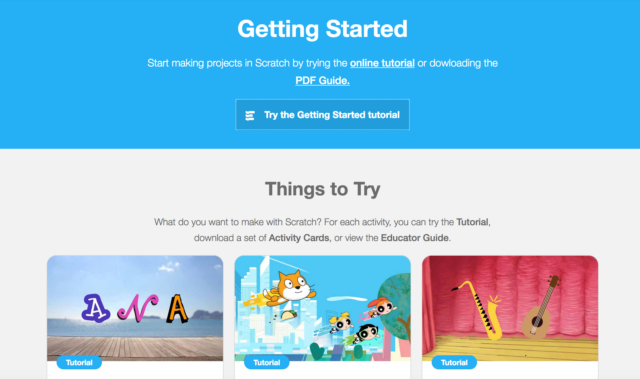
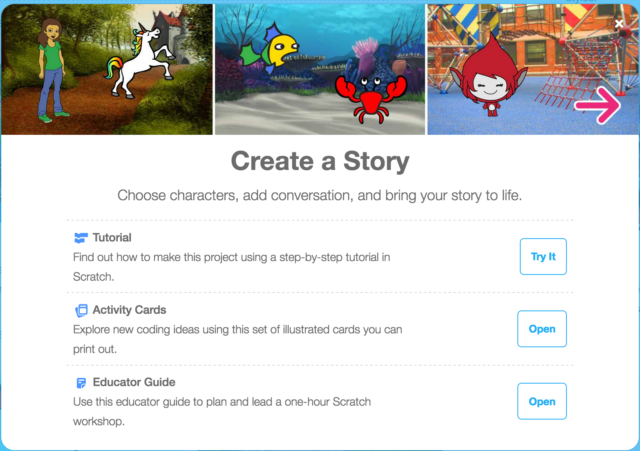
On the new Tips page, you will find interactive tutorials that can help you start making a variety of projects. There are also printable Activity Cards with detailed instructions on how to build any of the projects you are interested in.
In addition to the inclusion of the new Tips page, the site navigation menu has also been updated. We replaced the “Help” button with a “Tips” button, which will lead you to the new Tips page mentioned above. We believe this will help newcomers discover and use our new Scratch activities. We have also removed the “Discuss” button from the navigation menu. We made this decision based on usage (how often it was clicked) and to give emphasis to the other menu options like “Create” and “Explore.” You can still access the Discussion Forums by clicking the link in the footer at the bottom of every page or by going to https://scratch.mit.edu/discuss/. These changes were made to help highlight project creation and get new users started on becoming full fledged Scratchers!
Scratch On!
- - - - -
FAQ:
Where is “Discuss” in the footer?
In the footer, under “Community”, you will see a link to “Discussion Forums”. You can also always access the forums with this url: https://scratch.mit.edu/discuss/
Can you make the search bar smaller to make room for discuss?
This decision was also made in part because the navigation menu is translated to many other languages, and in some of those languages there was just too much text to fit in the space.
The search bar is flexible in size based on the language you are in. While it may appear extra large in English, this is not always the case. For example, change your language to Deutsch and see what happens. And this is with one item removed from the nav bar - imagine what it was like when there were five items in the nav bar before.
- WolfCat67
-
 Scratcher

1000+ posts
New ways to get started with Scratch!
I've never used the forums, really, but this seems like a bad decision. I was already turned off by the forums due to the unorganized structure since I couldn't search for specific topics I'd like to discuss, but this'll basically turn off every Scratcher who joins from now onWhoa you used the forums

- SuperRedCoder
-
Scratcher
100+ posts
New ways to get started with Scratch!
I've never used the forums, really, but this seems like a bad decision. I was already turned off by the forums due to the unorganized structure since I couldn't search for specific topics I'd like to discuss, but this'll basically turn off every Scratcher who joins from now onWhoa you used the forums

- nilbert
-
 Scratcher

500+ posts
New ways to get started with Scratch!
Maybe tips could also be added into “Support” or “Community” in the footer?
- SimpleScratch
-
 Scratcher

500+ posts
New ways to get started with Scratch!
This is an extremely poor step.
And to publicise it as a GOOD THING!!!!!!!!!!!!
I could go into why the Scratch discussion forum is so important to young (and not so young) Scratchers but you already know that and still have chosen to hide it away so it would be pointless.
Worst action I've seen by the Scratch team
And to publicise it as a GOOD THING!!!!!!!!!!!!
I could go into why the Scratch discussion forum is so important to young (and not so young) Scratchers but you already know that and still have chosen to hide it away so it would be pointless.
Worst action I've seen by the Scratch team


- Eldona1
-
 Scratcher

9 posts
New ways to get started with Scratch!
Bring back the “Discuss” option! It was easy to access before and I could get there any time that I wanted. The new Tips icon has upset me and others by the looks of it. I know we can still get there, but I am NOT a new Scratcher and know how to navigate the scripts. When I first click on it I was like “Tips??? Wonder what that is… Hope it's something cool!” But I was really let down when I found out it was just the tips that I could access when creating a project. Maybe if they were different tips that I could actually use, I would respect them.
- H0if0
-
 Scratcher
16 posts
New ways to get started with Scratch!
Bring back the “Discuss” option! It was easy to access before and I could get there any time that I wanted. The new Tips icon has upset me and others by the looks of it. I know we can still get there, but I am NOT a new Scratcher and know how to navigate the scripts. When I first click on it I was like “Tips??? Wonder what that is… Hope it's something cool!” But I was really let down when I found out it was just the tips that I could access when creating a project. Maybe if they were different tips that I could actually use, I would respect them.i agree
- WolfCat67
-
Scratcher
1000+ posts
New ways to get started with Scratch!
How do we find the disscus topic nowCheck the footer of the page, under “Community”.
I've added a section about this on the Scratch Wiki, on the list of controversial topics on Scratch.
https://wiki.scratch.mit.edu/wiki/List_of_Controversial_Topics_on_Scratch#Removal_of_Discuss_Link_from_Header
- Pylar
-
 Scratcher

100+ posts
New ways to get started with Scratch!
I agree. We make our own “tips” on forums, instead of just the eight or nine tips listed on the tip page.Weren't the “tips” easily accessible in the create section? That is a much better place for the tips. I also personally think much more people would use forums instead of tips.The forums can do much more, they can help much more.
Oh, definitely. Maybe add a tips section to the forums!
- WolfCat67
-
Scratcher
1000+ posts
New ways to get started with Scratch!
It doesn't help that all the tips are already in the Scratch editor.I agree. We make our own “tips” on forums, instead of just the eight or nine tips listed on the tip page.Weren't the “tips” easily accessible in the create section? That is a much better place for the tips. I also personally think much more people would use forums instead of tips.The forums can do much more, they can help much more.
Oh, definitely. Maybe add a tips section to the forums!

Also, the tips forum section idea… Isn't that just the Questions about Scratch forum mixed with Help with Scripts?
Oh, come on, 60-second-rule.
Last edited by WolfCat67 (July 5, 2017 22:23:56)
- bigpuppy
-
 Scratcher

1000+ posts
New ways to get started with Scratch!
Or use this direct link:How do we find the disscus topic nowCheck the footer of the page, under “Community”.
-snip-
https://scratch.mit.edu/discuss/
- -Galaxydust-
-
Scratcher
100+ posts
New ways to get started with Scratch!
I like the idea of tips, but it shouldn't be a tab. Maybe link it somewhere like the version of the what's happening part for new scratchers (you know how it looks different for them with links for other useful pages) or you could make the “try it out” link to it so those who have just discovered scratch see that there a lot of choices for things you can make on scratch.
- Eldona1
-
Scratcher
9 posts
New ways to get started with Scratch!
I like the idea of tips, but it shouldn't be a tab. Maybe link it somewhere like the version of the what's happening part for new scratchers (you know how it looks different for them with links for other useful pages) or you could make the “try it out” link to it so those who have just discovered scratch see that there a lot of choices for things you can make on scratch.
Actually, you can find the tips right inside your projects. This new tips tab should be removed. And I agree.
Last edited by Eldona1 (July 5, 2017 22:34:00)
- powercon5
-
 Scratcher

1000+ posts
New ways to get started with Scratch!
It's not needed when compared to the forums.I like the idea of tips, but it shouldn't be a tab. Maybe link it somewhere like the version of the what's happening part for new scratchers (you know how it looks different for them with links for other useful pages) or you could make the “try it out” link to it so those who have just discovered scratch see that there a lot of choices for things you can make on scratch.
Actually, you can find the tips right inside your projects. This new tips tab should be removed.
- -Galaxydust-
-
Scratcher
100+ posts
New ways to get started with Scratch!
I like the idea of tips, but it shouldn't be a tab. Maybe link it somewhere like the version of the what's happening part for new scratchers (you know how it looks different for them with links for other useful pages) or you could make the “try it out” link to it so those who have just discovered scratch see that there a lot of choices for things you can make on scratch.
Actually, you can find the tips right inside your projects. This new tips tab should be removed. And I agree.
Yes, I know. But if they want more places to find it.
- Eldona1
-
Scratcher
9 posts
New ways to get started with Scratch!
It's not needed when compared to the forums.I like the idea of tips, but it shouldn't be a tab. Maybe link it somewhere like the version of the what's happening part for new scratchers (you know how it looks different for them with links for other useful pages) or you could make the “try it out” link to it so those who have just discovered scratch see that there a lot of choices for things you can make on scratch.
Actually, you can find the tips right inside your projects. This new tips tab should be removed.
Exactly.