Discuss Scratch
- Discussion Forums
- » Help with Scripts
- » Custom Tooltips?
![[RSS Feed]](//cdn.scratch.mit.edu/scratchr2/static/__336e98d0be52178b42efe0f436e03dc6__//djangobb_forum/img/feed-icon-small.png "[RSS Feed]")
![[RSS Feed]](http://cdn.scratch.mit.edu/scratchr2/static/__336e98d0be52178b42efe0f436e03dc6__//djangobb_forum/img/feed-icon-small.png "[RSS Feed]")
- GvYoutube
-
 Scratcher

1000+ posts
Custom Tooltips?
Hello!
I am having issues making a custom tooltip that fades in and comes down from the top of the screen when the player is touching another sprite, and the same in reverse while the player ISN'T touching another sprite.
Can someone help?
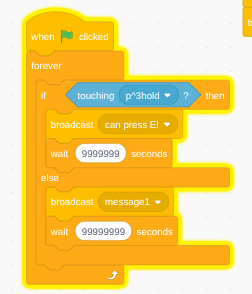
This is the code, in the player sprite to detect if player is touching:
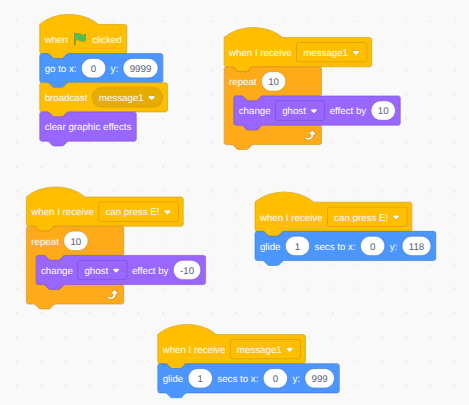
And this is the tooltip's code:
I am having issues making a custom tooltip that fades in and comes down from the top of the screen when the player is touching another sprite, and the same in reverse while the player ISN'T touching another sprite.
Can someone help?
This is the code, in the player sprite to detect if player is touching:
And this is the tooltip's code:
- gplb2718
-
 Scratcher

1000+ posts
Custom Tooltips?
...::hat
...{
if <touching (Sprite v) ?> then
broadcast [show animation v]
wait until <not <touching (Sprite v) ?>>
broadcast [hide animation v]
end
}::grey

when I receive [animation whatever v]
set [animation v] to [whatever]//if its active or not
loop{
...
...
if <not <(animation) = [whatever]>> then
stop [this script v]
end
}::grey
- GvYoutube
-
Scratcher
1000+ posts
Custom Tooltips?
This worked! Thanks!...::hat
...{
if <touching (Sprite v) ?> then
broadcast [show animation v]
wait until <not <touching (Sprite v) ?>>
broadcast [hide animation v]
end
}::grey
when I receive [animation whatever v]
set [animation v] to [whatever]//if its active or not
loop{
...
...
if <not <(animation) = [whatever]>> then
stop [this script v]
end
}::grey
- Discussion Forums
- » Help with Scripts
-
» Custom Tooltips?