Discuss Scratch

- Discussion Forums
- » Help with Scripts
- » Code behaving differently when I use run without screen refresh.
![[RSS Feed]](//cdn.scratch.mit.edu/scratchr2/static/__4bc739c53cfd81b94c5e6780b6a19bb8__//djangobb_forum/img/feed-icon-small.png "[RSS Feed]")
![[RSS Feed]](http://cdn.scratch.mit.edu/scratchr2/static/__4bc739c53cfd81b94c5e6780b6a19bb8__//djangobb_forum/img/feed-icon-small.png "[RSS Feed]")
- bitmap_caketin
-
 Scratcher

100+ posts
Code behaving differently when I use run without screen refresh.
Does anyone know why when I run a custom block without screen refresh, my background appears, but with screen refresh it doesn't
The code:
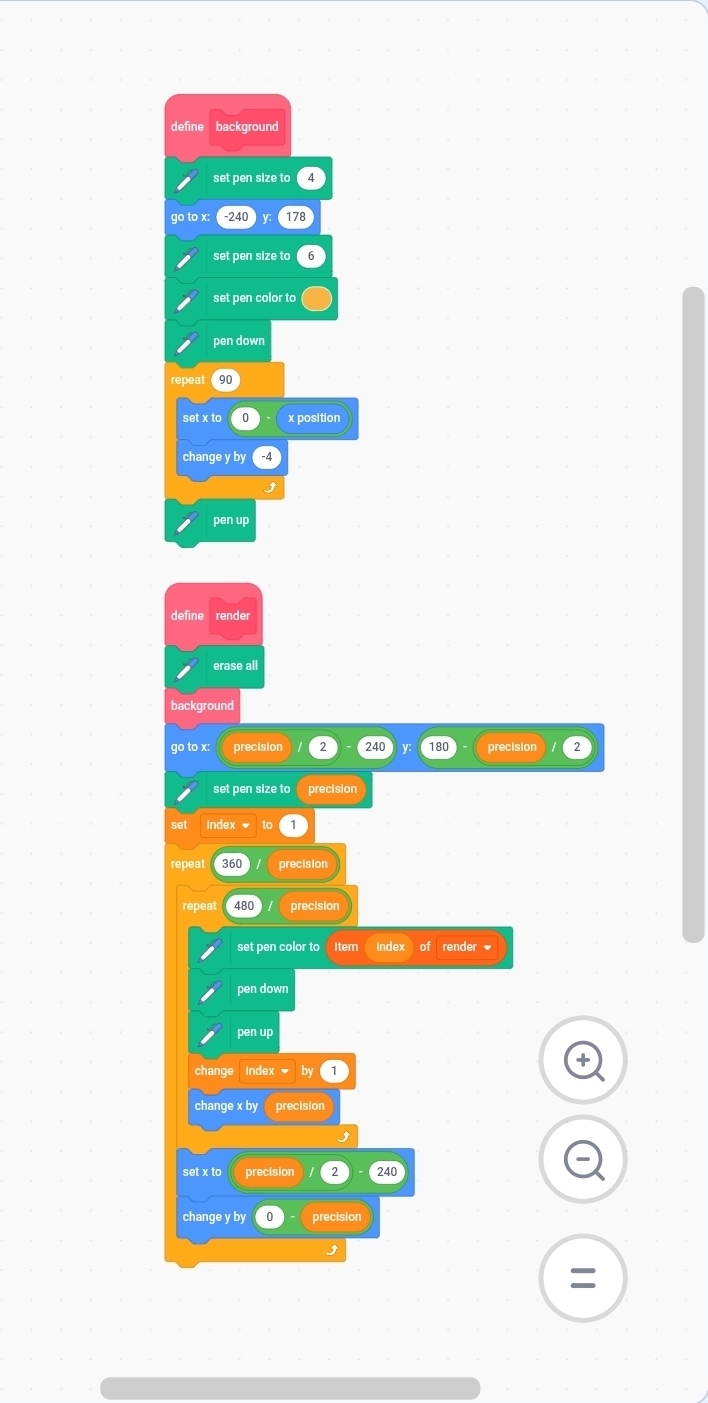
The code:
- bitmap_caketin
-
Scratcher
100+ posts
Code behaving differently when I use run without screen refresh.
I can get it to work when moving the background block and the erase all block out of the render block, but I would still like to know why it didn't work?
- ITS_DINO_XD
-
 Scratcher

100+ posts
Code behaving differently when I use run without screen refresh.
could you link the project?
- bitmap_caketin
-
Scratcher
100+ posts
Code behaving differently when I use run without screen refresh.
https://scratch.mit.edu/projects/1375659969/ (I know there's nothing in the list yet)
- bitmap_caketin
-
Scratcher
100+ posts
Code behaving differently when I use run without screen refresh.
It's working the way I had it now, I think.
- TimothyLawyer
-
 Scratcher

1000+ posts
Code behaving differently when I use run without screen refresh.
the project draws the light blue background and then the darker background with run w/o screen refresh checked on both blocks
the project still draws both backgrounds when i turn off run w/o screen refresh, although the second darker background draws especially slow
the slowness is due to it using more blocks and a drawing technique requiring 172,800 iterations (loops) instead of 90
one thing you can do to improve the speed is not have pen down pen up in the inner loop, instead put pen down before the outer loop and pen up after it
the following project lists the relative time “cost” for each block in scratch and may be helpful for figuring out which blocks to remove or replace to improve the drawing speed Every block timed v2
the project still draws both backgrounds when i turn off run w/o screen refresh, although the second darker background draws especially slow
the slowness is due to it using more blocks and a drawing technique requiring 172,800 iterations (loops) instead of 90
one thing you can do to improve the speed is not have pen down pen up in the inner loop, instead put pen down before the outer loop and pen up after it
the following project lists the relative time “cost” for each block in scratch and may be helpful for figuring out which blocks to remove or replace to improve the drawing speed Every block timed v2
Last edited by TimothyLawyer (Sept. 15, 2026 19:12:00)
- Discussion Forums
- » Help with Scripts
-
» Code behaving differently when I use run without screen refresh.