Discuss Scratch

- Discussion Forums
- » Advanced Topics
- » How to modify and customize Scratch 1.4?
![[RSS Feed]](//cdn.scratch.mit.edu/scratchr2/static/__d235e7f35585482ca999583499337ccd__//djangobb_forum/img/feed-icon-small.png "[RSS Feed]")
![[RSS Feed]](http://cdn.scratch.mit.edu/scratchr2/static/__d235e7f35585482ca999583499337ccd__//djangobb_forum/img/feed-icon-small.png "[RSS Feed]")
- HatmanGD
-
 Scratcher

500+ posts
How to modify and customize Scratch 1.4?
I am making a mod called “Obscratch”, and I used powerpoint56's tutorial on how to modify Scratch 1.4. It misses out on some points, like how do we customize images (like the top left logo and the sprite)?, and in some stuff I don't understand at all, or it just does not work. So, if anyone knows, please tell me how to modify Scratch 1.4.
- LittleGreyCells
-
 Scratch Team

1000+ posts
How to modify and customize Scratch 1.4?
Moved to Advanced Topics 

- TweetytheBird92
-
 Scratcher

100+ posts
How to modify and customize Scratch 1.4?
This wiki article is useful and touches up on more details: How to Make a Scratch Modification (1.4).
I'm the developer of Scratch 1.4 modification Luckode (also known as LuckodeX nowadays but that's what I call the internal codebase, the actual mod is still called Luckode)
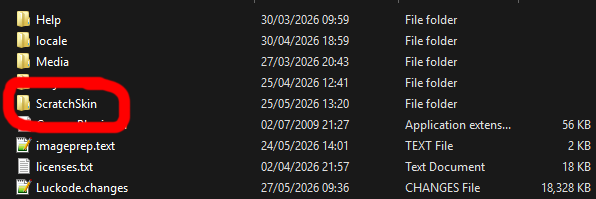
To change images, download the ScratchSkin archive from here and unzip it in your mod's directory, like this.
To modify the images, I'd recommend using paint.net (software, not website). It's what I use to design my mod's UI. Also note that if you use paint.net save what you change in the PNG file format since the way paint.net exports gifs is incompatible with the version of Squeak Scratch 1.4 uses
To apply the skin run the following code in a Workspace window:
and then restart your mod (making sure to save image as end-user/save changes/whatever)
The default sprite is actually called from a class method in ScratchFrameMorph itself. It should be defined in Scratch-UI-Panes > ScratchFrameMorph (class) > defaultSprite.
If you have any other questions please don't hesitate to reach out to me on my profile
I'm the developer of Scratch 1.4 modification Luckode (also known as LuckodeX nowadays but that's what I call the internal codebase, the actual mod is still called Luckode)
To change images, download the ScratchSkin archive from here and unzip it in your mod's directory, like this.
To modify the images, I'd recommend using paint.net (software, not website). It's what I use to design my mod's UI. Also note that if you use paint.net save what you change in the PNG file format since the way paint.net exports gifs is incompatible with the version of Squeak Scratch 1.4 uses
To apply the skin run the following code in a Workspace window:
ScratchFrameMorph readSkinFrom: (FileDirectory default directoryNamed: 'ScratchSkin')
The default sprite is actually called from a class method in ScratchFrameMorph itself. It should be defined in Scratch-UI-Panes > ScratchFrameMorph (class) > defaultSprite.
If you have any other questions please don't hesitate to reach out to me on my profile
- Discussion Forums
- » Advanced Topics
-
» How to modify and customize Scratch 1.4?