Discuss Scratch

- Discussion Forums
- » Suggestions
- » make the zoom sensitivity in the code editor lower
![[RSS Feed]](//cdn.scratch.mit.edu/scratchr2/static/__686c43b630f1b1d1d9fd96912eceff34__//djangobb_forum/img/feed-icon-small.png "[RSS Feed]")
![[RSS Feed]](http://cdn.scratch.mit.edu/scratchr2/static/__686c43b630f1b1d1d9fd96912eceff34__//djangobb_forum/img/feed-icon-small.png "[RSS Feed]")
- subjectnamehere
-
 Scratcher

1000+ posts
make the zoom sensitivity in the code editor lower
it zooms to far imo, i can only get it either too far zoomed out or in.
edit: it's not that bad using the on-screen buttons, this only applies to holding control and scrolling.
edit 2: here's what i mean
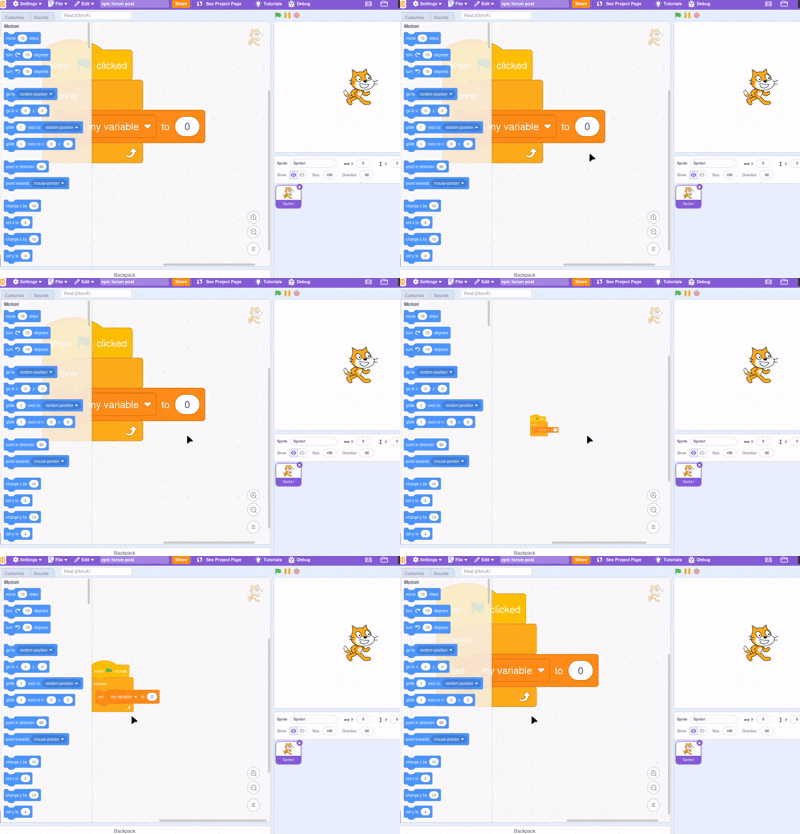
^^^ this bad
edit: it's not that bad using the on-screen buttons, this only applies to holding control and scrolling.
edit 2: here's what i mean
^^^ this bad
Last edited by subjectnamehere (May 27, 2026 04:08:16)
- I_wantasheep
-
 Scratcher

1000+ posts
make the zoom sensitivity in the code editor lower
what zoom? the option to shrink the project area thing?
- subjectnamehere
-
Scratcher
1000+ posts
make the zoom sensitivity in the code editor lower
what zoom? the option to shrink the project area thing?no, zooming in/out on blocks.
- I_wantasheep
-
Scratcher
1000+ posts
make the zoom sensitivity in the code editor lower
tbh i rarely use itwhat zoom? the option to shrink the project area thing?no, zooming in/out on blocks.
- subjectnamehere
-
Scratcher
1000+ posts
make the zoom sensitivity in the code editor lower
i use it a lot.tbh i rarely use itwhat zoom? the option to shrink the project area thing?no, zooming in/out on blocks.
Last edited by subjectnamehere (May 21, 2026 05:42:27)
- I_wantasheep
-
Scratcher
1000+ posts
make the zoom sensitivity in the code editor lower
hold up wdym blockswhat zoom? the option to shrink the project area thing?no, zooming in/out on blocks.
- subjectnamehere
-
Scratcher
1000+ posts
make the zoom sensitivity in the code editor lower
hold up wdym blockswhat zoom? the option to shrink the project area thing?no, zooming in/out on blocks.
it zooms in and out too much, none of those three are good for me.
also i just realized it could just be a browser thing sooo My browser / operating system: Linux, Firefox 150.0, No Flash versions detected
Last edited by subjectnamehere (May 27, 2026 04:07:40)
- Duke_Scratch56
-
 Scratcher

100+ posts
make the zoom sensitivity in the code editor lower
it zooms to far imo, i can only get it either too far zoomed out or in.No support, I want it to stay.
edit: it's not that bad using the on-screen buttons, this only applies to holding control and scrolling.
- I_wantasheep
-
Scratcher
1000+ posts
make the zoom sensitivity in the code editor lower
ohhhh i read it as a block that zooms the screen in and out sorryhold up wdym blockswhat zoom? the option to shrink the project area thing?no, zooming in/out on blocks.
it zooms in and out too much, none of those three are good for me.
also i just realized it could just be a browser thing sooo My browser / operating system: Linux, Firefox 150.0, No Flash versions detected
don't have that problem, i only use the buttons My browser / operating system: IPad iOS 26.4.2, ChromeiOS 148.0.7778.166, No Flash version detected
- subjectnamehere
-
Scratcher
1000+ posts
make the zoom sensitivity in the code editor lower
ohhhh i read it as a block that zooms the screen in and out sorrywell yeah, keyboard controls won't be a problem on an ipad.
don't have that problem, i only use the buttons My browser / operating system: IPad iOS 26.4.2, ChromeiOS 148.0.7778.166, No Flash version detected
No support, I want it to stay.wdym
- dinoparty0
-
 Scratcher

1000+ posts
make the zoom sensitivity in the code editor lower
Support, smaller increments would be helpful to focus a certain script
- medians
-
 Scratcher

1000+ posts
make the zoom sensitivity in the code editor lower
I experienced this a lot on mobile (earlier)hold up wdym blockswhat zoom? the option to shrink the project area thing?no, zooming in/out on blocks.
it zooms in and out too much, none of those three are good for me.
also i just realized it could just be a browser thing sooo My browser / operating system: Linux, Firefox 150.0, No Flash versions detected
My browser / operating system: iPadOS 14.7.1, Safari 14.1.2, No Flash version detected (I still have that iPad on that same OS, just never really use it for Scratch)
I get that the made the blocks bigger for mobile/tablet, but this actually was annoying and frustrating on mobile because they were actually too large because of this. When I tried zooming to make the blocks smaller, however, it zoomed out so far that I couldn't no longer read the blocks. Allowing smaller increments (like said above) or changing block size (similar to what 2.0 had) could help with this
Last edited by medians (May 27, 2026 01:09:07)
- _nix
-
 Scratcher

1000+ posts
make the zoom sensitivity in the code editor lower
I think the effect is coded with trackpads in mind, where scrolling (with two fingers) while holding control causes the blocks to scale smoothly.
That doesn't mean much for your suggestion, but probably has to do with how someone would code a fix. (i.e. keep supporting the below but be a lot more reasonable for more “step”-based scrolling inputs)
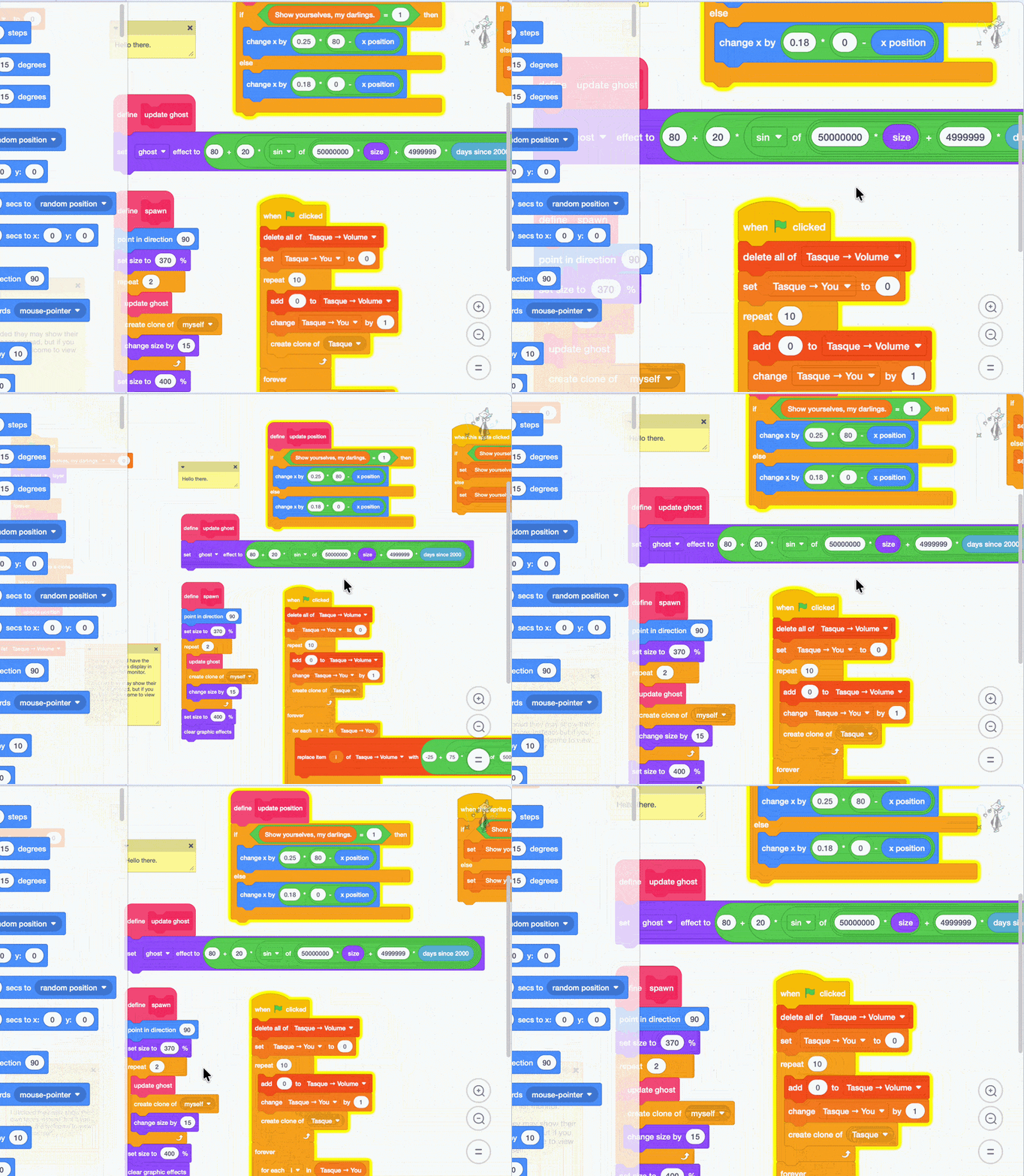
That doesn't mean much for your suggestion, but probably has to do with how someone would code a fix. (i.e. keep supporting the below but be a lot more reasonable for more “step”-based scrolling inputs)
- subjectnamehere
-
Scratcher
1000+ posts
make the zoom sensitivity in the code editor lower
bump (st please)
- subjectnamehere
-
Scratcher
1000+ posts
make the zoom sensitivity in the code editor lower
useless bump
- Discussion Forums
- » Suggestions
-
» make the zoom sensitivity in the code editor lower