Discuss Scratch

- Discussion Forums
- » Suggestions
- » option to hide "Project could not save"
![[RSS Feed]](//cdn.scratch.mit.edu/scratchr2/static/__d235e7f35585482ca999583499337ccd__//djangobb_forum/img/feed-icon-small.png "[RSS Feed]")
![[RSS Feed]](http://cdn.scratch.mit.edu/scratchr2/static/__d235e7f35585482ca999583499337ccd__//djangobb_forum/img/feed-icon-small.png "[RSS Feed]")
- Whatdidyousay245
-
 Scratcher

100+ posts
option to hide "Project could not save"
if youre working w/out internet for a long period of time, you get stuck with this message until online.
It prevents you from starting/stopping the project which is annoying
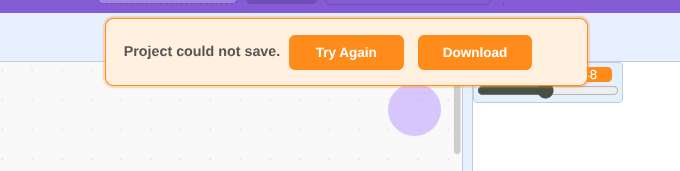
It prevents you from starting/stopping the project which is annoying
Last edited by Whatdidyousay245 (April 8, 2026 16:50:48)

- ScodexPerson
-
 Scratcher

1000+ posts
option to hide "Project could not save"
Support for obvious reasons.
For now, i use inspect element to remove it.
For now, i use inspect element to remove it.
- medians
-
 Scratcher

1000+ posts
option to hide "Project could not save"
Note that if you have no internet, then you can also use the 1.4 offline editor, the 2.0 offline editor, or the 3.0 offline editor. You can use the File button to save your project too and it won't have the Project could not save thing
3.0:
https://scratch.mit.edu/download (works on Windows 7 and up and you can get it on Vista [haven't tested on XP], and I think macOS 10.11 or 10.12 and up)
https://www.scratchfoundation.org/tools (alternate page)
2.0
https://scratch.mit.edu/download/scratch2 (if it doesn't show the downloads, go to https://download.scratch.mit.edu and then return to the page)
1.4
https://scratch.mit.edu/scratch_1.4/ (doesn't work on macOS Catalina and up due to lack of 32-bit support, but it works on Windows 2000 and up, including Windows 8.1 and up)
3.0:
https://scratch.mit.edu/download (works on Windows 7 and up and you can get it on Vista [haven't tested on XP], and I think macOS 10.11 or 10.12 and up)
https://www.scratchfoundation.org/tools (alternate page)
2.0
https://scratch.mit.edu/download/scratch2 (if it doesn't show the downloads, go to https://download.scratch.mit.edu and then return to the page)
1.4
https://scratch.mit.edu/scratch_1.4/ (doesn't work on macOS Catalina and up due to lack of 32-bit support, but it works on Windows 2000 and up, including Windows 8.1 and up)
Last edited by medians (April 8, 2026 19:19:47)
- Whatdidyousay245
-
Scratcher
100+ posts
option to hide "Project could not save"
Note that if you have no internet, then you can also use the 1.4 offline editor, the 2.0 offline editor, or the 3.0 offline editor. You can use the File button to save your project too and it won't have the Project could not save thing
3.0:
https://scratch.mit.edu/download (works on Windows 7 and up and you can get it on Vista [haven't tested on XP], and I think macOS 10.11 or 10.12 and up)
https://www.scratchfoundation.org/tools (alternate page)
2.0
https://scratch.mit.edu/download/scratch2 (if it doesn't show the downloads, go to https://download.scratch.mit.edu and then return to the page)
1.4
https://scratch.mit.edu/scratch_1.4/ (doesn't work on macOS Catalina and up due to lack of 32-bit support, but it works on Windows 2000 and up, including Windows 8.1 and up)
This is very good but at the same time if you are using a school Chromebook (Probably the most used device for scratch), then these probably won't work since Google play and Linux dev are usually disabled.
Last edited by Whatdidyousay245 (April 9, 2026 12:57:34)
- Discussion Forums
- » Suggestions
-
» option to hide "Project could not save"