Discuss Scratch

- Discussion Forums
- » Help with Scripts
- » CODE FOR AFTER-EXPLOSION DEBRIS in a 2D ground sprites that simulate 3D...
![[RSS Feed]](//cdn.scratch.mit.edu/scratchr2/static/__d235e7f35585482ca999583499337ccd__//djangobb_forum/img/feed-icon-small.png "[RSS Feed]")
![[RSS Feed]](http://cdn.scratch.mit.edu/scratchr2/static/__d235e7f35585482ca999583499337ccd__//djangobb_forum/img/feed-icon-small.png "[RSS Feed]")
- EnigmaInc
-
 Scratcher

3 posts
CODE FOR AFTER-EXPLOSION DEBRIS in a 2D ground sprites that simulate 3D...
What would the code look like to make it draw on a 3D-like ground 2D sprite instead of a flat (screen) ground sprite after a explosion effect?
The base project is link for the base Scratch proyect. (although it doesn't have an image as if it were 3D, it´s a flat grey screen prite) imagine that the image would be like the one attached, staggered, from Enigma Inc.
An image that has steps and must be used to draw it coordinates in x and y.
Notice the debris on the black edge of the image, but it is drawn on the flat image of the screen instead of if it were drawn on the 3D-like stepped image.

The base project is link for the base Scratch proyect. (although it doesn't have an image as if it were 3D, it´s a flat grey screen prite) imagine that the image would be like the one attached, staggered, from Enigma Inc.
An image that has steps and must be used to draw it coordinates in x and y.
Notice the debris on the black edge of the image, but it is drawn on the flat image of the screen instead of if it were drawn on the 3D-like stepped image.
Last edited by EnigmaInc (Sept. 17, 2025 07:11:20)
- EnigmaInc
-
Scratcher
3 posts
CODE FOR AFTER-EXPLOSION DEBRIS in a 2D ground sprites that simulate 3D...
I'm trying to make a dynamic shadow of the player (Dark Reig) that progressively reflects on the stage (ground)….
So far I've only managed to make a static shadow but it's only of 1 sprite, meaning it's not a real dynamic shadow when it moves…
The yellow light can be dragged with the mouse pointer, but it should be fixed (a candle/fire/lantern, etc).
Can anyone experiment with making the shadow truly “dynamic” (with maybe a code and/or the motion sprites) when it moves?
I based it on the Simple Dynamic Lighting project
by FarFledGamer
https://scratch.mit.edu/projects/1158070053/ …
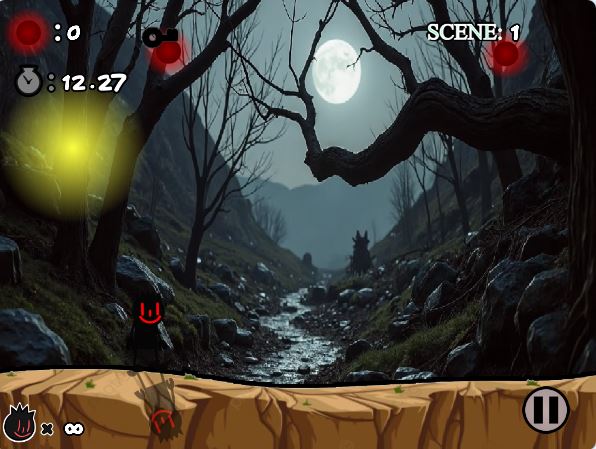
So far I've only managed to make a static shadow but it's only of 1 sprite, meaning it's not a real dynamic shadow when it moves…
The yellow light can be dragged with the mouse pointer, but it should be fixed (a candle/fire/lantern, etc).
Can anyone experiment with making the shadow truly “dynamic” (with maybe a code and/or the motion sprites) when it moves?
I based it on the Simple Dynamic Lighting project
by FarFledGamer
https://scratch.mit.edu/projects/1158070053/ …
Last edited by EnigmaInc (Sept. 26, 2025 17:32:32)
- Discussion Forums
- » Help with Scripts
-
» CODE FOR AFTER-EXPLOSION DEBRIS in a 2D ground sprites that simulate 3D...