Discuss Scratch

- Discussion Forums
- » Questions about Scratch
- » How Do You Create Blocks?
![[RSS Feed]](//cdn.scratch.mit.edu/scratchr2/static/__5b3e40ec58a840b41702360e9891321b__//djangobb_forum/img/feed-icon-small.png "[RSS Feed]")
![[RSS Feed]](http://cdn.scratch.mit.edu/scratchr2/static/__5b3e40ec58a840b41702360e9891321b__//djangobb_forum/img/feed-icon-small.png "[RSS Feed]")
- Kosi_101O
-
 Scratcher

57 posts
How Do You Create Blocks?
I'm wondering how to create working blocks in Scratch. I've tried it a few times, and they just seemed to take up space and didn't do anything. Then I see working custom blocks in other people's code and I'm wondering how to do that myself. 

- Bitebite12
-
 Scratcher

1000+ posts
How Do You Create Blocks?
I'm wondering how to create working blocks in Scratch. I've tried it a few times, and they just seemed to take up space and didn't do anything. Then I see working custom blocks in other people's code and I'm wondering how to do that myself.Do you mean these:
block :: customor hacked JSON blocks?
- Kosi_101O
-
Scratcher
57 posts
How Do You Create Blocks?
.I'm wondering how to create working blocks in Scratch. I've tried it a few times, and they just seemed to take up space and didn't do anything. Then I see working custom blocks in other people's code and I'm wondering how to do that myself.Do you mean these:block :: customor hacked JSON blocks?
The My Blocks block.
Last edited by Kosi_101O (Aug. 8, 2025 00:34:32)
- MarioBros956
-
 Scratcher

100+ posts
How Do You Create Blocks?
Well in your editor menu go to my blocks and click the small button called create a block
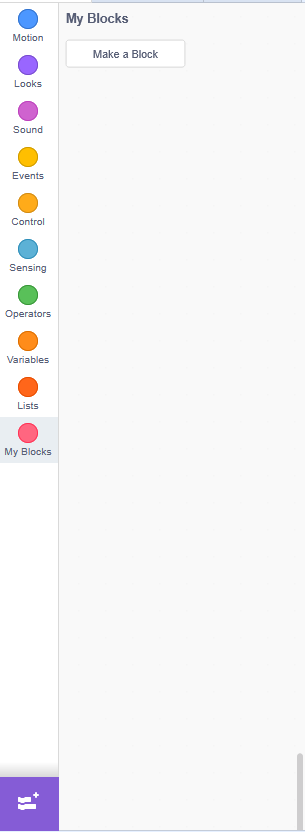
So you have to put code inside those blocks and then put the block out shown in the my blocks menu
So you have to put code inside those blocks and then put the block out shown in the my blocks menu
Last edited by MarioBros956 (Aug. 8, 2025 00:42:12)
- Kosi_101O
-
Scratcher
57 posts
How Do You Create Blocks?
Yeah, but how do you make sure it actually affects the sprite instead of wasting space?
- Scratch_Cat_Coder8
-
 Scratcher

1000+ posts
How Do You Create Blocks?
Yeah, but how do you make sure it actually affects the sprite instead of wasting space?It can be used as a way to repeat a line of code in a separate line without making the base line of code really long and can be used as a way to send messages to other lines of codes in a sprite without having to have the message constantly restart (ex: you have a repeat until script with a message block in it. Without any additional blocks, the message will restart before it can finish where on the other hand, a my block will finish the message and then restart it without skipping anything)
- KingDrover
-
 Scratcher

100+ posts
How Do You Create Blocks?
For more information, see this article on the Scratch Wiki.
- -Silentstar
-
 Scratcher

78 posts
How Do You Create Blocks?
Yeah, but how do you make sure it actually affects the sprite instead of wasting space?
if you put a block like this one
define
you can put the blocks that would make the custom block do what you want it to
- BFDI1a-TakethePlunge
-
 Scratcher

100+ posts
How Do You Create Blocks?
I don't really get it, but thanks anywayokay, imagine this code
when green flag clickedthis will make our sprite move in a square, with a 1 in 10 chance of having our sprite move in a square twice
if <(pick random (1) to (10)) = [1]> then
repeat (8)
move (10) steps
wait (1) seconds
turn cw (90) degrees
end
else
repeat (4)
move (10) steps
wait (1) seconds
turn cw (90) degrees
end
end
but… its a little repetitive, isnt it? if you wanted to make it play a sound as well when it turns, youd have to add it both times. thats simple enough in this example, but when things get more complicated, it is a very bad idea to repeat yourself like this. missing one instance of some code could break everything, and it will be very annoying
so you use custom blocks instead!
define move in a squarewhenever you use a custom block, it just acts like youre using the code under its corresponding ‘define’ block. this does the exact same thing as the first script
repeat (4)
move (10) steps
wait (1) seconds
turn cw (90) degrees
end
when green flag clicked
if <(pick random (1) to (10)) = [1]> then
repeat (2)
move in a square :: custom
end
else
move in a square :: custom
end
but its a bit easier to read to the greenflag script this way, isnt it? says exactly what it does. you dont have to think about what happens if you move some steps and then turn, it does what it says, it moves in a square. (again, this is simple enough to be unnecessary for this example, but when things get more complicated this is a very good thing)
and its the same every time!
you want it to play a sound when it turns? easy! you only have to add it once, and it affects it every time no matter how much you do it
define move in a square
repeat (4)
   move (10) steps
   wait (1) seconds
   turn cw (90) degrees
   play sound [... v]
end
but what if we want the 1 in 10 chance to wait 2 seconds between turns, instead of 1? do we have to repeat ourselves like the first script?
no!! because custom blocks can have inputs.
define move in a square, waiting (wait) seconds between turnstheyre like variables. wherever you refer to a custom block input, it gets replaced with whatever you put in the block. this does the same thing as the first one again, but if you want them to wait a different amount of time?
repeat (4)
move (10) steps
wait (wait :: custom-arg) seconds
turn cw (90) degrees
end
when green flag clicked
if <(pick random (1) to (10)) = [1]> then
repeat (2)
move in a square, waiting [1] seconds between turns :: custom
end
else
move in a square, waiting [1] seconds between turns :: custom
end
when green flag clickedsimple!
if <(pick random (1) to (10)) = [1]> then
repeat (2)
move in a square, waiting [2] seconds between turns :: custom
end
else
move in a square, waiting [1] seconds between turns :: custom
end
also, i dont know how to fit this into that guide, but ‘run without screen refresh’ means things happen immediately. this uses wait blocks, obviously, but even if you remove those from this example script youll notice that it still takes a little bit between turns! running without screen refresh stops it from doing that, so custom blocks also get used if you just need things to happen quickly. in this example it looks like nothing is happening, since it ends how it started, but if you change how much it turns its more noticeable
hope this was helpful, i kinda yapped
Last edited by BFDI1a-TakethePlunge (Aug. 8, 2025 01:54:57)
- Kosi_101O
-
Scratcher
57 posts
How Do You Create Blocks?
For more information, see this article on the Scratch Wiki.Ok, I'll check it out.
Last edited by Kosi_101O (Aug. 8, 2025 13:37:28)
- Discussion Forums
- » Questions about Scratch
-
» How Do You Create Blocks?