Discuss Scratch

- Discussion Forums
- » Suggestions
- » add position inputs in the paint editor
![[RSS Feed]](//cdn.scratch.mit.edu/scratchr2/static/__5b3e40ec58a840b41702360e9891321b__//djangobb_forum/img/feed-icon-small.png "[RSS Feed]")
![[RSS Feed]](http://cdn.scratch.mit.edu/scratchr2/static/__5b3e40ec58a840b41702360e9891321b__//djangobb_forum/img/feed-icon-small.png "[RSS Feed]")

- NotK3ndricAltAgain
-
 Scratcher

500+ posts
add position inputs in the paint editor
workaround:
just position the costume to the center, then change the x and y position of the sprite
just position the costume to the center, then change the x and y position of the sprite
- jmb1293634
-
 Scratcher
1000+ posts
add position inputs in the paint editor
workaround:problem with that: what about the width and also every time you set the position you have to remember the change also wouldn't work if you had more than 1 objects.
just position the costume to the center, then change the x and y position of the sprite
- floofycat4436
-
 Scratcher

500+ posts
add position inputs in the paint editor
This could be confusing because people might think that x and y would be out of the editor, not the x and y in the editor. While this could make things a little easier, this could also result in the bug where if things are off-centered, they can get cut-off.
- jmb1293634
-
Scratcher
1000+ posts
add position inputs in the paint editor
This could be confusing because people might think that x and y would be out of the editor, not the x and y in the editor. While this could make things a little easier, this could also result in the bug where if things are off-centered, they can get cut-off.I have not come across that bug and why would this make any difference? also for most intents and purposes if you move something in the editor it will move on the stage and also given that the menu is in the editor it should be reasonably clear that it will affect the editor
- AvidOsirianGuy
-
 Scratcher

100+ posts
add position inputs in the paint editor
semi-support, would be great but I don't think it should be a right-click menu.
Last edited by AvidOsirianGuy (Feb. 27, 2025 20:12:27)
- jmb1293634
-
Scratcher
1000+ posts
add position inputs in the paint editor
semi-support, would be great but I don't think it should be a right-click menu.what should it be then
- AvidOsirianGuy
-
Scratcher
100+ posts
add position inputs in the paint editor
(#8)idk, maybe a button in the editor with a popup menu where you input the X, Y and direction you want it to be insemi-support, would be great but I don't think it should be a right-click menu.what should it be then
- jmb1293634
-
Scratcher
1000+ posts
add position inputs in the paint editor
but then how would it know which object to move/reshape?(#8)idk, maybe a button in the editor with a popup menu where you input the X, Y and direction you want it to be insemi-support, would be great but I don't think it should be a right-click menu.what should it be then
- BigNate469
-
 Scratcher

1000+ posts
add position inputs in the paint editor
workaround:Your workaround only works in bitmap mode (the arrow keys move objects an amount relative to the zoom, and therefore in vector you only can get 4px precision accurately).
just position the costume to the center, then change the x and y position of the sprite
- Burn_Quartz
-
 Scratcher

42 posts
add position inputs in the paint editor
this seems really useful for centering and such. i support
- jmdzti_0-0
-
 Scratcher

1000+ posts
add position inputs in the paint editor
I think adding a pop-up is too much. Maybe add it to the top bar with the outline and such.
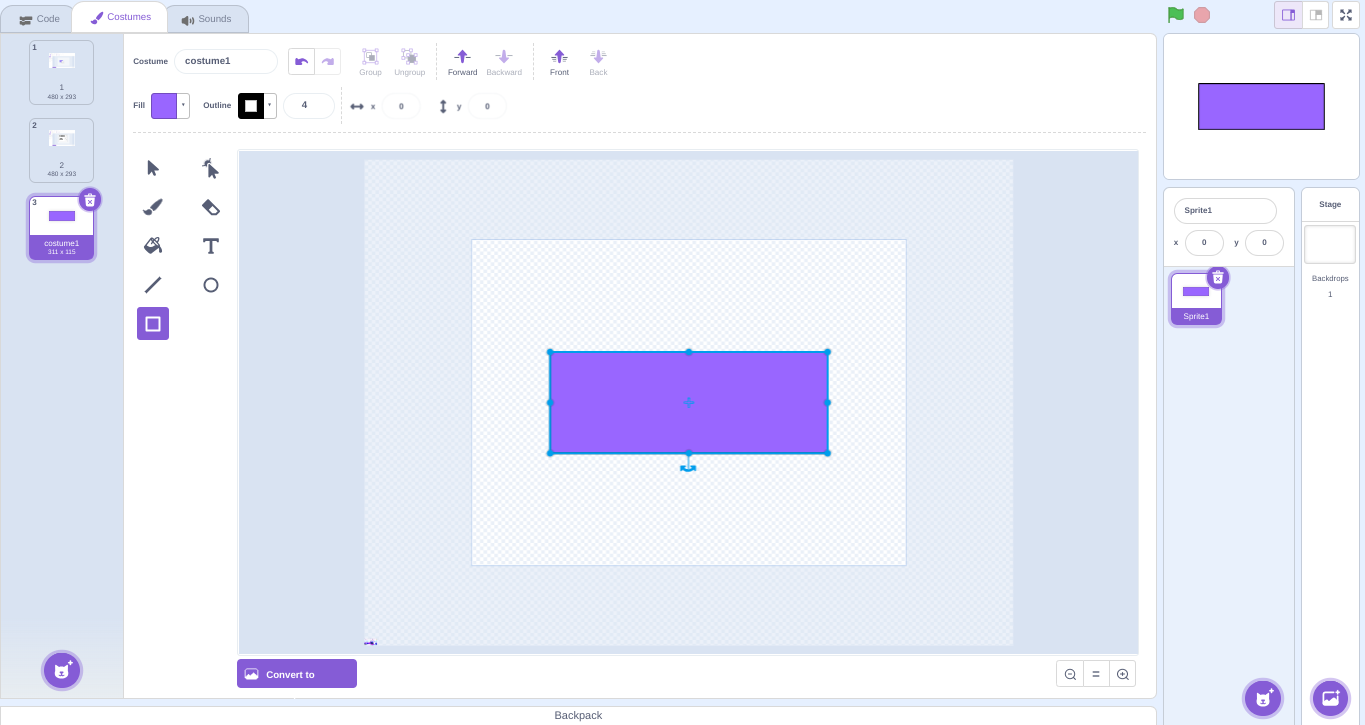
this seems really useful for centering and such. i supportyou can still center with the snapping feature
Last edited by jmdzti_0-0 (Nov. 30, 2025 14:15:43)
- jmb1293634
-
Scratcher
1000+ posts
add position inputs in the paint editor
I think adding a pop-up is too much. Maybe add it to the top bar with the outline and such.why to much? also that could work but you only have width and height not position and we need the flip tools!
- Discussion Forums
- » Suggestions
-
» add position inputs in the paint editor