Discuss Scratch

- Discussion Forums
- » Advanced Topics
- » Pixel height of blocks
![[RSS Feed]](//cdn.scratch.mit.edu/scratchr2/static/__5b3e40ec58a840b41702360e9891321b__//djangobb_forum/img/feed-icon-small.png "[RSS Feed]")
![[RSS Feed]](http://cdn.scratch.mit.edu/scratchr2/static/__5b3e40ec58a840b41702360e9891321b__//djangobb_forum/img/feed-icon-small.png "[RSS Feed]")
- B1j2754
-
 Scratcher

78 posts
Pixel height of blocks
I am currently working on a text version of scratch (https://scratch.mit.edu/discuss/topic/769174/ ) but recently ran in to some issues when trying to place comments. Has anyone figured out the pixel heights of each block type? Heres the list for reference:
Hat
Stack
Extension_stack
C 1/2
C 2/2
Cap
I guess the list needs some explaining too. Currently I am implementing comments, and attaching them to blocks. The reason Extension_stack is listed there is because for some reason the extension blocks are slightly bigger than normal ones (pen extension stack blocks at least).
C 1/2 and 2/2 refer to the top and bottom pieces of a c-block.
I would also like to know the effect of reporters on the size of a block. (Each layer += how many pixels difference)
Hat
Stack
Extension_stack
C 1/2
C 2/2
Cap
I guess the list needs some explaining too. Currently I am implementing comments, and attaching them to blocks. The reason Extension_stack is listed there is because for some reason the extension blocks are slightly bigger than normal ones (pen extension stack blocks at least).
C 1/2 and 2/2 refer to the top and bottom pieces of a c-block.
I would also like to know the effect of reporters on the size of a block. (Each layer += how many pixels difference)
Last edited by B1j2754 (Dec. 9, 2024 23:09:31)
- B1j2754
-
Scratcher
78 posts
Pixel height of blocks
Through some json-parsing I deduced the following:
- Hat: 48 pixels tall, tho im not sure abt the top bit, bc my measuring method of creating comments in the middle of the block measures in the middle of the hat block minus the top bit
- Stack: 48 pixels tall
- Extension_stack: 56 pixels tall
- Reporters: The first layer adds 0, and each layer depth after adds 8 pixels. But if they are being added to Extension_stack blocks, the first 2 layers add 0 because the extension block is larger, and therefore can handle more reporter layers before changing shape
- Cap: 48 pixels tall
- C top: 48 pixels tall
- C bottom: 32 pixels tall
- If-else middle: 32 pixels tall
Also comments should be positions 15 pixels up from the block's middle to align correctly (block_y-15)
Also c top blocks need their comment adjust 5 pixels up from the block's middle to align correctly (block_y-5)
Don't ask why, I just got the values while testing and it works
Hope this helps someone in the future!
Here's some ss from my testing:
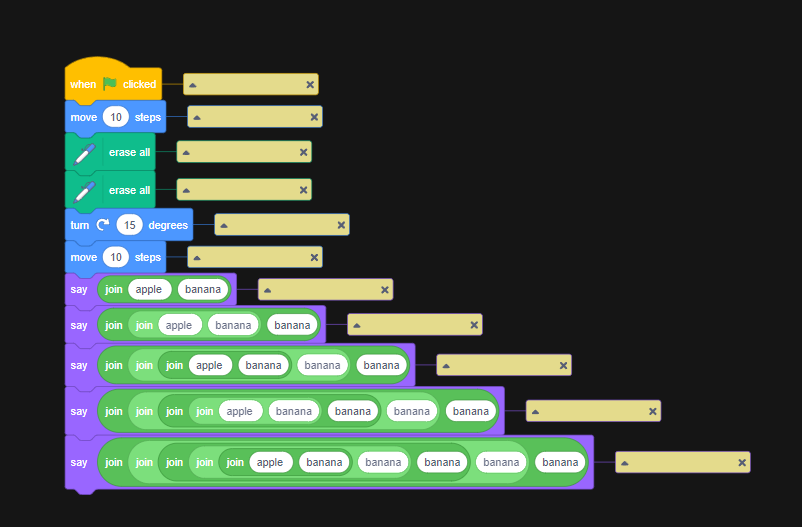
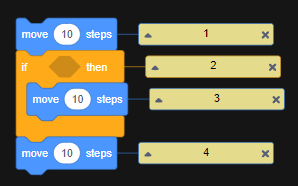
Here's a picture of it working:
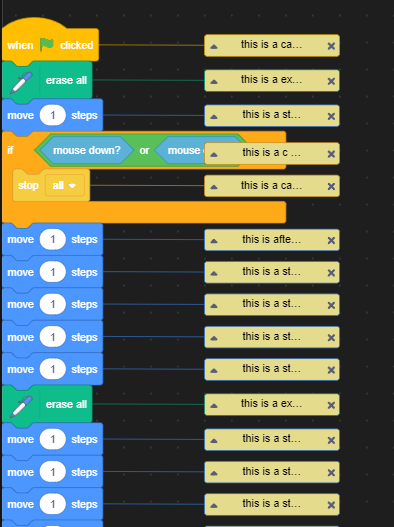
I created a comment, which auto-aligns to the center of the block. Then I downloaded the sb3 file and unpacked the json file, looking at the y-values of the comments
Sticky?
- Hat: 48 pixels tall, tho im not sure abt the top bit, bc my measuring method of creating comments in the middle of the block measures in the middle of the hat block minus the top bit
- Stack: 48 pixels tall
- Extension_stack: 56 pixels tall
- Reporters: The first layer adds 0, and each layer depth after adds 8 pixels. But if they are being added to Extension_stack blocks, the first 2 layers add 0 because the extension block is larger, and therefore can handle more reporter layers before changing shape
- Cap: 48 pixels tall
- C top: 48 pixels tall
- C bottom: 32 pixels tall
- If-else middle: 32 pixels tall
Also comments should be positions 15 pixels up from the block's middle to align correctly (block_y-15)
Also c top blocks need their comment adjust 5 pixels up from the block's middle to align correctly (block_y-5)
Don't ask why, I just got the values while testing and it works

Hope this helps someone in the future!
Here's some ss from my testing:
Here's a picture of it working:
I created a comment, which auto-aligns to the center of the block. Then I downloaded the sb3 file and unpacked the json file, looking at the y-values of the comments
Sticky?
Last edited by B1j2754 (Dec. 15, 2024 16:55:51)
- B1j2754
-
Scratcher
78 posts
Pixel height of blocks
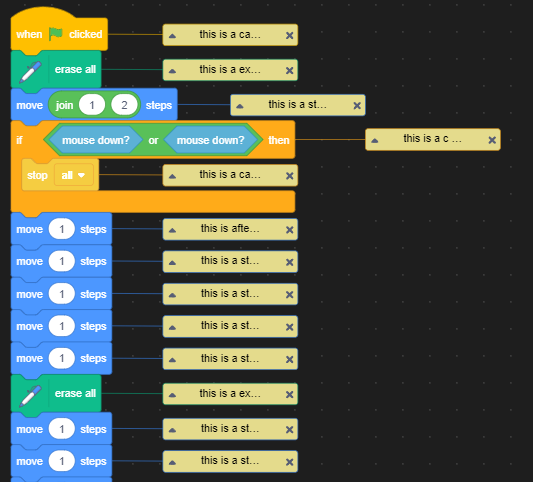
I also just implemented a rudimentary approach for adjust the comment on the x-axis by doing the following:
stack, cap, hat, and c top all add 200 (this is a set value bc it would be a pain to actually find for each block
reporters increase it by 100 (this is just roughly how long they are)
I also add 25 pixels of offset and it looks pretty nice:
stack, cap, hat, and c top all add 200 (this is a set value bc it would be a pain to actually find for each block
reporters increase it by 100 (this is just roughly how long they are)
I also add 25 pixels of offset and it looks pretty nice:
- B1j2754
-
Scratcher
78 posts
Pixel height of blocks
As for the x-value of blocks, I just did some testing and found that if the length of a string (or number) sequence exceeds 15 (14? i can't test closer) pixels (HelveticaNeue font size 12 for reference), then increase the width by: width (in pixels) * 1.4 - 15 (or 14)
- Discussion Forums
- » Advanced Topics
-
» Pixel height of blocks