Discuss Scratch

- Discussion Forums
- » Suggestions
- » "Classic" block color pallet
![[RSS Feed]](//cdn.scratch.mit.edu/scratchr2/static/__ff7229f036c458728e45c39b0751aa44__//djangobb_forum/img/feed-icon-small.png "[RSS Feed]")
![[RSS Feed]](http://cdn.scratch.mit.edu/scratchr2/static/__ff7229f036c458728e45c39b0751aa44__//djangobb_forum/img/feed-icon-small.png "[RSS Feed]")
- M1mikyu
-
 Scratcher

1000+ posts
"Classic" block color pallet
With the High Contrast Blocks update, it was implied that more block color pallets would be added. I came up with an idea for one: a “classic” pallet!
This would switch the block colors to how they looked in 2.0.
Some block colors, most notably to me are the Custom Blocks, are very different in 3.0 than they were in 2.0. When following tutorials intended for Scratch 2.0, it can be confusing seeing the blocks be very different colors, making it harder to identify what blocks are what since the colors are so different.
This would also be nice for people who are nostalgic for the 2.0 era block colors! But the main reason it'd be useful is so that the block colors match up with 2.0torials rather than being incredibly different.
In 2.0, custom blocks were purple, but in 3.0 they're a pinkish red. Due to the drastic difference in color between 2.0 and 3.0 custom blocks, it can be confusing telling what blocks are what. Other block colors are just different shades of basically the same color, but custom blocks are a completely different color!
Will update OP with some mockups later
This would switch the block colors to how they looked in 2.0.
Some block colors, most notably to me are the Custom Blocks, are very different in 3.0 than they were in 2.0. When following tutorials intended for Scratch 2.0, it can be confusing seeing the blocks be very different colors, making it harder to identify what blocks are what since the colors are so different.
This would also be nice for people who are nostalgic for the 2.0 era block colors! But the main reason it'd be useful is so that the block colors match up with 2.0torials rather than being incredibly different.
In 2.0, custom blocks were purple, but in 3.0 they're a pinkish red. Due to the drastic difference in color between 2.0 and 3.0 custom blocks, it can be confusing telling what blocks are what. Other block colors are just different shades of basically the same color, but custom blocks are a completely different color!
Will update OP with some mockups later
Last edited by M1mikyu (April 14, 2024 18:45:35)
- ilovestories
-
 Scratcher

1000+ posts
"Classic" block color pallet
2.3 Set the editor to look like older versions of ScratchI know that this suggestion is only for the blocks, but in my opinion, it's the same deal.
Some users prefer the look and feel of the older Scratch editors, and have suggested an option to make the editor look like an older version of Scratch (such as Scratch 1.4 or 2.0), but still run off of HTML5 like Scratch 3.0 does. However, this would be more complicated for educational and documentation purposes. It could be confusing if someone is trying to learn Scratch from someone who is using a completely different layout of the editor than them. In addition, the Scratch Team changed the design for a reason: to make it easier, more intuitive, and friendlier for newcomers to use.
Then again, my opinion could easily be wrong.
Last edited by ilovestories (April 14, 2024 18:52:27)
- MythosLore
-
 Scratcher

1000+ posts
"Classic" block color pallet
This would only be for the colors of the blocks. Having 2.0-colored blocks wouldn't be any more confusing than high contrast blocks.2.3 Set the editor to look like older versions of ScratchI know that this suggestion is only for the blocks, but in my opinion, it's the same deal.
Some users prefer the look and feel of the older Scratch editors, and have suggested an option to make the editor look like an older version of Scratch (such as Scratch 1.4 or 2.0), but still run off of HTML5 like Scratch 3.0 does. However, this would be more complicated for educational and documentation purposes. It could be confusing if someone is trying to learn Scratch from someone who is using a completely different layout of the editor than them. In addition, the Scratch Team changed the design for a reason: to make it easier, more intuitive, and friendlier for newcomers to use.
Then again, my opinion could easily be wrong.
- Za-Chary
-
 Scratcher
1000+ posts
"Classic" block color pallet
I know that this suggestion is only for the blocks, but in my opinion, it's the same deal.If the OP's suggestion is only asking to change the colors of the blocks, and not the overall shape/structure along with it, then I don't think this rejection applies. After all, we do currently have at least one alternate color palette for the Scratch blocks.
Then again, my opinion could easily be wrong.
- M1mikyu
-
Scratcher
1000+ posts
"Classic" block color pallet
In the High Contrast blocks announcement it was implied that more color pallets might be coming in the futureI know that this suggestion is only for the blocks, but in my opinion, it's the same deal.If the OP's suggestion is only asking to change the colors of the blocks, and not the overall shape/structure along with it, then I don't think this rejection applies. After all, we do currently have at least one alternate color palette for the Scratch blocks.
Then again, my opinion could easily be wrong.
You can always change the color mode back or decide not to try High Contrast blocks at all! You may even see some new color mode options in the future.Source: https://scratch.mit.edu/discuss/topic/689659/
So I don't think adding a 2.0 block color pallet is out of the question
Last edited by M1mikyu (April 14, 2024 20:11:08)
- M1mikyu
-
Scratcher
1000+ posts
"Classic" block color pallet
However, as I stated in the OP, due to the different color pallet it makes 2.0 based tutorials more confusing as many blocks have very different colors than they did originally. This would reduce confusion for people following 2.0 era tutorials2.3 Set the editor to look like older versions of ScratchI know that this suggestion is only for the blocks, but in my opinion, it's the same deal.
Some users prefer the look and feel of the older Scratch editors, and have suggested an option to make the editor look like an older version of Scratch (such as Scratch 1.4 or 2.0), but still run off of HTML5 like Scratch 3.0 does. However, this would be more complicated for educational and documentation purposes. It could be confusing if someone is trying to learn Scratch from someone who is using a completely different layout of the editor than them. In addition, the Scratch Team changed the design for a reason: to make it easier, more intuitive, and friendlier for newcomers to use.
Then again, my opinion could easily be wrong.
- medians
-
 Scratcher

1000+ posts
"Classic" block color pallet
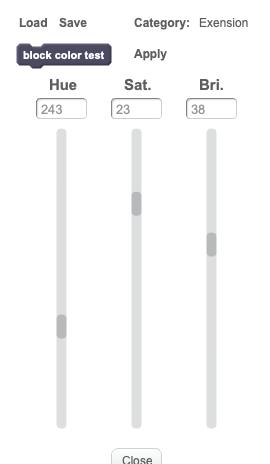
I feel like you should just be able to use a color picker, kind of like what happened with Edit Block Colors (a feature that was present in Scratch 2.0 when shift clicking the edit button [this was only in the online editor]):
- M1mikyu
-
Scratcher
1000+ posts
"Classic" block color pallet
I feel like you should just be able to use a color picker, kind of like what happened with Edit Block Colors (a feature that was present in Scratch 2.0 when shift clicking the edit button [this was only in the online editor]):Bringing back the ability to customize each block's color individually would be awesome, no idea why they removed it to begin with. It's a great accessibility feature, and it's also fun to make everything neon or grayscale.
- ChameleonGamerYT
-
 Scratcher

500+ posts
"Classic" block color pallet
Support, would be pretty good for the 2.0 fans.
- Discussion Forums
- » Suggestions
-
» "Classic" block color pallet