Discuss Scratch

- Discussion Forums
- » Help with Scripts
- » How do I change an individual clone back to another sprite, while not changing other clones?
![[RSS Feed]](//cdn.scratch.mit.edu/scratchr2/static/__5f750b17a17db0b5d7ffaf5afb2e7e2b__//djangobb_forum/img/feed-icon-small.png "[RSS Feed]")
![[RSS Feed]](http://cdn.scratch.mit.edu/scratchr2/static/__5f750b17a17db0b5d7ffaf5afb2e7e2b__//djangobb_forum/img/feed-icon-small.png "[RSS Feed]")
- jhuang0044
-
 Scratcher

14 posts
How do I change an individual clone back to another sprite, while not changing other clones?
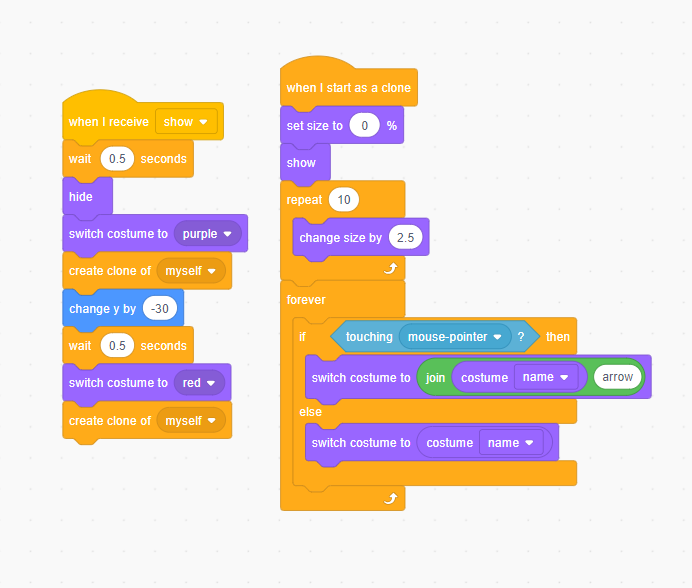
I have this script that makes two different boxes by cloning itself. Then, whenever the mouse touches the box/clone, it changes to the same costume, but just with an arrow indicating that you're hovering over it. When it's not touching the mouse, it would switch back to the costume without an arrow. However, I'm not sure how to change it back to the previous costume without an arrow without changing the other clones as well
Last edited by jhuang0044 (April 1, 2024 01:52:13)
- PhiPhenomenon
-
 Scratcher

500+ posts
How do I change an individual clone back to another sprite, while not changing other clones?
The costume name reporter changes with the switch costume block, so it gets stuck on the arrow costume. You should save the costume name inside of a variable instead:
when I start as a clone
set [costumeName v] to (costume name :: looks) // this sprite only
forever
if <touching [mouse-pointer v] ?> then
switch costume to (join (costumeName) [arrow])


else
switch costume to (costumeName)
end
end
Last edited by PhiPhenomenon (April 1, 2024 02:03:13)
- jhuang0044
-
Scratcher
14 posts
How do I change an individual clone back to another sprite, while not changing other clones?
The costume name reporter changes with the switch costume block, so it gets stuck on the arrow costume. You should save the costume name inside of a variable instead:I tried that and it doesn't work. It does show and not show the arrow depending on whether or not it's touching the mouse but it changes both the costumes back to the variable costumeName, which is the same for all the clones. As a result, both of the costumes end up as costume “red”when I start as a clone
set [costumeName v] to (costume name :: looks) // this sprite only
forever
if <touching [mouse-pointer v] ?> then
switch costume to (join (costumeName) [arrow])
else
switch costume to (costumeName)
end
end
Edit: I didn't change it to “for this sprite only” it works actually. Thank you.
Last edited by jhuang0044 (April 1, 2024 02:37:35)
- Discussion Forums
- » Help with Scripts
-
» How do I change an individual clone back to another sprite, while not changing other clones?