Discuss Scratch

- Discussion Forums
- » Bugs and Glitches
- » Repeat until key press isn't working
![[RSS Feed]](//cdn.scratch.mit.edu/scratchr2/static/__5b3e40ec58a840b41702360e9891321b__//djangobb_forum/img/feed-icon-small.png "[RSS Feed]")
![[RSS Feed]](http://cdn.scratch.mit.edu/scratchr2/static/__5b3e40ec58a840b41702360e9891321b__//djangobb_forum/img/feed-icon-small.png "[RSS Feed]")
- SNicolas2023G2
-
 Scratcher

2 posts
Repeat until key press isn't working
My browser / operating system: MacOS Macintosh X 10.15.7, Safari 16.5, No Flash version detected
My code is:
When I click the down arrow, the code doesn't stop running. I don't know what is causing this problem
My code is:
repeat until <<key [down arrow] pressed?> or <(timeleft) = [0]>>
wait (1) secs
change [timeleft] by (-1)
end
When I click the down arrow, the code doesn't stop running. I don't know what is causing this problem
Last edited by SNicolas2023G2 (March 4, 2024 02:00:52)
- coolgamerkid9
-
 Scratcher

53 posts
Repeat until key press isn't working
I tried recreating your code and I think I can see the problem. The code inside the “repeat until” block needs to complete running all the blocks inside it before the “key down arrow pressed? or timeleft = 0” can be activated, which is why the code won't stop on command.
I do however have a workaround to this problem:
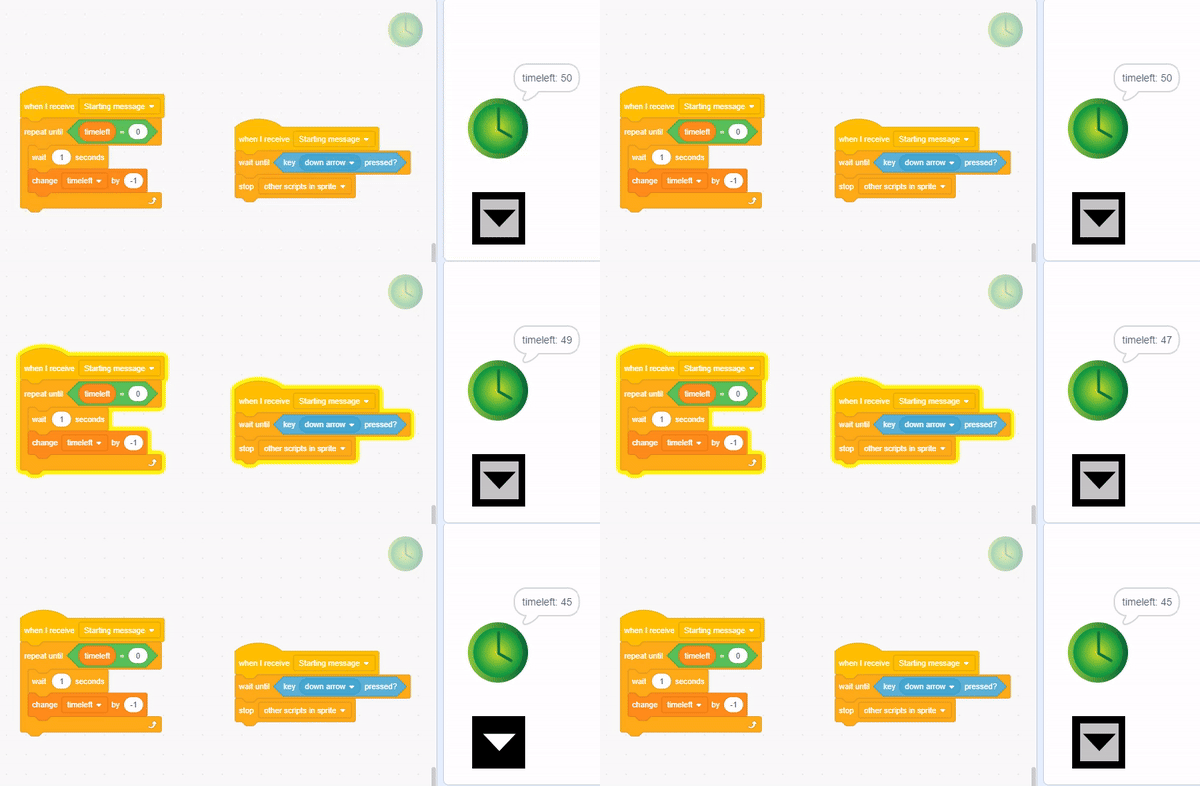
Making a new sprite called “Timer” or something like that, then adding the following blocks mentioned in the image above to it. That way, when the down arrow is pressed or the timer reaches 0, the script stops immediately instead of stopping after the script has completed.
Hope this helped you out
I do however have a workaround to this problem:
Making a new sprite called “Timer” or something like that, then adding the following blocks mentioned in the image above to it. That way, when the down arrow is pressed or the timer reaches 0, the script stops immediately instead of stopping after the script has completed.
Hope this helped you out

- Discussion Forums
- » Bugs and Glitches
-
» Repeat until key press isn't working