Discuss Scratch

- Discussion Forums
- » Help with Scripts
- » How to make a collision script for this?
![[RSS Feed]](//cdn.scratch.mit.edu/scratchr2/static/__5b3e40ec58a840b41702360e9891321b__//djangobb_forum/img/feed-icon-small.png "[RSS Feed]")
![[RSS Feed]](http://cdn.scratch.mit.edu/scratchr2/static/__5b3e40ec58a840b41702360e9891321b__//djangobb_forum/img/feed-icon-small.png "[RSS Feed]")
- -Valtren-
-
 Scratcher

1000+ posts
How to make a collision script for this?
edit: I simplified my script a bit so that you guys can hopefully understand it a bit better.
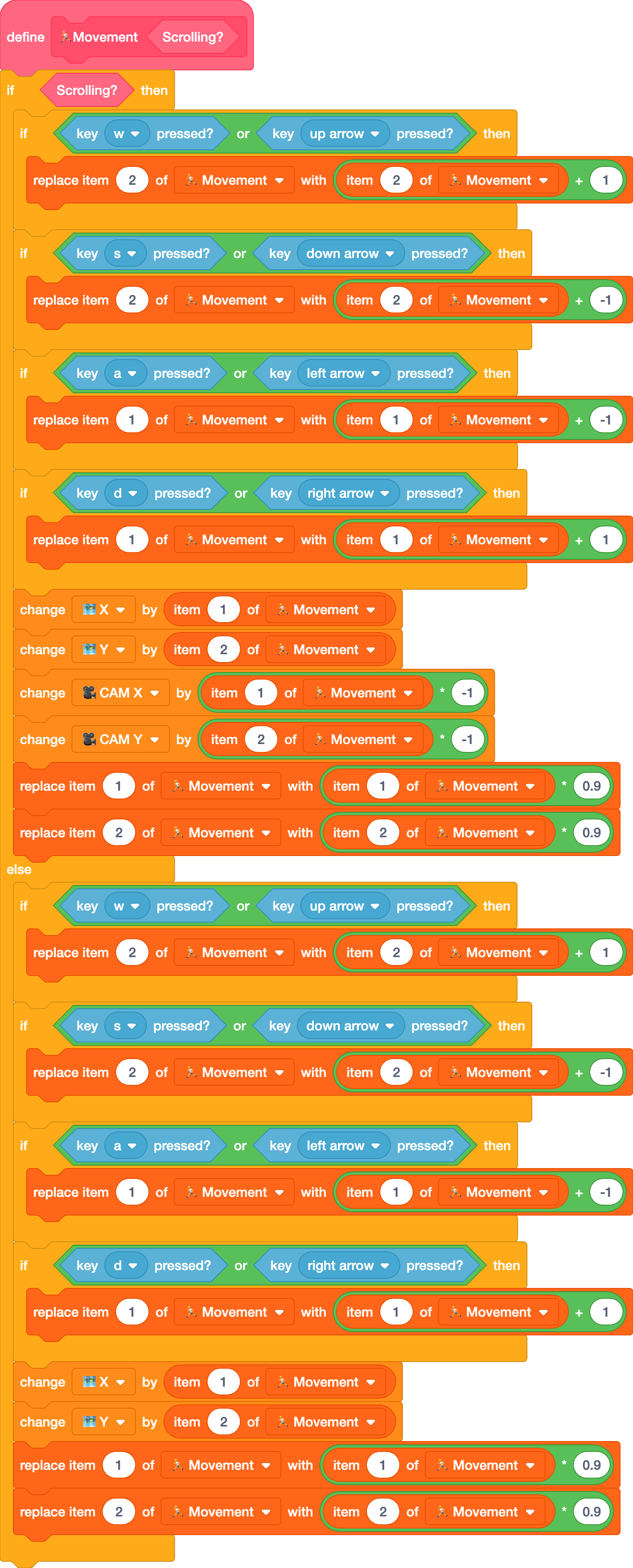
I've been making a game, and in it it uses this script for movement:
I've been making a game, and in it it uses this script for movement:
foreverI've tried various different methods for making collisions but none of them work. Is there any way?
if <key [up arrow v] pressed?> then
change [y v] by (1)
end
if <key [down arrow v] pressed?> then
change [y v] by (-1)
end
if <key [right arrow v] pressed?> then
change [x v] by (1)
end
if <key [left arrow v] pressed?> then
change [x v] by (-1)
end
set [x v] to ((x)*(0.9))
set [y v] to ((y)*(0.9))
change x by (x)
change y by (y)
end
Last edited by -Valtren- (Feb. 22, 2024 01:13:06)
- evantparkes
-
 Scratcher

100+ posts
How to make a collision script for this?
Would touching blocks work?
if <key [ w] pressed?> then
(your previous script)
if <touching [edge] ?> then
replace item ( v) of [list v] with [thing]
end
Last edited by evantparkes (Feb. 21, 2024 16:24:56)
- malicondii
-
 Scratcher

100+ posts
How to make a collision script for this?
I've been making a game, and in it it uses this script for movement:as cube upload is blocked for me and i can't see the image, can you share the code in a project so i can see what it is and help better?
(the variables X and Y act as normal X and Y position variables.)
I've tried various different methods for making collisions but none of them work. Is there any way?
- evantparkes
-
Scratcher
100+ posts
How to make a collision script for this?
Then if you use D and hit a wall try w it won't work. I'm stumped. Try Youtube
- sashimiricedev
-
 Scratcher

100+ posts
How to make a collision script for this?
Try this: https://scratch.mit.edu/projects/927729774
Or this: https://scratch.mit.edu/projects/940310732
Both of these are projects from my Forum Post Demos studio. Check it out!
Or this: https://scratch.mit.edu/projects/940310732
Both of these are projects from my Forum Post Demos studio. Check it out!
- -Valtren-
-
Scratcher
1000+ posts
How to make a collision script for this?
(#1)edited the script so it's a bit easier to understand.
edit: I simplified my script a bit so that you guys can hopefully understand it a bit better.
I've been making a game, and in it it uses this script for movement:foreverI've tried various different methods for making collisions but none of them work. Is there any way?
if <key [up arrow v] pressed?> then
change [y v] by (1)
end
if <key [down arrow v] pressed?> then
change [y v] by (-1)
end
if <key [right arrow v] pressed?> then
change [x v] by (1)
end
if <key [left arrow v] pressed?> then
change [x v] by (-1)
end
set [x v] to ((x)*(0.9))
set [y v] to ((y)*(0.9))
change x by (x)
change y by (y)
end
- sashimiricedev
-
Scratcher
100+ posts
How to make a collision script for this?
This should help with your problem.
- yadayadayadagoodbye
-
 Scratcher

1000+ posts
How to make a collision script for this?
I assume you're tryna make something topdown? If so, you could take a look at this
- NIKI-KOLCHAGOV
-
 Scratcher
500+ posts
How to make a collision script for this?
The way i make collisions is when the character touches a wall it stops it from moving and waits until the player presses another key
Heres an example this should be in the player sprite
Heres an example this should be in the player sprite
when green flag clickedAnd in the walls sprite
forever
if <<key [w v] pressed?> and <not <(Stop W movement) = (1)>>> then
move script
end
end
when green flag clicked
forever
if <touching [Player sprite v] ?> then
set [Stop W movement v] to [1]
wait until <not <key [w v] pressed?>
set [Stop W movement v] to [0]
end
end

- Discussion Forums
- » Help with Scripts
-
» How to make a collision script for this?