Discuss Scratch

- Discussion Forums
- » Advanced Topics
- » How slow is layering in scratch??
![[RSS Feed]](//cdn.scratch.mit.edu/scratchr2/static/__ff7229f036c458728e45c39b0751aa44__//djangobb_forum/img/feed-icon-small.png "[RSS Feed]")
![[RSS Feed]](http://cdn.scratch.mit.edu/scratchr2/static/__ff7229f036c458728e45c39b0751aa44__//djangobb_forum/img/feed-icon-small.png "[RSS Feed]")
- Ninja_snake15
-
 Scratcher

59 posts
How slow is layering in scratch??
I made a super modified version of Griffpatch's layering system for a game I'm working on that lets me layer sprites specifically above other sprites, layer specific clones, have logs for debugging, and other nice features you don't get with the built-in layering blocks.
There is a specific “Update layers” script that I need to copy over to every sprite I use. Basically it does an insertion sort with the items in a manually-sorted layers list being used as input. The sorted ZOrder list is used only for that bit of code and is deleted before the layers begin updating. The script is called by a single broadcast, but I've set the overall system up so it only runs when it absolutely needs to (and isn't running every frame, or more than once in a frame). Since this single piece of code is being run by every single sprite and clone in the project, obviously optimization is important.
Here's a screenshot of the code:
The code
Anyway, I'm getting a ton of lag whenever many clones are on screen since clones have to be “registered” and “unregistered”, adding and removing their names to/from the layers list and forcing the layers to update again. I don't think it's a problem with the FOR loop, though. Like obviously there is room for optimization but almost always, the loop terminates before it even starts, so I'm thinking that it's an issue with the actual “go forward X layers” block (Unless it isn't, then I just need to optimize my game better). So how slow actually are the layering blocks in scratch? How many times can you run that block a frame without causing lag spikes?
There is a specific “Update layers” script that I need to copy over to every sprite I use. Basically it does an insertion sort with the items in a manually-sorted layers list being used as input. The sorted ZOrder list is used only for that bit of code and is deleted before the layers begin updating. The script is called by a single broadcast, but I've set the overall system up so it only runs when it absolutely needs to (and isn't running every frame, or more than once in a frame). Since this single piece of code is being run by every single sprite and clone in the project, obviously optimization is important.
Here's a screenshot of the code:
The code
Anyway, I'm getting a ton of lag whenever many clones are on screen since clones have to be “registered” and “unregistered”, adding and removing their names to/from the layers list and forcing the layers to update again. I don't think it's a problem with the FOR loop, though. Like obviously there is room for optimization but almost always, the loop terminates before it even starts, so I'm thinking that it's an issue with the actual “go forward X layers” block (Unless it isn't, then I just need to optimize my game better). So how slow actually are the layering blocks in scratch? How many times can you run that block a frame without causing lag spikes?
Last edited by Ninja_snake15 (Jan. 20, 2024 21:23:26)
- Ninja_snake15
-
Scratcher
59 posts
How slow is layering in scratch??
for some reason it won't let me share the image link, hold on
edit: ok i fixed it you can see the image now
edit: ok i fixed it you can see the image now
Last edited by Ninja_snake15 (Jan. 20, 2024 22:34:11)
- scratchusername40
-
 Scratcher

1000+ posts
How slow is layering in scratch??
You can upload images to cubeupload, it's free and works in the scratch forums (the forums only support a few image hosts, and cubeupload is the best one)
- Clippy-Cat
-
 Scratcher

66 posts
How slow is layering in scratch??
I've transcribed the image to the Scratch Forum's [scratchblocks] tag.
When green flag clicked
set [$Parent Sprite Name v] to [Layering//LayerManager]
set [$Sprite Name v] to ($Parent Sprite Name)

When I receive [!!Layer Order!! v]
$Update Sprite Layers

define $Update Sprite Layers
set [$Current Layer v] to (Item # of ($Sprite Name) in [__Layer-LAYERS v]::list)
set [$LayerSort-i v] to (1)
repeat until <not <($Current Layer) < (item ($LayerSort-i) of [__Layer-ZOrder])>>
change[$LayerSort-i v] by (1)
end
insert ($Current Layer) at ($LayerSort-i) of [__Layer-ZOrder v]
go [forward v] (($LayerSort-i) - (1)) layers::looks
- Ninja_snake15
-
Scratcher
59 posts
How slow is layering in scratch??
Thanks for that ^^ 
Sorry guys, this post was way too much text without a whole lot of context so I guess a better question would be: Are there any projects that measure how fast blocks can execute, like a benchmark? That way there would be a way to benchmark both high and low-end hardware, on both scratch and turbowarp.

Sorry guys, this post was way too much text without a whole lot of context so I guess a better question would be: Are there any projects that measure how fast blocks can execute, like a benchmark? That way there would be a way to benchmark both high and low-end hardware, on both scratch and turbowarp.
Last edited by Ninja_snake15 (Jan. 21, 2024 18:35:27)
- Clippy-Cat
-
Scratcher
66 posts
How slow is layering in scratch??
Sorry guys, this post was way too much text without a whole lot of context so I guess a better question would be: Are there any projects that measure how fast blocks can execute, like a benchmark? That way there would be a way to benchmark both high and low-end hardware, on both scratch and turbowarp.I'm assuming you mean measuring the amount of time that has past between the start of a block running, and the end. This is called “delta timing.” A delta is the difference, so a time delta is the difference between 2 points in time. The most accurate way we can measure a time delta is with Days Since 2000.
I'm making the assumption that the block you want to measure the execution time of is $Update Sprite Layers.
We can get a time delta by subtracting.
When I receive [!!Layer Order!! v]
set [t0 v] to (Days Since 2000)
$Update Sprite Layers::custom
set [time delta v] to ((t0) - (Days Since 2000)) // This is the amount of time it took to execute as a fraction of a day.
To display this number as seconds, we can divide time delta by 0.00001157(how many days are in 1 second).
((time delta ) / (0.00001157))
- awesome-llama
-
 Scratcher

1000+ posts
How slow is layering in scratch??
Thanks for that ^^You can refer to Chrome_Cat's Every block timed project for block speed in relation to each other.
Sorry guys, this post was way too much text without a whole lot of context so I guess a better question would be: Are there any projects that measure how fast blocks can execute, like a benchmark? That way there would be a way to benchmark both high and low-end hardware, on both scratch and turbowarp.
For an overall benchmark, there is Scratch Benchmark by -Rex-.
Last edited by awesome-llama (Jan. 22, 2024 06:24:23)
- meunspeakable
-
 Scratcher
100+ posts
How slow is layering in scratch??
Thanks for that ^^Yes. Use this project: https://scratch.mit.edu/projects/564755510/
Sorry guys, this post was way too much text without a whole lot of context so I guess a better question would be: Are there any projects that measure how fast blocks can execute, like a benchmark? That way there would be a way to benchmark both high and low-end hardware, on both scratch and turbowarp.
“Timing blocks for micro-optimisation
by ChromeCat_test”
- Ninja_snake15
-
Scratcher
59 posts
How slow is layering in scratch??
servers went down lmao
Anyway, I made an improved version of the “update layers” code which is about 2x faster. It's way bigger and adds about 100 extra KB to the JSON size (since i have 80 sprites in the project) but tried to optimize for speed as much as possible by:
-Reversing the order the ZOrder list sorts at so that I can use “add to list” blocks instead of “insert at x of list” blocks
-Only using the “layer forward” block when required
-Using the “item # of item in list” block only when I need to
Might make optimizations or reduce size down the line but good enough for now.
sorry i have no idea how to use scratchblocks
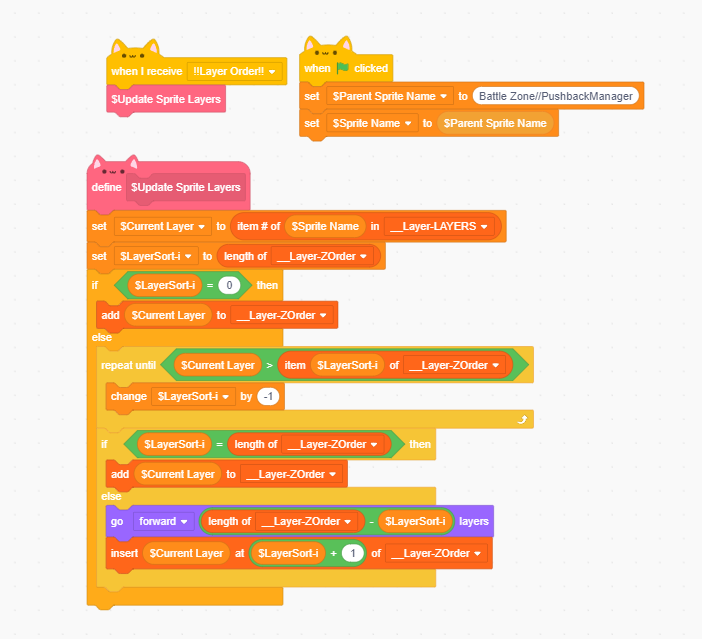
Anyway, I made an improved version of the “update layers” code which is about 2x faster. It's way bigger and adds about 100 extra KB to the JSON size (since i have 80 sprites in the project) but tried to optimize for speed as much as possible by:
-Reversing the order the ZOrder list sorts at so that I can use “add to list” blocks instead of “insert at x of list” blocks
-Only using the “layer forward” block when required
-Using the “item # of item in list” block only when I need to
Might make optimizations or reduce size down the line but good enough for now.
sorry i have no idea how to use scratchblocks
Last edited by Ninja_snake15 (Jan. 28, 2024 02:42:59)
- Discussion Forums
- » Advanced Topics
-
» How slow is layering in scratch??