Discuss Scratch

![[RSS Feed]](http://cdn.scratch.mit.edu/scratchr2/static/__ff7229f036c458728e45c39b0751aa44__//djangobb_forum/img/feed-icon-small.png "[RSS Feed]")
- EngineerRunner
-
 Scratcher

1000+ posts
dual-screen scratch
allows projects along 2 screens.
how it appears in editor (ignore my dark mode extension please)
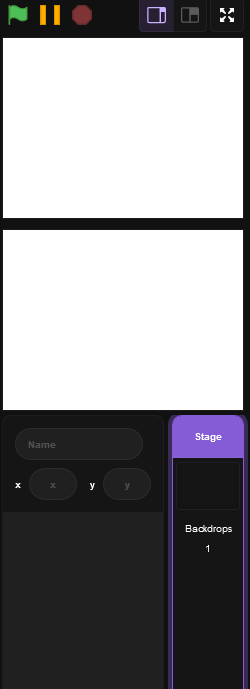
with the following blocks:

some games just work better with 2 screens, such as Ace Attorney, Ghost Trick, Brain Age and more.
how it appears in editor (ignore my dark mode extension please)
with the following blocks:
some games just work better with 2 screens, such as Ace Attorney, Ghost Trick, Brain Age and more.
- RethinkingVoxels
-
 Scratcher

1000+ posts
dual-screen scratch
can you explain im on a chromebook rn
60 second rule i hate you
60 second rule i hate you
- EngineerRunner
-
Scratcher
1000+ posts
dual-screen scratch
can you explain im on a chromebook rnprojects across 2 different screens, like a DS game.
60 second rule i hate you
- -Rodri
-
 Scratcher
1000+ posts
dual-screen scratch
the only reason i think this would be useful is when making a 3ds simulator, so idk if this would be worth implenenting
- EngineerRunner
-
Scratcher
1000+ posts
dual-screen scratch
the only reason i think this would be useful is when making a 3ds simulator, so idk if this would be worth implenentingi literally listed games that work better on dual screens in OP
- -Rodri
-
Scratcher
1000+ posts
dual-screen scratch
oops, but can't you just split the one screen in two?the only reason i think this would be useful is when making a 3ds simulator, so idk if this would be worth implenentingi literally listed games that work better on dual screens in OP
- EngineerRunner
-
Scratcher
1000+ posts
dual-screen scratch
ah yes, the perfect way to play a gameoops, but can't you just split the one screen in two?the only reason i think this would be useful is when making a 3ds simulator, so idk if this would be worth implenentingi literally listed games that work better on dual screens in OP

- Elijah999999
-
 Scratcher

1000+ posts
dual-screen scratch
Now we can make any Nintendo DS game in Scratch XD
I don't see anything wrong with this suggestion other than the usuals, such as cost and work for the ST. But this would make each screen significantly smaller, almost to the point that you might be better off splitting one screen in half.
I don't see anything wrong with this suggestion other than the usuals, such as cost and work for the ST. But this would make each screen significantly smaller, almost to the point that you might be better off splitting one screen in half.
- XCartooonX
-
 Scratcher

500+ posts
dual-screen scratch
Now we can make any Nintendo DS game in Scratch XDThere should definitely be some way to make the screens bigger (probably a toggle option,) but apart from that I don't see much issues
I don't see anything wrong with this suggestion other than the usuals, such as cost and work for the ST. But this would make each screen significantly smaller, almost to the point that you might be better off splitting one screen in half.
- EngineerRunner
-
Scratcher
1000+ posts
dual-screen scratch
Now we can make any Nintendo DS game in Scratch XDeh, only really in the editor. it wouldn't make that much of a difference otherwise.
I don't see anything wrong with this suggestion other than the usuals, such as cost and work for the ST. But this would make each screen significantly smaller, almost to the point that you might be better off splitting one screen in half.
- -Rodri
-
Scratcher
1000+ posts
dual-screen scratch
wait but that actually doesn't look half badah yes, the perfect way to play a gameoops, but can't you just split the one screen in two?the only reason i think this would be useful is when making a 3ds simulator, so idk if this would be worth implenentingi literally listed games that work better on dual screens in OP
it doesn't have to be the same ratio, it's not like you're copy and pasting the game files to scratch
- Elijah999999
-
Scratcher
1000+ posts
dual-screen scratch
Would these motion blocks need to be added though?
go to [screen 1 v]

go to [screen 2 v]
Last edited by Elijah999999 (Jan. 5, 2024 23:59:03)
- EngineerRunner
-
Scratcher
1000+ posts
dual-screen scratch
Would these motion blocks need to be added though?nah, they'd be the extension blocks. if the sprite gets moved to a screen, it retains the same position but on the other screen.go to [screen 1 v]
go to [screen 2 v]
- EngineerRunner
-
Scratcher
1000+ posts
dual-screen scratch
i have fully beaten ghost trick (game i showed), and i can guarantee it only works either in wide-screen or on 2 screens. there is 100% no way it could fit in 4:3wait but that actually doesn't look half badah yes, the perfect way to play a gameoops, but can't you just split the one screen in two?the only reason i think this would be useful is when making a 3ds simulator, so idk if this would be worth implenentingi literally listed games that work better on dual screens in OP
it doesn't have to be the same ratio, it's not like you're copy and pasting the game files to scratch
- -Expo
-
 Scratcher

1000+ posts
dual-screen scratch
So, this isn't like split-screen on a computer right?
- randomguy3513
-
 Scratcher

1000+ posts
dual-screen scratch
I can finally add subway surfers to my games so people keep playing them
- EngineerRunner
-
Scratcher
1000+ posts
dual-screen scratch
So, this isn't like split-screen on a computer right?wdym
I can finally add subway surfers to my games so people keep playing them(removed by moderator - please keep it polite)
(the A is for arm)
Last edited by Paddle2See (Jan. 9, 2024 18:50:18)
