Discuss Scratch

- Discussion Forums
- » Help with Scripts
- » how do you do those pictures that show 1.0 blocks
![[RSS Feed]](//cdn.scratch.mit.edu/scratchr2/static/__ff7229f036c458728e45c39b0751aa44__//djangobb_forum/img/feed-icon-small.png "[RSS Feed]")
![[RSS Feed]](http://cdn.scratch.mit.edu/scratchr2/static/__ff7229f036c458728e45c39b0751aa44__//djangobb_forum/img/feed-icon-small.png "[RSS Feed]")
- mh24m
-
 Scratcher

4 posts
how do you do those pictures that show 1.0 blocks
hello I seriously do not know how to do that can someone help me with this
- TheScratcherPro16
-
 Scratcher

15 posts
how do you do those pictures that show 1.0 blocks
Like Change The Blocks In The Editor To The 1.0 Ones?
Last edited by TheScratcherPro16 (Jan. 2, 2024 22:42:10)
- TheScratcherPro16
-
Scratcher
15 posts
how do you do those pictures that show 1.0 blocks
Are They 3.0 Blocks? Because There Is An Extension That Changes It From 1.0 To 3.0 Blocks
btw TY (I Can't Say The Extension, I'll Be Blocked)
btw TY (I Can't Say The Extension, I'll Be Blocked)
Last edited by TheScratcherPro16 (Jan. 2, 2024 22:59:08)
- Rainia-Productions
-
 Scratcher

100+ posts
how do you do those pictures that show 1.0 blocks
Oh wait I’m editing my post now I think I messed something up
Oh I think you’re talking about these:
For example, if I wanted to say “when flag clicked, turn __ degrees”, first you would click the button. Then, click events, then the block. This text should appear after that:
[ scratchblocks
when green flag clicked
[/ scratchblocks (I just did space so it doesn’t actually do it)
Then, go to “motion” then click turn ___ degrees (any one)
But when you click it do NOT click it outside the text “[scratchblocks ” and ”). First before you click the block click under “when green flag clicked” then click the block.
After you click the block, it should look like this:
[ scratchblocks
when green flag clicked
turn ccw () 90 degrees
[/ scratchblocks
And if I didn’t include the spaces and delete the symbol “]” it would look like this:
So for the number of degrees just put your number in the “()” (for example, I did 90.)
Now it should look like this:
I hope this helped!
Oh I think you’re talking about these:
when green flag clickedBelow “New reply” and “Message” you see the toolbar, right? Click on that blue block next to the earth button. This is how you do it if you don’t know how:
say [hi]
For example, if I wanted to say “when flag clicked, turn __ degrees”, first you would click the button. Then, click events, then the block. This text should appear after that:
[ scratchblocks
when green flag clicked
[/ scratchblocks (I just did space so it doesn’t actually do it)
Then, go to “motion” then click turn ___ degrees (any one)
But when you click it do NOT click it outside the text “[scratchblocks ” and ”). First before you click the block click under “when green flag clicked” then click the block.
After you click the block, it should look like this:
[ scratchblocks
when green flag clicked
turn ccw () 90 degrees
[/ scratchblocks
And if I didn’t include the spaces and delete the symbol “]” it would look like this:
when green flag clicked
turn ccw () degrees
So for the number of degrees just put your number in the “()” (for example, I did 90.)
Now it should look like this:
when green flag clicked
turn ccw (90) degrees
I hope this helped!
Last edited by Rainia-Productions (Jan. 3, 2024 00:12:08)
- HedwigsHat
-
 Scratcher

1000+ posts
how do you do those pictures that show 1.0 blocks
do this
[scratchblocks]
- mh24m
-
Scratcher
4 posts
how do you do those pictures that show 1.0 blocks
when green flag clicked
say [thank you for that information] for (2) secs
- medians
-
 Scratcher

1000+ posts
how do you do those pictures that show 1.0 blocks
Those are 2.0 blocks, not 1.0..
2.0:
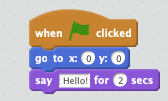
1.x:

2.0:
1.x:
- Discussion Forums
- » Help with Scripts
-
» how do you do those pictures that show 1.0 blocks