Discuss Scratch

- Discussion Forums
- » Questions about Scratch
- » Hacked block? (Anyone know what this does?)
![[RSS Feed]](//cdn.scratch.mit.edu/scratchr2/static/__ff7229f036c458728e45c39b0751aa44__//djangobb_forum/img/feed-icon-small.png "[RSS Feed]")
![[RSS Feed]](http://cdn.scratch.mit.edu/scratchr2/static/__ff7229f036c458728e45c39b0751aa44__//djangobb_forum/img/feed-icon-small.png "[RSS Feed]")
- NotK3ndricAlt
-
 Scratcher

1000+ posts
Hacked block? (Anyone know what this does?)
I was trying to make a project with the simplest 3D engine (well, actually 2.5D but it introduces to real 3D programming) but then I found this block.
set pen color to (0) // hacked??? :OCould this be a LEGACY hacked block? Because yes, the project was made 1 day after Christmas 2014. Extension task if you can do it: Could someone tell me how to use this block?
- yadayadayadagoodbye
-
 Scratcher

1000+ posts
Hacked block? (Anyone know what this does?)
You could likely input a rgb value in there, as I believe scratch pens use those
I belive the equation to convert RGB to a single number is as follows:
(R*65536)+(G*256)+B
I belive the equation to convert RGB to a single number is as follows:
(R*65536)+(G*256)+B
- NotK3ndricAlt
-
Scratcher
1000+ posts
Hacked block? (Anyone know what this does?)
You could likely input a rgb value in there, as I believe scratch pens use thoseRGB values? Well I do know math, but not RGB math. Tell me how this works.
I belive the equation to convert RGB to a single number is as follows:
(R*65536)+(G*256)+B
- ilovestories
-
 Scratcher

1000+ posts
Hacked block? (Anyone know what this does?)
If the block's like the present set pen color block (below), it works a bit like the color effect block.
set pen [color v] to [] ::penI don't know if it does work like it, though.
- yadayadayadagoodbye
-
Scratcher
1000+ posts
Hacked block? (Anyone know what this does?)
RGB values are values with 3 numbers: a R value, a G value, and a B value.You could likely input a rgb value in there, as I believe scratch pens use thoseRGB values? Well I do know math, but not RGB math. Tell me how this works.
I belive the equation to convert RGB to a single number is as follows:
(R*65536)+(G*256)+B
Each of these 3 values corresponds to the amount of red, blue, or green in a pixel, with each value going up to 256 and down to 0. To get the “single number” version of the values, simply do (R*65536)+(G*256)+B
- NotK3ndricAlt
-
Scratcher
1000+ posts
Hacked block? (Anyone know what this does?)
Yeah, that?RGB values are values with 3 numbers: a R value, a G value, and a B value.You could likely input a rgb value in there, as I believe scratch pens use thoseRGB values? Well I do know math, but not RGB math. Tell me how this works.
I belive the equation to convert RGB to a single number is as follows:
(R*65536)+(G*256)+B
Each of these 3 values corresponds to the amount of red, blue, or green in a pixel, with each value going up to 256 and down to 0. To get the “single number” version of the values, simply do (R*65536)+(G*256)+B
(((R) * (65536)) + ((G) * ((256) + (B))
- yadayadayadagoodbye
-
Scratcher
1000+ posts
Hacked block? (Anyone know what this does?)
no, the green is the one being multiplied by 256, its not being multiplied by (256+B) lolYeah, that?RGB values are values with 3 numbers: a R value, a G value, and a B value.You could likely input a rgb value in there, as I believe scratch pens use thoseRGB values? Well I do know math, but not RGB math. Tell me how this works.
I belive the equation to convert RGB to a single number is as follows:
(R*65536)+(G*256)+B
Each of these 3 values corresponds to the amount of red, blue, or green in a pixel, with each value going up to 256 and down to 0. To get the “single number” version of the values, simply do (R*65536)+(G*256)+B(((R) * (65536)) + ((G) * ((256) + (B))
it'd be
(((R) * (65536)) + (((G) * (256)) + (B)))or (this one is more clear)
((((R) * (65536)) + ((G) * (256))) + (B))
- Fun_Cupcake_i81
-
 Scratcher

1000+ posts
Hacked block? (Anyone know what this does?)
I believe it just functions the same as
(This is just a guess, though.)
set pen color to (my variable). (Which accepts hex codes including the # at the beginning)
(This is just a guess, though.)
Last edited by Fun_Cupcake_i81 (Dec. 16, 2023 01:16:24)
- medians
-
 Scratcher

1000+ posts
Hacked block? (Anyone know what this does?)
Okay let me explain:
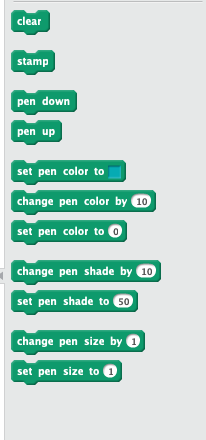
https://en.scratch-wiki.info/wiki/Set_Pen_Color_to_()_(number_input_block)
https://en.scratch-wiki.info/wiki/Set_Pen_Shade_to_()_(block)
Shade was replaced with brightness and the color and that was also put into the dropdown, well kinda. They didn't actually remove the original blocks but yea they hid it from the block palette (it was in 1.x). Also this block goes from 0 to 200 instead of 0 to 100.
https://en.scratch-wiki.info/wiki/Set_Pen_Color_to_()_(number_input_block)
https://en.scratch-wiki.info/wiki/Set_Pen_Shade_to_()_(block)
Shade was replaced with brightness and the color and that was also put into the dropdown, well kinda. They didn't actually remove the original blocks but yea they hid it from the block palette (it was in 1.x). Also this block goes from 0 to 200 instead of 0 to 100.
Last edited by medians (Dec. 16, 2023 02:56:42)
- Discussion Forums
- » Questions about Scratch
-
» Hacked block? (Anyone know what this does?)