Discuss Scratch
- Discussion Forums
- » Bugs and Glitches
- » Arabic language making inverted screen
![[RSS Feed]](//cdn.scratch.mit.edu/scratchr2/static/__ff7229f036c458728e45c39b0751aa44__//djangobb_forum/img/feed-icon-small.png "[RSS Feed]")
![[RSS Feed]](http://cdn.scratch.mit.edu/scratchr2/static/__ff7229f036c458728e45c39b0751aa44__//djangobb_forum/img/feed-icon-small.png "[RSS Feed]")
- DOGGYPLAYSDOORS
-
 Scratcher

70 posts
Arabic language making inverted screen
I heard of this and this could be a dupe but if you use the Arabic language in the project editor, the screen will be inverted (the stage will be on the left instead of the right, the block palette will be on the right instead of the left, etc) You can try it out for yourself if you want.
- 106809nes
-
 Scratcher
1000+ posts
Arabic language making inverted screen
I heard of this and this could be a dupe but if you use the Arabic language in the project editor, the screen will be inverted (the stage will be on the left instead of the right, the block palette will be on the right instead of the left, etc) You can try it out for yourself if you want.…because arabic is right-to-left?
just know it isn't a bug, it's intentional.
Last edited by 106809nes (Dec. 15, 2023 01:38:36)
- DOGGYPLAYSDOORS
-
Scratcher
70 posts
Arabic language making inverted screen
Ok, the wiki doesn’t list it as a bug, you might be right.I heard of this and this could be a dupe but if you use the Arabic language in the project editor, the screen will be inverted (the stage will be on the left instead of the right, the block palette will be on the right instead of the left, etc) You can try it out for yourself if you want.…because arabic is right-to-left?
just know it isn't a bug, it's intentional.
- GlitchedThrough
-
 New Scratcher

1000+ posts
Arabic language making inverted screen
No it ain’t.I heard of this and this could be a dupe but if you use the Arabic language in the project editor, the screen will be inverted (the stage will be on the left instead of the right, the block palette will be on the right instead of the left, etc) You can try it out for yourself if you want.…because arabic is right-to-left?
just know it isn't a bug, it's intentional.
—
OP, I can’t reproduce. Can you click the globe icon on the format bar and post that please?
- 54387a
-
 Scratcher

1000+ posts
Arabic language making inverted screen
-snip-Then how can I reproduce it? My browser / operating system: Android 11, Firefox 120.0, No Flash version detected
No it ain’t.
—
OP, I can’t reproduce. Can you click the globe icon on the format bar and post that please?
Image:
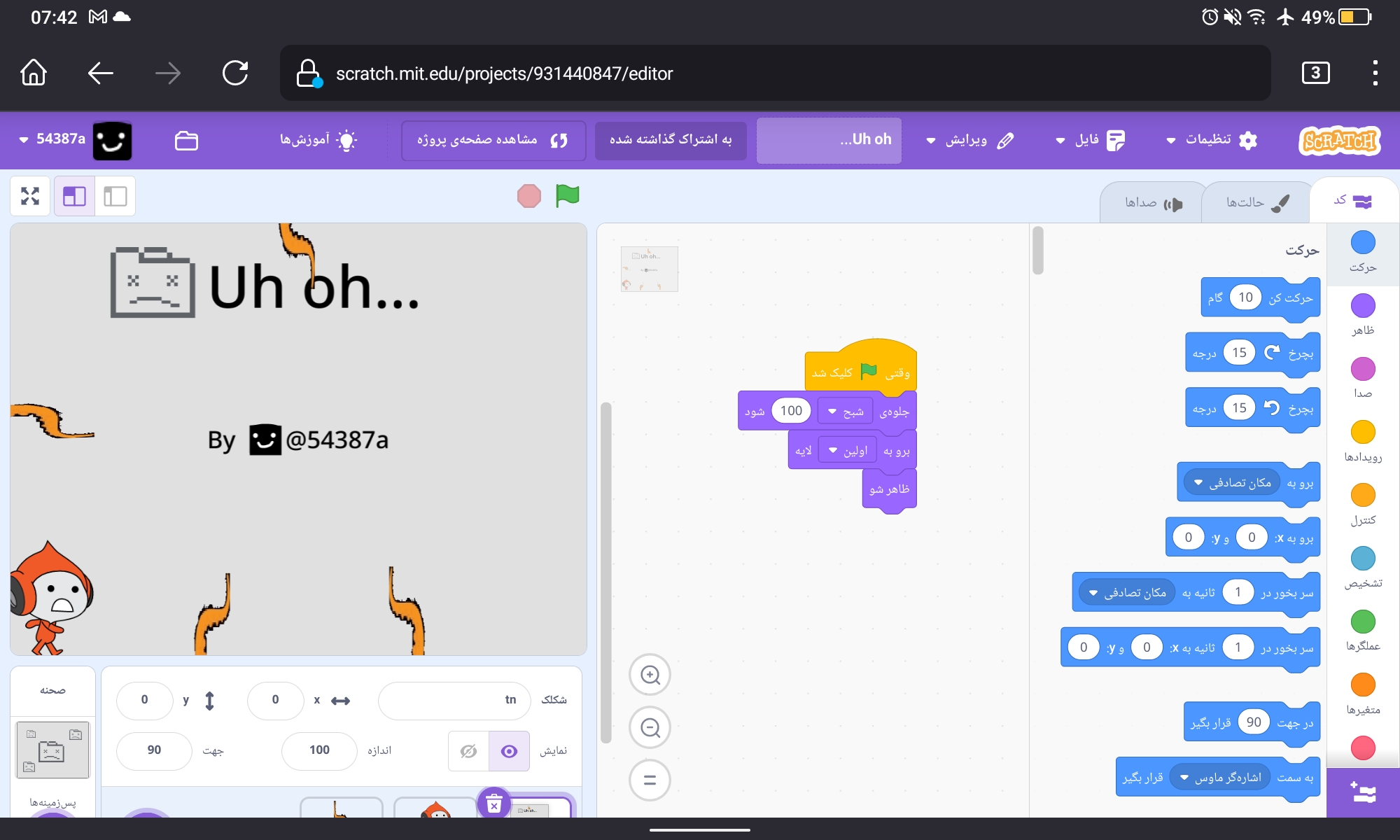 .
.By the way, like almost everyone else mentioned, it's because Arabic is right to left. Try changing the language to Arabic and testing it in the editor.
- GlitchedThrough
-
New Scratcher
1000+ posts
Arabic language making inverted screen
Here’s the source: Why would it flip the navbar on one specific page??-snip-Then how can I reproduce it? My browser / operating system: Android 11, Firefox 120.0, No Flash version detected
No it ain’t.
—
OP, I can’t reproduce. Can you click the globe icon on the format bar and post that please?
Image: https://u.cubeupload.com/Eters/Screenshot2023121507.jpg.
By the way, like almost everyone else mentioned, it's because Arabic is right to left. Try changing the language to Arabic and testing it in the editor.
- floppasyay
-
 Scratcher

1000+ posts
Arabic language making inverted screen
I heard of this and this could be a dupe but if you use the Arabic language in the project editor, the screen will be inverted (the stage will be on the left instead of the right, the block palette will be on the right instead of the left, etc) You can try it out for yourself if you want.Same with Farsi.
Also, like #2, Arabic and Farsi is supposed to be read right to left, so it flips the whole editor for readers.
- gdxfor
-
 Scratcher

100+ posts
Arabic language making inverted screen
Scratch probably doesn't have the time nor the resources to make every part of the website flip for right-to-left languages.Here’s the source: Why would it flip the navbar on one specific page??-snip-Then how can I reproduce it? My browser / operating system: Android 11, Firefox 120.0, No Flash version detected
No it ain’t.
—
OP, I can’t reproduce. Can you click the globe icon on the format bar and post that please?
Image: https://u.cubeupload.com/Eters/Screenshot2023121507.jpg.
By the way, like almost everyone else mentioned, it's because Arabic is right to left. Try changing the language to Arabic and testing it in the editor.

- GlitchedThrough
-
New Scratcher
1000+ posts
Arabic language making inverted screen
What time and resources?Scratch probably doesn't have the time nor the resources to make every part of the website flip for right-to-left languages.Here’s the source: Why would it flip the navbar on one specific page??-snip-Then how can I reproduce it? My browser / operating system: Android 11, Firefox 120.0, No Flash version detected
No it ain’t.
—
OP, I can’t reproduce. Can you click the globe icon on the format bar and post that please?
Image: https://u.cubeupload.com/Eters/Screenshot2023121507.jpg.
By the way, like almost everyone else mentioned, it's because Arabic is right to left. Try changing the language to Arabic and testing it in the editor.
Last edited by GlitchedThrough (Dec. 15, 2023 17:34:56)
- DOGGYPLAYSDOORS
-
Scratcher
70 posts
Arabic language making inverted screen
ok i didn’t expect this to become popular
Ok you have a point I guess. That could be true. but if they read it from right to left, why do they have to flip the entire editor? (if he is right)I heard of this and this could be a dupe but if you use the Arabic language in the project editor, the screen will be inverted (the stage will be on the left instead of the right, the block palette will be on the right instead of the left, etc) You can try it out for yourself if you want.Same with Farsi.
Also, like #2, Arabic and Farsi is supposed to be read right to left, so it flips the whole editor for readers.
- floppasyay
-
Scratcher
1000+ posts
Arabic language making inverted screen
Original post here
People in English and other left to right reading languages are inclined to look at the left of something first, then move towards the right because of the direction that our sentences move in. The layout of Scratch reflects this in creating a visual clue for how the interface works - there's a selection of blocks in the left, which can be placed in the middle to produce a result on the right.
Arabic is read right to left, so Arabic readers are inclined to look to the right first, then towards the left. The result is that the entire interface is flipped to make it seem natural to Arabic, or other right-to-left readers
- DOGGYPLAYSDOORS
-
Scratcher
70 posts
Arabic language making inverted screen
Original post hereok ima close thisPeople in English and other left to right reading languages are inclined to look at the left of something first, then move towards the right because of the direction that our sentences move in. The layout of Scratch reflects this in creating a visual clue for how the interface works - there's a selection of blocks in the left, which can be placed in the middle to produce a result on the right.
Arabic is read right to left, so Arabic readers are inclined to look to the right first, then towards the left. The result is that the entire interface is flipped to make it seem natural to Arabic, or other right-to-left readers
- Discussion Forums
- » Bugs and Glitches
-
» Arabic language making inverted screen