Discuss Scratch

- Discussion Forums
- » Suggestions
- » Info about each block in the block palette
![[RSS Feed]](//cdn.scratch.mit.edu/scratchr2/static/__ff7229f036c458728e45c39b0751aa44__//djangobb_forum/img/feed-icon-small.png "[RSS Feed]")
![[RSS Feed]](http://cdn.scratch.mit.edu/scratchr2/static/__ff7229f036c458728e45c39b0751aa44__//djangobb_forum/img/feed-icon-small.png "[RSS Feed]")
- AzK5B
-
 Scratcher

1 post
Info about each block in the block palette
What this suggestion is talking about is an info button next to each block in the block palette (as well as buttons to make new blocks), that shows information about the block in question (e.g. what the block does) when clicked/tapped. I think that some blocks, especially operators, could be a bit confusing for new users.
It might even link to the Scratch Wiki.
It might even link to the Scratch Wiki.
Last edited by AzK5B (Dec. 13, 2023 00:51:07)
- Tris_das_Einhorn
-
 Scratcher

100+ posts
Info about each block in the block palette
I like this idea, maybe there could be a setting, where if a Scratcher has it toggled on, they can hover over a block to see a short explanation of what it does?
This could be the default for New Scratchers and then they could choose to keep it after they become a Scratcher if they still want it.
Support!
This could be the default for New Scratchers and then they could choose to keep it after they become a Scratcher if they still want it.
Support!
- unmissable
-
 Scratcher

1000+ posts
Info about each block in the block palette
How would you see those? By hovering over them? What about mobile users? What about my blocks?
edit: semi ninja'd
edit: semi ninja'd
Last edited by unmissable (Dec. 13, 2023 00:42:13)
- RecessFailsOffical
-
 Scratcher

1000+ posts
Info about each block in the block palette
I support but for most blocks it's pretty clear what they do. The only blocks I can think of that need explaining are clones, variables, cloud variables (if applicable), and lists.
- medians
-
 Scratcher

1000+ posts
Info about each block in the block palette
How would you see those? By hovering over them? What about mobile users? What about my blocks?This used to exist in 1.x and 2.0 and I want it to be brought back honestly in some way since blocks can be confusing, when you right clicked blocks there was sth that said “help” that brought you to it and there was a part on the right in 2.0 that allowed you to do this too (it made sense to be on the right since the stage was on the left). You can now hold blocks to show that context menu on mobile. For More Blocks, it explained how define worked and how you could add inputs and use them.
edit: semi ninja'd
It was called the Tips Window
Edit:
This topic:
https://scratch.mit.edu/discuss/topic/342227
Last edited by medians (Dec. 13, 2023 00:59:41)
- pasta_enjoyer7
-
 Scratcher

1000+ posts
Info about each block in the block palette
when you right clicked blocksAssuming the feature gets implemented like this, a suggestion for mobile users would be maybe a tap and hold down for a few seconds system? I can't see any other alternative, but I'm sure somebody else has one.
What about mobile users?I suggested something above.
What about my blocks?I'm assuming custom blocks wouldn't have a specific pop-up. Maybe something on how to use custom blocks?
It's a good idea, though. I personally would love having pop-ups or tips on how to use certain blocks, because they can be challenging and I don't want to have to search up every block that I don't understand.
- RocketDesign_
-
 Scratcher

100+ posts
Info about each block in the block palette
What this suggestion is talking about is an info button next to each block in the block palette (as well as buttons to make new blocks), that shows information about the block in question (e.g. what the block does) when clicked/tapped. I think that some blocks, especially operators, could be a bit confusing for new users.Support, but I think this should be a togglable feature
It might even link to the Scratch Wiki.
- medians
-
Scratcher
1000+ posts
Info about each block in the block palette
It could be like every other right click menu on mobile, I believe if you do that for anything else that needs right click in the editor it does that on mobile, but I can't really test.when you right clicked blocksAssuming the feature gets implemented like this, a suggestion for mobile users would be maybe a tap and hold down for a few seconds system? I can't see any other alternative, but I'm sure somebody else has one.
I'm assuming custom blocks wouldn't have a specific pop-up. Maybe something on how to use custom blocks?This is what it was in 2.0 when this feature existed (if you're wondering about the extension thing, you used to click “More Blocks” and that's where the “Add an Extension” was):
It's a good idea, though. I personally would love having pop-ups or tips on how to use certain blocks, because they can be challenging and I don't want to have to search up every block that I don't understand.
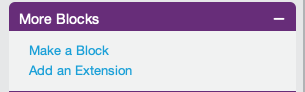
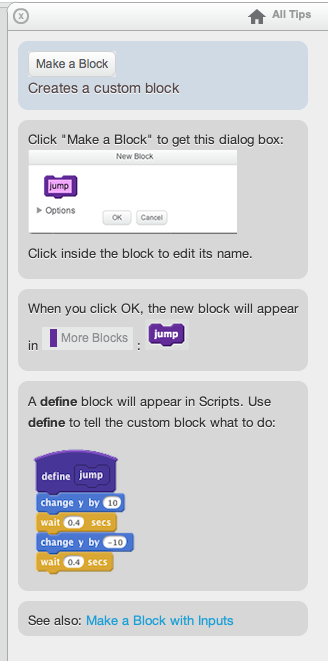
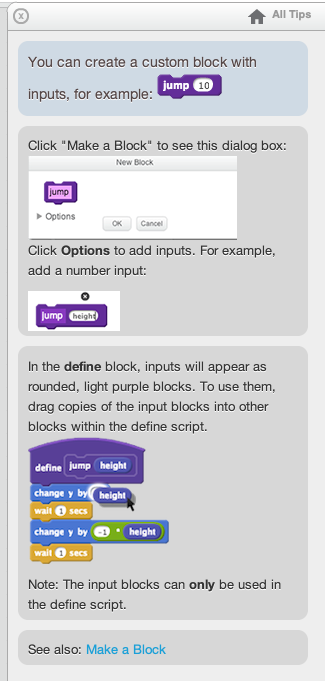
Also, if you're wondering, number and text inputs used to be separate too.
Last edited by medians (Dec. 13, 2023 01:06:17)
- Chickennuggetcon
-
 Scratcher

500+ posts
Info about each block in the block palette
support it would be very useful for new scratchers and could help out a lot.
- Discussion Forums
- » Suggestions
-
» Info about each block in the block palette