Discuss Scratch
- Discussion Forums
- » Advanced Topics
- » Raycasting in Very Early Versions of Scratch
![[RSS Feed]](//cdn.scratch.mit.edu/scratchr2/static/__5b3e40ec58a840b41702360e9891321b__//djangobb_forum/img/feed-icon-small.png "[RSS Feed]")
![[RSS Feed]](http://cdn.scratch.mit.edu/scratchr2/static/__5b3e40ec58a840b41702360e9891321b__//djangobb_forum/img/feed-icon-small.png "[RSS Feed]")
- retro_person
-
 Scratcher

100+ posts
Raycasting in Very Early Versions of Scratch
This is a very, very simple 3D raycasting engine I wrote in the October 2003 version of Scratch a while ago. The render window itself is in the lower left corner.
There's no clear pen block in this version, so I simply utilize a very large pen to redraw the original rendering window every cycle. Otherwise, it utilizes the same principles as nearly every other raycasting engine in Scratch; shooting out several “beams” to calculate the distance to a wall. It also has a customizable render distance and renders the (purple) goal in green.
The reason that the rendering window is only 4 columns wide is because, even running on a decent PC, this version of Scratch runs pretty slow. Even this engine takes about a quarter second to render, and although I've tested a “high-quality” version of this engine, it takes about half a minute to render a single scene.
(And yes, I am aware that there is no real use to this, but it was fun designing it. :P )
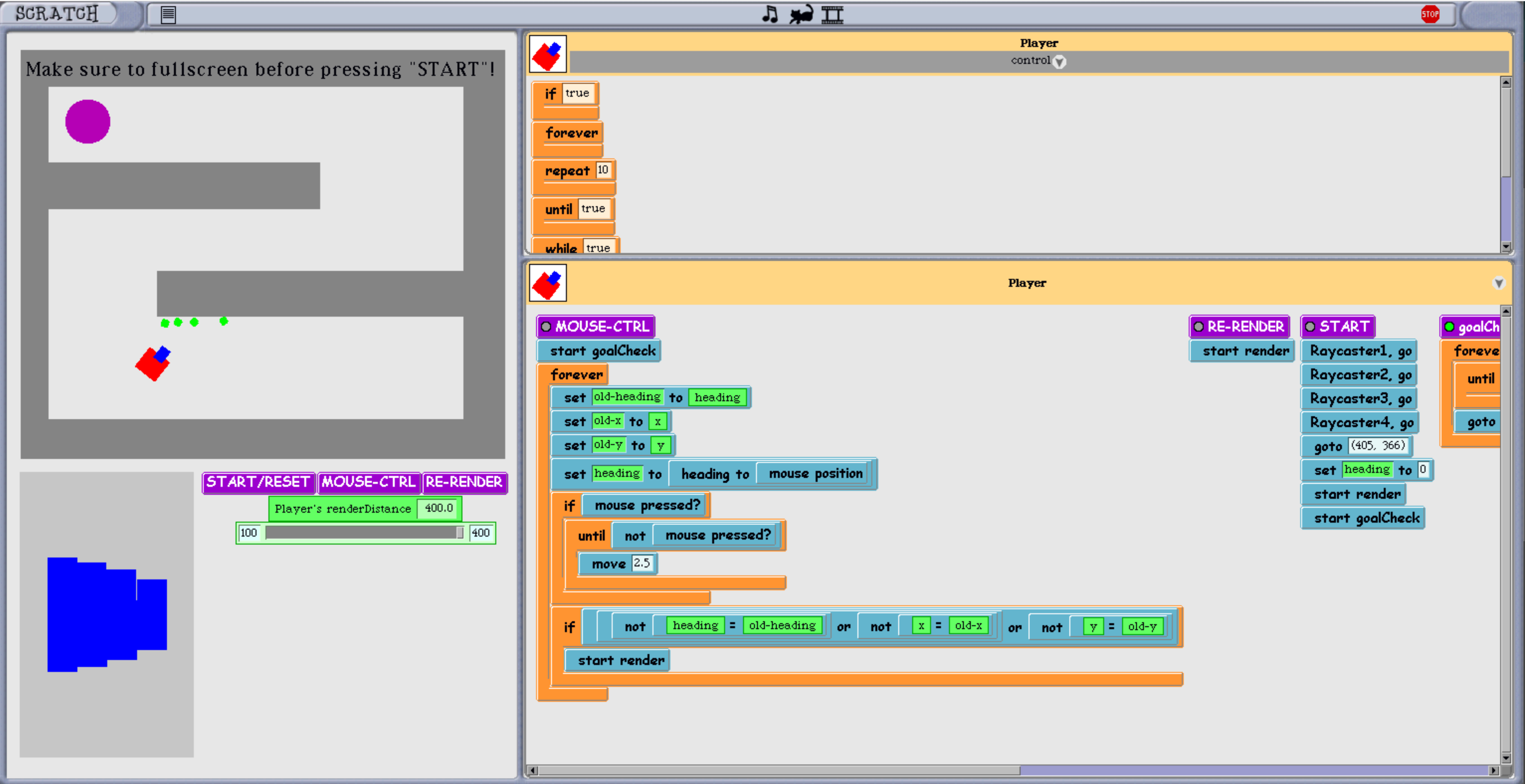
There's no clear pen block in this version, so I simply utilize a very large pen to redraw the original rendering window every cycle. Otherwise, it utilizes the same principles as nearly every other raycasting engine in Scratch; shooting out several “beams” to calculate the distance to a wall. It also has a customizable render distance and renders the (purple) goal in green.
The reason that the rendering window is only 4 columns wide is because, even running on a decent PC, this version of Scratch runs pretty slow. Even this engine takes about a quarter second to render, and although I've tested a “high-quality” version of this engine, it takes about half a minute to render a single scene.
(And yes, I am aware that there is no real use to this, but it was fun designing it. :P )
- ajskateboarder
-
 Scratcher

1000+ posts
Raycasting in Very Early Versions of Scratch
I could see why this would take a while, considering the blocks have to be translated into a corresponding Lisp/Smalltalk instruction (I'm pretty sure oct 2003 was written in those langs right?) which then also has to be interpreted - so basically a lot of overhead
Correct me if I'm wrong since I know almost zilch about these old Scratch versions
Correct me if I'm wrong since I know almost zilch about these old Scratch versions

Last edited by ajskateboarder (Dec. 11, 2023 12:04:24)
- CST1229
-
 Scratcher

1000+ posts
Raycasting in Very Early Versions of Scratch
(#2)I'm also fairly sure this version of Scratch also has lots of intentional waiting built-in (as in, each custom block call waits a frame).
I could see why this would take a while, considering the blocks have to be translated into a corresponding Lisp/Smalltalk instruction (I'm pretty sure oct 2003 was written in those langs right?) which then also has to be interpreted - so basically a lot of overtime
(Also, 11Oct03 was made in Squeak, just like 1.4.)
Last edited by CST1229 (Dec. 11, 2023 11:08:05)
- retro_person
-
Scratcher
100+ posts
Raycasting in Very Early Versions of Scratch
Would it be possible to increase the speed of the renderer in any way? (e.g. by bypassing the built-in “intentional” waiting)
- cookieclickerer33
-
 Scratcher

1000+ posts
Raycasting in Very Early Versions of Scratch
Id love to help optimize this, I did an extensive study on all scratch versions prior to 1.4 so I know the quirks of the versions
Is there any specific function that takes the longest/is likely the main part that’s slowing it down?
Is there any specific function that takes the longest/is likely the main part that’s slowing it down?
- retro_person
-
Scratcher
100+ posts
Raycasting in Very Early Versions of Scratch
Id love to help optimize this, I did an extensive study on all scratch versions prior to 1.4 so I know the quirks of the versionsSpecifically the actual “beam” sprites that measure the distance to a wall (that basically move a few steps at a time to be accurate) and the actual drawing sprites are very slow.
Is there any specific function that takes the longest/is likely the main part that’s slowing it down?
Also, here is the link to the original raycaster (as seen in the image in my first post) and here is the link to the “HD” version, which is a lot slower, if you're interested in modifying either.
- cookieclickerer33
-
Scratcher
1000+ posts
Raycasting in Very Early Versions of Scratch
(Can’t view the project now sorry!)
You could try to process all 4 rays at once by making multiple of them and having them all fire at the same time,
Another thing you could do is increasing the steps and do something like this
You could try to process all 4 rays at once by making multiple of them and having them all fire at the same time,
Another thing you could do is increasing the steps and do something like this
Function ({raycast::sensing}::ring)::sensing
repeat until <touching [wall v]?>
move (5) steps
end
repeat until <not <touching [wall v]?>
move (-1) steps
end
Answer [distance]::sensing cap
(Recreated to the best of my ability)- retro_person
-
Scratcher
100+ posts
Raycasting in Very Early Versions of Scratch
(Can’t view the project now sorry!)My current engine actually goes forward by 19 steps and back by 3 (instead of 5 and 1, which is I believe would be slower) using the same technique in your post, but is still very slow. (Thanks for the advice, though!)
You could try to process all 4 rays at once by making multiple of them and having them all fire at the same time,
Another thing you could do is increasing the steps and do something like this
-snip-
(Recreated to the best of my ability)
Last edited by retro_person (Dec. 11, 2023 19:11:39)
- cookieclickerer33
-
Scratcher
1000+ posts
Raycasting in Very Early Versions of Scratch
How precise is the drawing code?(Can’t view the project now sorry!)My current engine actually goes forward by 19 steps and back by 3 (instead of 5 and 1, which is I believe would be slower) using the same technique in your post, but is still very slow.
You could try to process all 4 rays at once by making multiple of them and having them all fire at the same time,
Another thing you could do is increasing the steps and do something like this
-snip-
(Recreated to the best of my ability)
Id ask to see all of the code but that’s probobly too much
- retro_person
-
Scratcher
100+ posts
Raycasting in Very Early Versions of Scratch
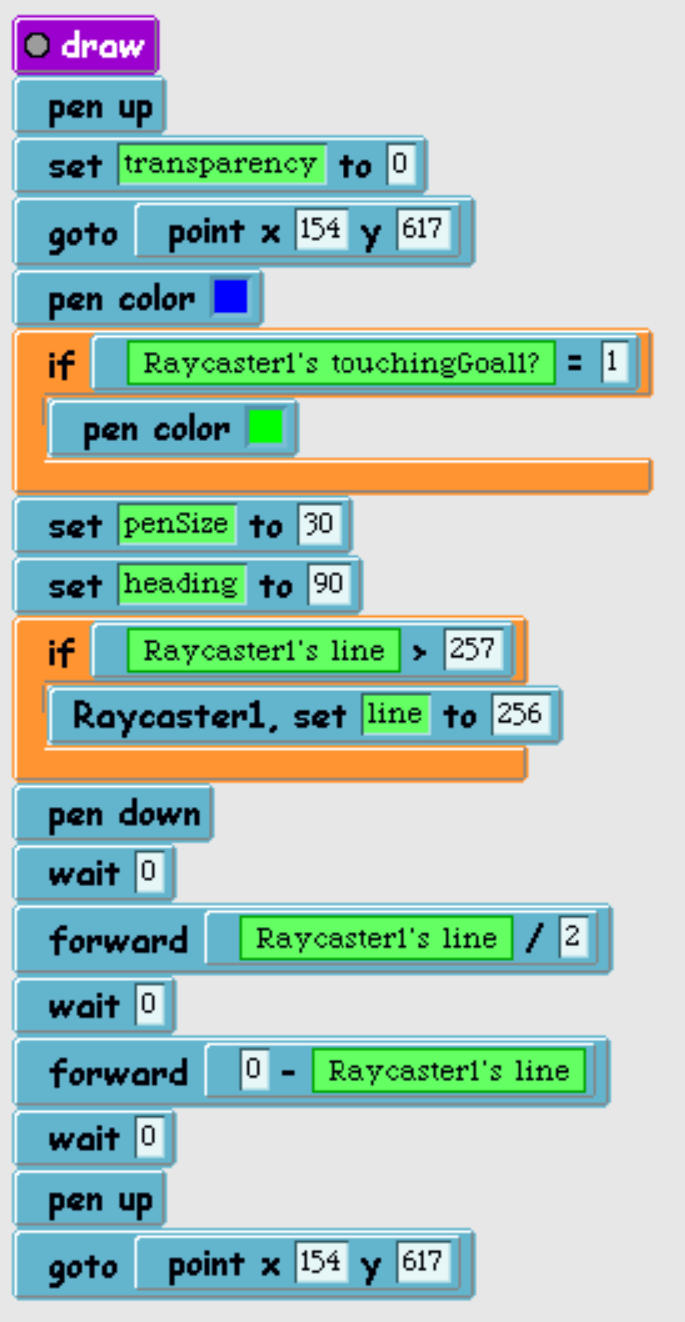
How precise is the drawing code?
Id ask to see all of the code but that’s probobly too much
- cookieclickerer33
-
Scratcher
1000+ posts
Raycasting in Very Early Versions of Scratch
i wondered why this looked so weird
my deep dive was before we found this version and i cant really help without being able to download the version myself
however i can still help after i experement a little with this version and it looks simalar to the prevously oldest version
my deep dive was before we found this version and i cant really help without being able to download the version myself
however i can still help after i experement a little with this version and it looks simalar to the prevously oldest version
Last edited by cookieclickerer33 (Dec. 11, 2023 20:39:37)
- cookieclickerer33
-
Scratcher
1000+ posts
Raycasting in Very Early Versions of Scratch
after some experementing i think ive come to a conclusion,
you should make a frame buffer. clear and draw things on the same frame so it looks like a fluid motion with input delay
you should make a frame buffer. clear and draw things on the same frame so it looks like a fluid motion with input delay
- retro_person
-
Scratcher
100+ posts
Raycasting in Very Early Versions of Scratch
after some experementing i think ive come to a conclusion,How should I go about doing that?
you should make a frame buffer. clear and draw things on the same frame so it looks like a fluid motion with input delay
- cookieclickerer33
-
Scratcher
1000+ posts
Raycasting in Very Early Versions of Scratch
thats the thing im not sure about. im better with the history and internal programming side of the old versions not this kinda thing, the code is preatty optiimisedafter some experementing i think ive come to a conclusion,How should I go about doing that?
you should make a frame buffer. clear and draw things on the same frame so it looks like a fluid motion with input delay
Last edited by cookieclickerer33 (Dec. 11, 2023 21:09:37)
- retro_person
-
Scratcher
100+ posts
Raycasting in Very Early Versions of Scratch
Yeah, fair. Do you have any other ideas for optimization?thats the thing im not sure about. im better with the history and internal programming side of the old versions not this kinda thing, the code is preatty optiimisedafter some experementing i think ive come to a conclusion,How should I go about doing that?
you should make a frame buffer. clear and draw things on the same frame so it looks like a fluid motion with input delay
- cookieclickerer33
-
Scratcher
1000+ posts
Raycasting in Very Early Versions of Scratch
just really try to optimise the code to be as streamline as possibleYeah, fair. Do you have any other ideas for optimization?thats the thing im not sure about. im better with the history and internal programming side of the old versions not this kinda thing, the code is preatty optiimisedafter some experementing i think ive come to a conclusion,How should I go about doing that?
you should make a frame buffer. clear and draw things on the same frame so it looks like a fluid motion with input delay
- retro_person
-
Scratcher
100+ posts
Raycasting in Very Early Versions of Scratch
There's no clear pen block in this version, so I simply utilize a very large pen to redraw the original rendering window every cycle.A friend recently let me know that the
answer[]::#63B5CEblock in this version actually executes the code inside of its argument. Therefore, it's possible to do something like this:

which selects the first instance of ScratchFrameMorph, and runs the clearPenTrails command.
- cookieclickerer33
-
Scratcher
1000+ posts
Raycasting in Very Early Versions of Scratch
Yep it both runs code and makes custom return functionsThere's no clear pen block in this version, so I simply utilize a very large pen to redraw the original rendering window every cycle.A friend recently let me know that theanswer[]::#63B5CEblock in this version actually executes the code inside of its argument. Therefore, it's possible to do something like this:
which selects the first instance of ScratchFrameMorph, and runs the clearPenTrails command.
RIp scratch 0.x answer block, we still feel the impact of your loss to this day
- thunderzee17
-
 Scratcher

72 posts
Raycasting in Very Early Versions of Scratch
Oh that
define Walls
define Rays<touching [ rays] ?>
- Discussion Forums
- » Advanced Topics
-
» Raycasting in Very Early Versions of Scratch