Discuss Scratch

- Discussion Forums
- » Collaboration
- » Discussion Forums Tutorial for Writing Relay
![[RSS Feed]](//cdn.scratch.mit.edu/scratchr2/static/__ff7229f036c458728e45c39b0751aa44__//djangobb_forum/img/feed-icon-small.png "[RSS Feed]")
![[RSS Feed]](http://cdn.scratch.mit.edu/scratchr2/static/__ff7229f036c458728e45c39b0751aa44__//djangobb_forum/img/feed-icon-small.png "[RSS Feed]")
- MBZ_901
-
 Scratcher

100+ posts
Discussion Forums Tutorial for Writing Relay
This is a step-by-step tutorial for members of the Writing Relay. I know this may sound somewhat basic to users of the Discussion Forums, but please read even if you are familiar with it. There is also some information specific to this project.
Thank you for reading and happy writing!
- PLEASE write your draft outside of the Discussion Forums. A Google Doc, a Word Doc, whatever. Write it someplace you know you'll be able to save it.
- Once you're ready to post your chapter, make sure you're on the right page. You should be at https://scratch.mit.edu/discuss/topic/449878/, and it should look something like this:
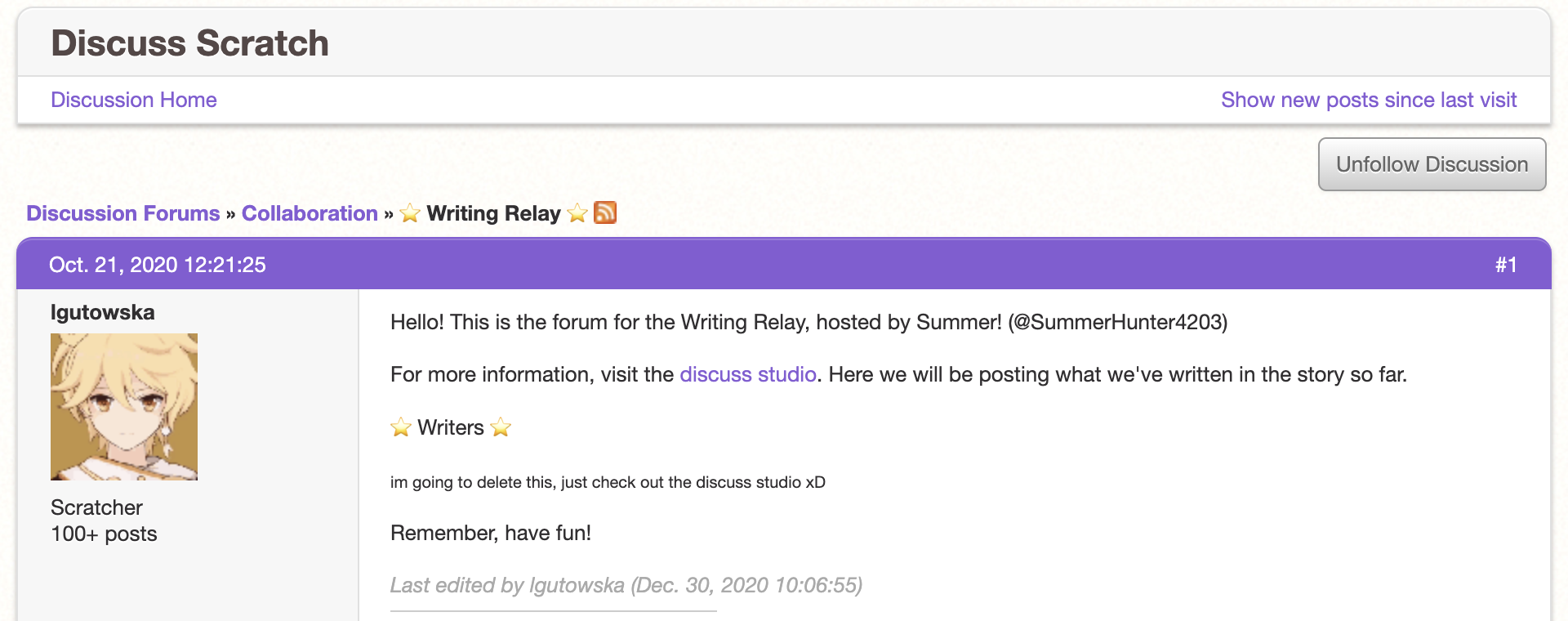
- Scroll down to the bottom until it says “New Reply.” That's where you'll copy/paste your chapter.

- The first thing you'll need is a header so that we can easily refer back to your chapter. It should say “Chapter 1” except with the right number (and make sure you write it like “1” and not “One”). Highlight the title and click on the “B.” This will bold the title.
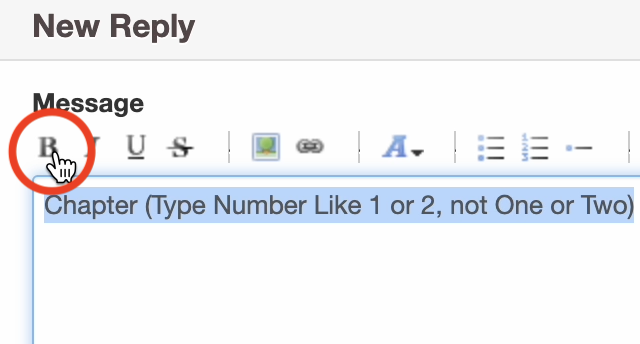
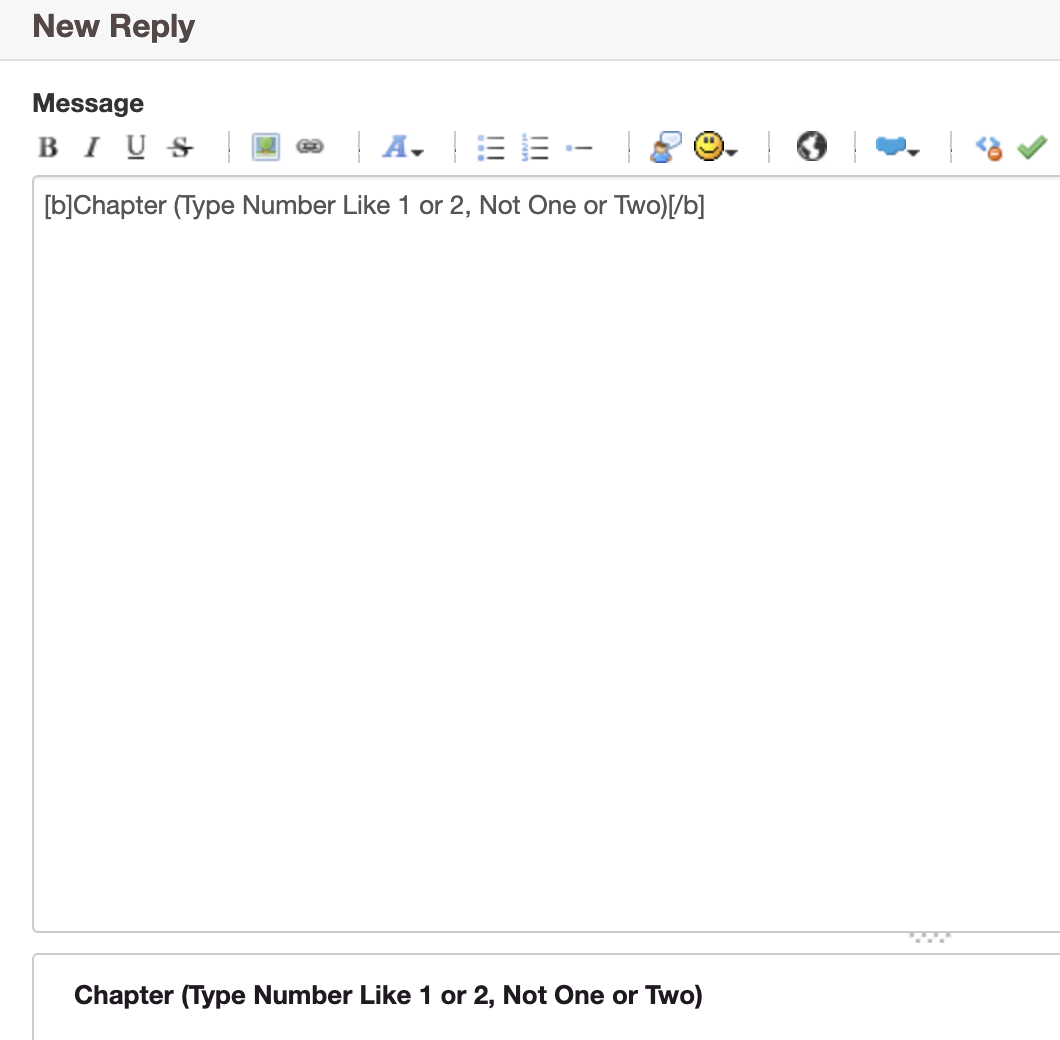
- In the code, it should look like:

- Next, you'll need to apply formatting to the rest of your chapter. Note that formatting WILL NOT carry over from your document. Use the “B” for bolding, the “I” for italics, the “U” for underlining, and the “S” for strikethrough. You most likely won't need to worry about any of the other formatting options. Also, make sure to indent! Indentation will also not carry over, but there's a workaround. Simply copy/paste this in front of anything you need to indent:
| |
(copy and paste the blank space in between the lines)
In case you need a refresher on indentation, you need to indent the start of every paragraph. Also, note that you should start a new paragraph every time a different character character speaks. Here's a little guide for punctuating dialogue:. .
It was a beautiful day. Bob was strolling along when he saw Alice.
“Hi, Alice,” said Bob. (note that it's “Hi, Alice,” with a COMMA at the end)
“Hello, Bob,” responded Alice. Alice paused to think. “Nice weather today.” (note that there's not a new paragraph because it's the SAME speaker)
“Indeed.” (note that it's a PERIOD now because there's no “said” anymore)
“I'll see you later, Bob!” (also, note that you don't need to clarify who's speaking when there's only two speakers and you already know who they are)
“Later, Alice!”
. . - Before you submit your post, you should make sure it's formatted properly. To do this, hit the green check mark.

- It will show you how your post will look with formatting applied. If something isn't working out, try re-following these instructions, looking for a tutorial, or asking me for help.
- Now that you're all ready to go, hit “Submit”!
- However… Sometimes submitting your chapter isn't the last step. If you notice an error or I ask you to change something, go down to the bottom of your post and hit “Edit.” Just don't change any plot elements after your chapter has been approved.

Thank you for reading and happy writing!
- Discussion Forums
- » Collaboration
-
» Discussion Forums Tutorial for Writing Relay