Discuss Scratch
- Discussion Forums
- » Help with Scripts
- » Player Moving Through Walls When Moving Too Fast
![[RSS Feed]](//cdn.scratch.mit.edu/scratchr2/static/__0658a36e9581019c3b12e5c74cd164da__//djangobb_forum/img/feed-icon-small.png "[RSS Feed]")
![[RSS Feed]](http://cdn.scratch.mit.edu/scratchr2/static/__0658a36e9581019c3b12e5c74cd164da__//djangobb_forum/img/feed-icon-small.png "[RSS Feed]")
- minekraftkid
-
 Scratcher

100+ posts
Player Moving Through Walls When Moving Too Fast
I am work on a platformer where the ground consists of line segments and the player is sphere. The problem is that when the player's speed is greater than their radius, they can “step” through walls when falling. I've drawn out a few ideas to address this issue, but I'd love to hear some general concepts if anyone has any better ideas. Heres the project: https://scratch.mit.edu/projects/871393661/
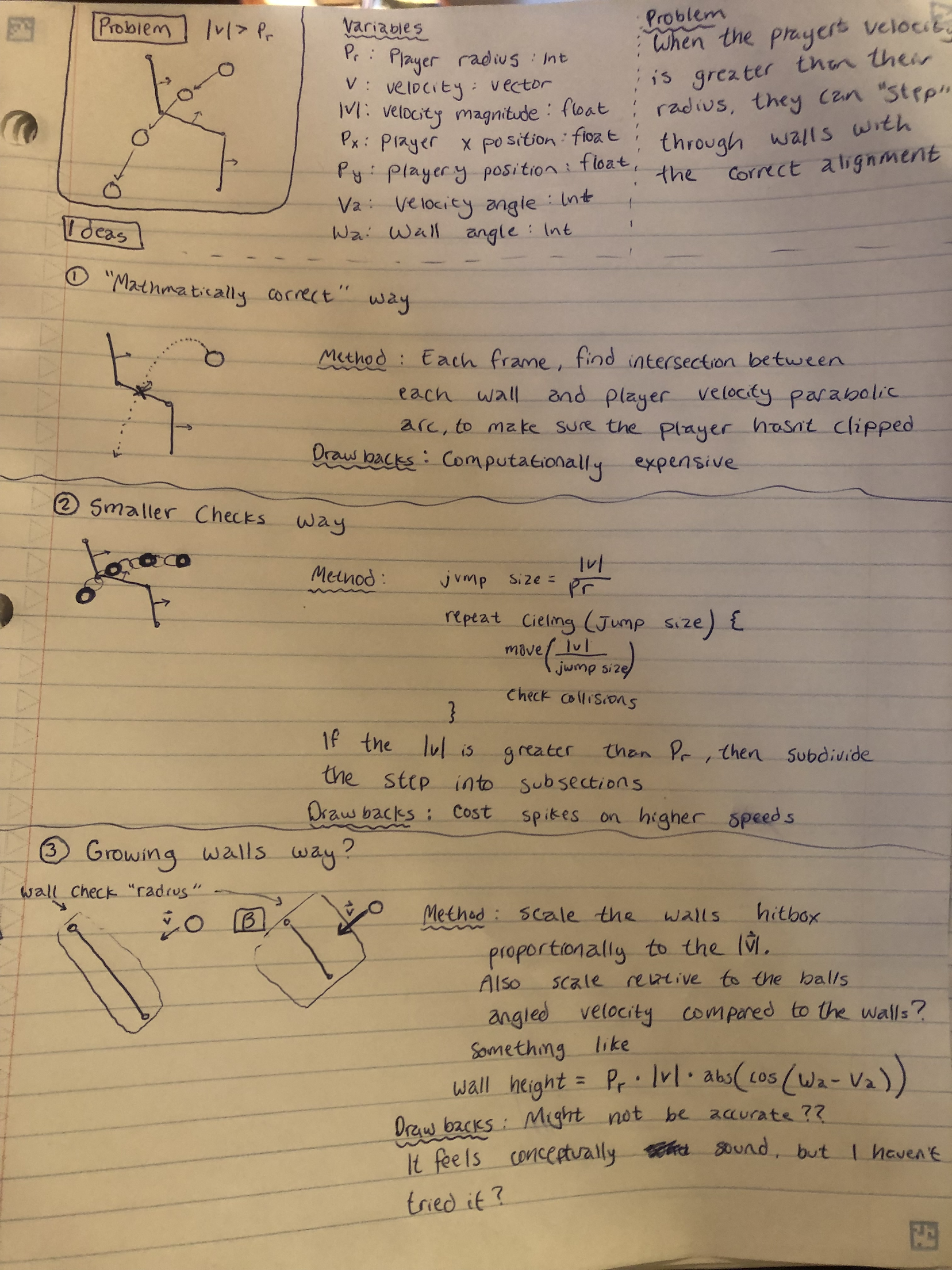
Just realizing I spelled ceiling wrong
Just realizing I spelled ceiling wrong
Last edited by minekraftkid (July 11, 2023 01:13:40)
- Mr_Woomy
-
 Scratcher

500+ posts
Player Moving Through Walls When Moving Too Fast
i think its cause the hitbox is a sphere
or just add a cap to the falling speed
or just add a cap to the falling speed
- minekraftkid
-
Scratcher
100+ posts
Player Moving Through Walls When Moving Too Fast
i think its cause the hitbox is a sphereHi @Mr Woomy, I appreciate you taking the time to provide feedback. Sadly, the hitbox being a sphere has nothing to do with this (that would make this problem much easier if it was though!). In this project, we move our player by what their velocity is each frame. If they get moving fast enough, the step size of moving them by their velocity is enough that they can go completely “through a wall” without ever being in a position where they are intersecting the wall.
or just add a cap to the falling speed
Capping the player's movement speed would eliminate this issue, however it would also make the physics not feel realistic, and not allow for momentum based puzzles. So unfortunately, this is not what I am looking for.
Happy scratching!
- Mr_Woomy
-
Scratcher
500+ posts
Player Moving Through Walls When Moving Too Fast
alright so i also think its the size of the wallsi think its cause the hitbox is a sphereHi @Mr Woomy, I appreciate you taking the time to provide feedback. Sadly, the hitbox being a sphere has nothing to do with this (that would make this problem much easier if it was though!). In this project, we move our player by what their velocity is each frame. If they get moving fast enough, the step size of moving them by their velocity is enough that they can go completely “through a wall” without ever being in a position where they are intersecting the wall.
or just add a cap to the falling speed
Capping the player's movement speed would eliminate this issue, however it would also make the physics not feel realistic, and not allow for momentum based puzzles. So unfortunately, this is not what I am looking for.
Happy scratching!
as you said you move so fast in that frame that the lil guy doesnt even interact with the wall but the way the map is built also makes this harder as some sections are a bit smaller
- minekraftkid
-
Scratcher
100+ posts
Player Moving Through Walls When Moving Too Fast
alright so i also think its the size of the walls@Mr_Woomy, thank you for the further input. Making the walls substantially thicker would make it so that the player could move faster, however there are several problems that this creates.
1) Thicker walls would cause incorrect collision behavior between walls angled sharply to eachother.
2) With the speeds the player will be reaching, the walls would be thick enough to be a substantial obstruction.
However, as mentioned in the original post, dynamically scaling the wall hitbox proportionally to the players speed might fix this issue, however I am unsure if it is mathematically sound.
If I tried to implement this method, I would need to somehow make the angle between the player in the wall be accounted for when scaling the hitbox. As an example, picture the player moving quickly parallel to the wall. We wouldn't want the wall's hitbox to become bigger and snatch the player. We only want that when the player is moving perpendicular to the wall.
I am currently playing with this concept, however I'm hoping other users use or have heard of other methods.
I would like to note that when I say the wall's hitbox would grow, it would not grow visually for the user.
Last edited by minekraftkid (July 11, 2023 02:01:45)
- Mr_Woomy
-
Scratcher
500+ posts
Player Moving Through Walls When Moving Too Fast
i had a “collision line” idea which draws a certain colored line between movement frames so it can act as backup collision or something close to thatalright so i also think its the size of the walls@Mr_Woomy, thank you for the further input. Making the walls substantially thicker would make it so that the player could move faster, however there are several problems that this creates.
1) Thicker walls would cause incorrect collision behavior between walls angled sharply to eachother.
2) With the speeds the player will be reaching, the walls would be thick enough to be a substantial obstruction.
However, as mentioned in the original post, dynamically scaling the wall hitbox proportionally to the players speed might fix this issue, however I am unsure if it is mathematically sound.
If I tried to implement this method, I would need to somehow make the angle between the player in the wall be accounted for when scaling the hitbox. As an example, picture the player moving quickly parallel to the wall. We wouldn't want the wall's hitbox to become bigger and snatch the player. We only want that when the player is moving perpendicular to the wall.
I am currently playing with this concept, however I'm hoping other users use or have heard of other methods.
I would like to note that when I say the wall's hitbox would grow, it would not grow visually for the user.
- minekraftkid
-
Scratcher
100+ posts
Player Moving Through Walls When Moving Too Fast
i had a “collision line” idea which draws a certain colored line between movement frames so it can act as backup collision or something close to that
@Mr_Woomy, I'm glad you had an idea, however it's effectiveness is limited by how little you share of it. Could you elaborate?
- Mr_Woomy
-
Scratcher
500+ posts
Player Moving Through Walls When Moving Too Fast
right before the change x by (speed) change y by (yspeed) have a line drawn and if the drawn line touches collision it does a thing to stop iti had a “collision line” idea which draws a certain colored line between movement frames so it can act as backup collision or something close to that
@Mr_Woomy, I'm glad you had an idea, however it's effectiveness is limited by how little you share of it. Could you elaborate?
- minekraftkid
-
Scratcher
100+ posts
Player Moving Through Walls When Moving Too Fast
right before the change x by (speed) change y by (yspeed) have a line drawn and if the drawn line touches collision it does a thing to stop it
@Mr_Woomy, thanks for elaborating. Doing a raycast to where the player intends to go to is an interesting idea. The only issue I could see with that would be dealing with what happens if the ray intersects multiple ground line segments, but the idea holds some merit. I'll play some with this one, thanks.
- Ninja_666
-
 Scratcher

100+ posts
Player Moving Through Walls When Moving Too Fast
So the very bad and terrible options is thickening the walls but that is terrible. Another option is change to a bigger circle costume during a tick and see if there is a wall near and if there is then check more thoroughly. This is not a great idea but it's not too bad. Another idea is to store all the lines and use maths to figure out if the line goes inside the sphere. That is complicated but you use less computer cells. But you use more brain cells…
Also, you're project is really well made.
Also, you're project is really well made.

- Woodfur
-
 Scratcher

100+ posts
Player Moving Through Walls When Moving Too Fast
Instead of moving some distance at a time and then checking for collisions, you could always define a custom block that runs without refresh and checks for collisions at multiple intermediate points.
where d is a little less than the diameter of your circle
define move (v) steps
repeat ([ceiling v] of ((v) / (d)))
move (d) steps
if colliding stop etc
end
move ((d) - ((v) mod (d))) steps
where d is a little less than the diameter of your circle
- minekraftkid
-
Scratcher
100+ posts
Player Moving Through Walls When Moving Too Fast
Instead of moving some distance at a time and then checking for collisions, you could always define a custom block that runs without refresh and checks for collisions at multiple intermediate pointsHi @Woodfur, thanks for taking the time to respond. This is a viable option, however it would require me to optimize my broad scope collision detection to run the game at the same speed, since using this would raise the cost of the function.
So the very bad and terrible options is thickening the walls but that is terrible. Another option is change to a bigger circle costume during a tick and see if there is a wall near and if there is then check more thoroughly. This is not a great idea but it's not too bad. Another idea is to store all the lines and use maths to figure out if the line goes inside the sphere. That is complicated but you use less computer cells. But you use more brain cells…@Ninja_666, I appreciate you weighing in. Using large circles to find the largest safest distance the player could travel is a viable option. In fact, that technique is used in rendering, and is called ray marching. I would have to completely rewrite the project to use signed distance fields, but that could be an interesting challenge.
Seeing what wall lines go inside the sphere is exactly what I am doing currently. The problem is that when our speed gets too fast, we sometimes never even overlap with a wall when we are “stepping forward” by the players velocity.
While I agree that keeping the walls thick all of the time is not the best idea, I'm wondering how effective scaling the wall's hitbox based on the players velocity and angle would be. Something like:
[For easier reading, I am simplifying some functions] :: grey ring
set [velocity magnitude v] to ([sqrt v] of (((velocity x) * (velocity x)) + ((velocity y) * (velocity y))))
set [velocity angle v] to ([arctan2 v] of (velocity y) (velocity x) :: operators )
set [wall padding v] to (([cos v] of ((wall angle) - (velocity angle))) * (velocity magnitude))
set [wall cos v] to ([cos v] of (wall angle))
set [wall sin v] to ([sin v] of (wall angle))
set [player projected x v] to ((((player y) - (wall y)) * (wall cos)) + (((player x) - (wall x)) * (wall sin))) // Translate and rotate x relative to wall
set [player projected x v] to ((((player x) - (wall x)) * (wall cos)) - (((player y) - (wall y)) * (wall sin))) // Translate and rotate y relative to wall
set [inside wall x v] to <(([abs v] of(played projected x)) + (player radius)) < ((wall width) / (2))>
set [inside wall y v] to <([abs v] of (player projected y)) < ([max v] of (wall padding)(player radius) :: operators)>
if <<inside wall x :: variables> and <inside wall y :: variables>> then
collision found :: custom
end
If you want to see a mockup of this, I've been playing with this idea in desmos: https://www.desmos.com/calculator/fhww14bfhm
- NMario84
-
 Scratcher

1000+ posts
Player Moving Through Walls When Moving Too Fast
Couldn't you simply move the player 1 pixel per frame, then just make a custom block, run without screen refresh with a repeat speed function?
Example:
What's happening is that the movement is being run/repeated by how fast you need the player able to move. This script is literally changing the players X position by 1 pixel each of the 50 loops, checking against the walls in the process of each movement.
When I set this ‘Speed’ variable slider to 1000, it still could NOT escape an empty box that is literally 1 pixel thick. The player sprite was even a very small circle.
Example:
when green flag clicked
go to x: (0) y: (0)
set [Speed v] to (50)
forever
Movement
end

define Movement
repeat (speed)
change x by ((1) * (<key (right arrow v) pressed?> - <key (left arrow v) pressed?>))
if <touching (area v)?> then
change x by ((-1) * (<key (right arrow v) pressed?> - <key (left arrow v) pressed?>))
end
What's happening is that the movement is being run/repeated by how fast you need the player able to move. This script is literally changing the players X position by 1 pixel each of the 50 loops, checking against the walls in the process of each movement.
When I set this ‘Speed’ variable slider to 1000, it still could NOT escape an empty box that is literally 1 pixel thick. The player sprite was even a very small circle.
- minekraftkid
-
Scratcher
100+ posts
Player Moving Through Walls When Moving Too Fast
Couldn't you simply move the player 1 pixel per frame, then just make a custom block, run without screen refresh with a repeat speed function?@NMario84, thanks for providing an idea. First, if you view the project you will notice that I am mathematically handling collision detection instead of using sensing blocks. This offers several benefits for accurately simulating the momentum transfer, but for the sake of this explanation lets just say that sensing blocks are off the table (This also allows me to snap the player to a wall without needing a loop, which is nice). We currently are not working with any pre-collision handling such as quad trees or AABB tests, so each wall segment will be iterated through each tick. If we have a handful of walls, lets lowball it and say 30 for now, and we are moving the player at a magnitude of 30 pixels / tick, that is 900 collisions to check. The cost of this adds up fairly quickly. As mentioned in the original post, we technically only have to break the step size down by multiples of the player radius, because this guarantees the player will always intersect with a wall they are move towards. That being said, a script like this will still cause the cost to spike when the player is moving at higher speeds.
Regardless, it is still a solid idea. That being said, I'm hoping that there is a cost effective way to work past this problem. Happy scratching!
- NMario84
-
Scratcher
1000+ posts
Player Moving Through Walls When Moving Too Fast
This really depends how “fast” you need the player to move. In reality, anything higher than say, 500 is going to be “way too fast” to see anyway. 100 would be fast enough.
Perhaps maybe you could make it ignore, or skip certain scripts if there are no collisions needed to be checked in the process?
Perhaps maybe you could make it ignore, or skip certain scripts if there are no collisions needed to be checked in the process?
- minekraftkid
-
Scratcher
100+ posts
Player Moving Through Walls When Moving Too Fast
This really depends how “fast” you need the player to move. In reality, anything higher than say, 500 is going to be “way too fast” to see anyway. 100 would be fast enough.That’s an interesting idea. I’m already working on optimizations for loading zones, so this would fit nicely into that. I’ll play with this some.
Perhaps maybe you could make it ignore, or skip certain scripts if there are no collisions needed to be checked in the process?
- NeonG4
-
 Scratcher

1000+ posts
Player Moving Through Walls When Moving Too Fast
snipThat’s an interesting idea. I’m already working on optimizations for loading zones, so this would fit nicely into that. I’ll play with this some.
You have to check if the players trajectory is going to intersect with any walls, and if so, you have to calculate that point, and set the player position to it. I'm unsure which custom block calculates player movement, could you tell me?
- minekraftkid
-
Scratcher
100+ posts
Player Moving Through Walls When Moving Too Fast
I'm unsure which custom block calculates player movement, could you tell me?Collision detection is happening in the wall tick block. It iterates through the walls, translates and rotates the player to them as if they were on the origin, and performs a simple AABB check. The player is snapped to the wall + their radius if they are colliding, and the velocity is set as the relative projected x velocity. This is also where we handle some of the portal logic, and a few other things to do with the wall like rounded egdes.
Sorry, the entire project used to be commented out but they were removed when I rewrote a section.

- minekraftkid
-
Scratcher
100+ posts
Player Moving Through Walls When Moving Too Fast
While I agree that keeping the walls thick all of the time is not the best idea, I'm wondering how effective scaling the wall's hitbox based on the players velocity and angle would be.
I did it! This actually works even though it probably shouldn't: https://scratch.mit.edu/projects/873899981/
Thanks y'all for all of the input.
- Ninja_666
-
Scratcher
100+ posts
Player Moving Through Walls When Moving Too Fast
Idea 2 may cost spikes on higher speeds but surely, you're not going 50 circles a frame? And you can limit the x and y speed per frame right?
Edit: Did not see the post before
Edit: Did not see the post before
Last edited by Ninja_666 (July 12, 2023 06:52:11)
- Discussion Forums
- » Help with Scripts
-
» Player Moving Through Walls When Moving Too Fast