Discuss Scratch

- Discussion Forums
- » Bugs and Glitches
- » Comments in the code become tangled after Clean Up Blocks
![[RSS Feed]](//cdn.scratch.mit.edu/scratchr2/static/__4e0742d12e7ec27fbe5c4d5078faf541__//djangobb_forum/img/feed-icon-small.png "[RSS Feed]")
![[RSS Feed]](http://cdn.scratch.mit.edu/scratchr2/static/__4e0742d12e7ec27fbe5c4d5078faf541__//djangobb_forum/img/feed-icon-small.png "[RSS Feed]")
- TeenySpoon
-
 Scratcher

500+ posts
Comments in the code become tangled after Clean Up Blocks
My browser / operating system: Windows NT 10.0, Chrome 114.0.0.0, No Flash version detected
Hi!
This has happened to me more than once. I like to leave comments in my code so I know what it does, especially if it is complex. Unfortunately, this causes some problems.
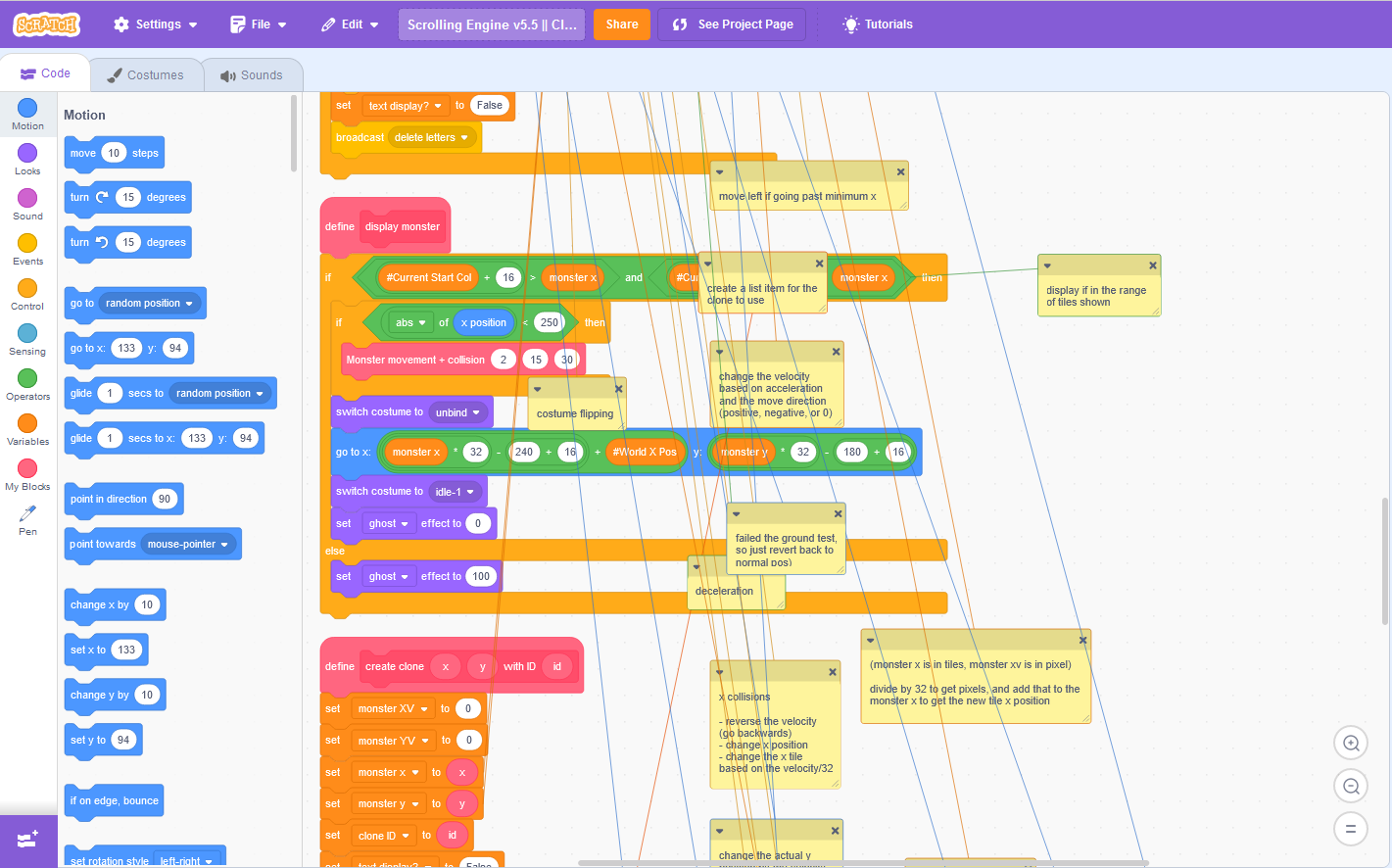
Bug description: I opened up my project to see that all the comments I had left in my code had become tangled! As in all the comments were nowhere near the code they were pointing to, and all the strings were crisscrossed.
When it started: I'm not sure, because it happens to me occasionally, not just this one time. For the most recent time though, I noticed it last night (June 30 at around 8-9 EST)
Where it is: the Scratch project code editor
A link: Here is the most recent one: https://scratch.mit.edu/projects/869094682/editor Look at the “Swamperholic” sprite.
Reproduction steps: Well, it usually happens in sprites with a lot of code (over 100 blocks). Make a lot of comments, and make sure they are attached to blocks (not floating in the space). Use “Clean Up Blocks”. After leaving the project for a while (a day or two) look at the sprite's comments again. They will be tangled.
Expected result: For my coding comments to be neat, organized, and in the same place as I left it.
Actual result: Comments crisscrossing each other and either way above or way below the script it is actually referring to.
Screenshot:
Hi!
This has happened to me more than once. I like to leave comments in my code so I know what it does, especially if it is complex. Unfortunately, this causes some problems.
Bug description: I opened up my project to see that all the comments I had left in my code had become tangled! As in all the comments were nowhere near the code they were pointing to, and all the strings were crisscrossed.
When it started: I'm not sure, because it happens to me occasionally, not just this one time. For the most recent time though, I noticed it last night (June 30 at around 8-9 EST)
Where it is: the Scratch project code editor
A link: Here is the most recent one: https://scratch.mit.edu/projects/869094682/editor Look at the “Swamperholic” sprite.
Reproduction steps: Well, it usually happens in sprites with a lot of code (over 100 blocks). Make a lot of comments, and make sure they are attached to blocks (not floating in the space). Use “Clean Up Blocks”. After leaving the project for a while (a day or two) look at the sprite's comments again. They will be tangled.
Expected result: For my coding comments to be neat, organized, and in the same place as I left it.
Actual result: Comments crisscrossing each other and either way above or way below the script it is actually referring to.
Screenshot:
- Discussion Forums
- » Bugs and Glitches
-
» Comments in the code become tangled after Clean Up Blocks