Discuss Scratch

- Discussion Forums
- » Help with Scripts
- » Adding Inputs to :Make a Block"
![[RSS Feed]](//cdn.scratch.mit.edu/scratchr2/static/__b3a0234be9d6cf9c4178ac9bbd21a1bc__//djangobb_forum/img/feed-icon-small.png "[RSS Feed]")
![[RSS Feed]](http://cdn.scratch.mit.edu/scratchr2/static/__b3a0234be9d6cf9c4178ac9bbd21a1bc__//djangobb_forum/img/feed-icon-small.png "[RSS Feed]")
- MrsStoodley
-
 Teacher

2 posts
Adding Inputs to :Make a Block"
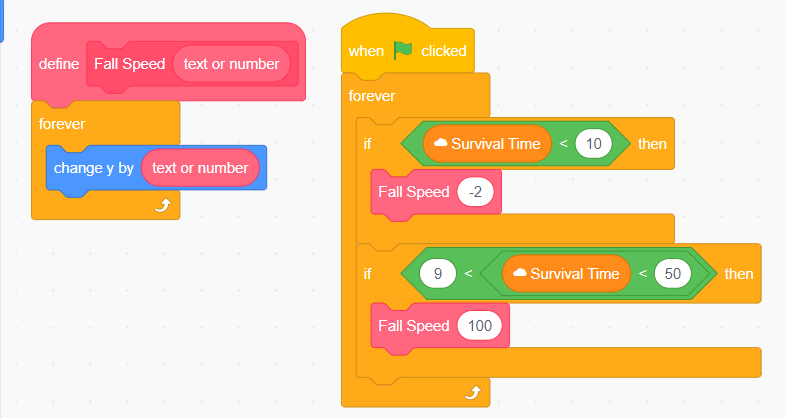
I'm doing an assignment for an online course, and I need to create a programme with a “make a block” which uses an input. I'm not sure if I fully understand adding an input to a block I've made. I've made a block to set the speed of my spiders' fall, and change the input so that it increases as the time increases, however the code doesn't work. My experiments seem to show that you can only have an input once in the code, not change it with conditionals. If this is the case, then why have inputs? Image of my block of code that doesn't work, full game link here (bits are currently disconnected/not working while I'm working on this bug)
Help! TIA!
https://imagizer.imageshack.com/img923/9341/P91ZHe.png
Help! TIA!
https://imagizer.imageshack.com/img923/9341/P91ZHe.png
- legendary34678
-
 Scratcher

1000+ posts
Adding Inputs to :Make a Block"
Custom blocks are basically Scratch's version of functions. Functions are very important in code! The way you implemented your custom blocks seems to work. However, as you mentioned, the spiders aren't changing their speed when Survival Time is more than 20 seconds! Let's find out why.
It seems like you have a forever loop inside your custom block definition. That's not a good idea because this means the control will get passed to the custom block but it will never return to the main code. This is why you should stick to having a forever loop outside of custom blocks.
If you simply remove the forever loop, it looks like the speed should increase just as you wanted! Using custom blocks can start simple, but they are capable of a lot more! They can help shorten your code by reducing really repetitive, bulky bunches of code and you can also take advantage of the handy “run without screen refresh” feature to run all of the code in a custom block extremely fast!
Hope this helped, and feel free to ask any questions!
It seems like you have a forever loop inside your custom block definition. That's not a good idea because this means the control will get passed to the custom block but it will never return to the main code. This is why you should stick to having a forever loop outside of custom blocks.
TIP: Never put a forever loop in a custom block definition!
If you simply remove the forever loop, it looks like the speed should increase just as you wanted! Using custom blocks can start simple, but they are capable of a lot more! They can help shorten your code by reducing really repetitive, bulky bunches of code and you can also take advantage of the handy “run without screen refresh” feature to run all of the code in a custom block extremely fast!
Hope this helped, and feel free to ask any questions!
- awesome-llama
-
 Scratcher

1000+ posts
Adding Inputs to :Make a Block"
Have a look at the scratch wiki, I think it does a good job at explaining them:
https://en.scratch-wiki.info/wiki/My_Blocks
Though in my opinion (and against one example shown in the wiki), the use of never-ending blocks such as forever within the custom block is not the right use case. Custom blocks are for when you have a certain task, and you want to simplify your code, they shouldn't be a replacement for an entire script, only parts of it.
As for the inputs, treat them as parameters that modify how the custom block runs in the same way parameters exist on all the normal blocks. Anything that needs to change should be handled with variables (and variables used exclusively within a custom block is something that you may want to try).
https://en.scratch-wiki.info/wiki/My_Blocks
Though in my opinion (and against one example shown in the wiki), the use of never-ending blocks such as forever within the custom block is not the right use case. Custom blocks are for when you have a certain task, and you want to simplify your code, they shouldn't be a replacement for an entire script, only parts of it.
As for the inputs, treat them as parameters that modify how the custom block runs in the same way parameters exist on all the normal blocks. Anything that needs to change should be handled with variables (and variables used exclusively within a custom block is something that you may want to try).
- deck26
-
 Scratcher

1000+ posts
Adding Inputs to :Make a Block"
Think of the example where you want a custom block to draw a circle. The inputs might be x and y for position and the radius or diameter. So you could then easily draw 3 circles just by doing
define draw-circle (x) (y) (radius)which is nice and concise. If you tried to do this in another way you'd either be setting 3 parameters and broadcasting OR having a script for each circle OR need lists of the values for a script to access. None of those would be nearly as easy to understand or as neat within the project.
code here
draw-circle (50) (100) (25)
draw-circle (90) (-100) (40)
draw-circle (150) (10) (60)
- fluo1234
-
 Scratcher

100+ posts
Adding Inputs to :Make a Block"
you put a forever loop inside of the myblocks, and the code waits for my blocks to end, so because the myblock never ends the code wont get to the other parts and stays on the myblock
Last edited by fluo1234 (Feb. 27, 2023 17:34:07)
- Discussion Forums
- » Help with Scripts
-
» Adding Inputs to :Make a Block"