Discuss Scratch

- Discussion Forums
- » Help with Scripts
- » Moving duplicate sprites to a new random position
![[RSS Feed]](//cdn.scratch.mit.edu/scratchr2/static/__ff7229f036c458728e45c39b0751aa44__//djangobb_forum/img/feed-icon-small.png "[RSS Feed]")
![[RSS Feed]](http://cdn.scratch.mit.edu/scratchr2/static/__ff7229f036c458728e45c39b0751aa44__//djangobb_forum/img/feed-icon-small.png "[RSS Feed]")
- theoldprogramer2
-
 Teacher

3 posts
Moving duplicate sprites to a new random position
Teaching 5th grade to make a predator / prey game. Game starts with a predator, and a prey sprite with several duplicates of the prey sprite. When predator touches prey, prey hides. So far no problem. At this point, I would like all the duplicates of the prey sprite move to a new random position. Any suggestions? (Even ChatGPT is struggling with this!!)
Any help for my 5th grade class (and their teacher!) would be most appreciated!
Any help for my 5th grade class (and their teacher!) would be most appreciated!
- medians
-
 Scratcher

1000+ posts
Moving duplicate sprites to a new random position
You can use this block:

If you want to also check if it's a clone:
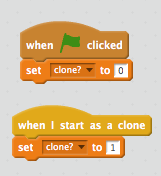
Note: The variable must be sprite only, 1 represents a clone, and 0 means that it isn't a clone.
If you want to also check if it's a clone:
Note: The variable must be sprite only, 1 represents a clone, and 0 means that it isn't a clone.
- theoldprogramer2
-
Teacher
3 posts
Moving duplicate sprites to a new random position
Thanks for the suggestion! I am currently using the go to random position block. I am not sure I get the connection with checking to see if it is a clone or not. But I will try a few things based on your suggestion and see what happens! Thanks again!
- legendary34678
-
 Scratcher

1000+ posts
Moving duplicate sprites to a new random position
Try using a broadcast block. After a clone is eaten, it broadcasts a message and then deletes itself. Then, when the other clones receives the broadcast message (yes, clones receive broadcast messages too) they can randomize their position.
- theoldprogramer2
-
Teacher
3 posts
Moving duplicate sprites to a new random position
Thanks, I will give that a try. Appreciate the help! Wayne
- Discussion Forums
- » Help with Scripts
-
» Moving duplicate sprites to a new random position