Discuss Scratch

- Discussion Forums
- » Advanced Topics
- » All the PyQT web browser examples.. fail.
![[RSS Feed]](//cdn.scratch.mit.edu/scratchr2/static/__ff7229f036c458728e45c39b0751aa44__//djangobb_forum/img/feed-icon-small.png "[RSS Feed]")
![[RSS Feed]](http://cdn.scratch.mit.edu/scratchr2/static/__ff7229f036c458728e45c39b0751aa44__//djangobb_forum/img/feed-icon-small.png "[RSS Feed]")
- MagicCrayon9342
-
 Scratcher

1000+ posts
All the PyQT web browser examples.. fail.
There's many so here's one:
Pretty much if you search PyQT Web Browser you will get an example that looks like the code above. With different varieties and amounts of functionality. In each, theres a screenshot of the code in action. However, no web content actually appears in the viewer. It's just a white screen. Why is this?
import sys
from PyQt5.QtCore import *
from PyQt5.QtWidgets import *
from PyQt5.QtWebEngineWidgets import *

class MainScreen(QMainWindow):
    def __init__(self):
        super(MainScreen,self).__init__()
        self.Browser = QWebEngineView()
        self.Browser.setUrl(QUrl('https://google.com'))
        self.setCentralWidget(self.Browser)
        self.showMaximized()
        NavBar=QToolBar()
        self.addToolBar(NavBar)
        BackButton=QAction('Back',self)
        BackButton.triggered.connect(self.Browser.back)
        NavBar.addAction(BackButton)

        ForwardButton = QAction('Forward',self)
        ForwardButton.triggered.connect(self.Browser.forward)
        NavBar.addAction(ForwardButton)

        ReloadButton = QAction('Reload',self)
        ReloadButton.triggered.connect(self.Browser.reload)

        NavBar.addAction(ReloadButton)
        HomeButton = QAction('Home',self)
        HomeButton.triggered.connect(self.NavigateHome)
        self.UrlBar=QLineEdit()
        self.UrlBar.returnPressed.connect(self.NavigateToUrl)

        NavBar.addWidget(self.UrlBar)
        self.Browser.urlChanged.connect(self.UpdateUrl)

    def NavigateHome(self):
        self.Browser.setUrl("http://google.com")

    def NavigateToUrl(self):
        Url = self.UrlBar.text()
        self.Browser.setUrl(QUrl('https://google.com'))

    def UpdateUrl(self,p):
        self.UrlBar.setText(str(p))

Application = QApplication(sys.argv)
QApplication.setApplicationName('web browser by- DataFlair')
Window = MainScreen()
Application.exec()
Pretty much if you search PyQT Web Browser you will get an example that looks like the code above. With different varieties and amounts of functionality. In each, theres a screenshot of the code in action. However, no web content actually appears in the viewer. It's just a white screen. Why is this?
Last edited by MagicCrayon9342 (Jan. 7, 2023 21:57:50)
- uwv
-
 Scratcher

1000+ posts
All the PyQT web browser examples.. fail.
QT's webview isn't supported anymore iirc
- MagicCrayon9342
-
Scratcher
1000+ posts
All the PyQT web browser examples.. fail.
QT's webview isn't supported anymore iircOh… guess I'll have to go the GTK route then.
- Maximouse
-
 Scratcher

1000+ posts
All the PyQT web browser examples.. fail.
QT's webview isn't supported anymore iircQtWebKit is deprecated. This example uses Qt WebEngine, which is still actively developed.
- Maximouse
-
Scratcher
1000+ posts
All the PyQT web browser examples.. fail.
Pretty much if you search PyQT Web Browser you will get an example that looks like the code above. With different varieties and amounts of functionality. In each, theres a screenshot of the code in action. However, no web content actually appears in the viewer. It's just a white screen. Why is this?The code you posted works for me:
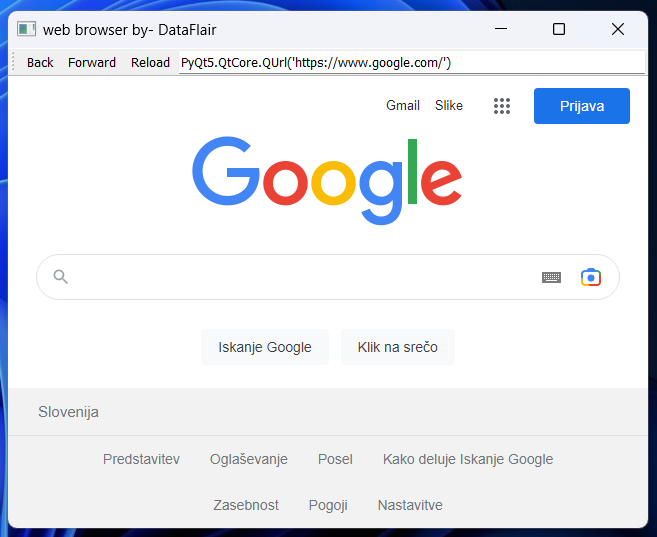
Note that you need to install both PyQt5 and PyQtWebEngine from PyPI to run it.
- MagicCrayon9342
-
Scratcher
1000+ posts
All the PyQT web browser examples.. fail.
I'm on Linux is that why?Pretty much if you search PyQT Web Browser you will get an example that looks like the code above. With different varieties and amounts of functionality. In each, theres a screenshot of the code in action. However, no web content actually appears in the viewer. It's just a white screen. Why is this?The code you posted works for me:
Note that you need to install both PyQt5 and PyQtWebEngine from PyPI to run it.
- Maximouse
-
Scratcher
1000+ posts
All the PyQT web browser examples.. fail.
I'm on Linux is that why?I've used PyQt's WebEngine on Linux without problems, and there isn't anything specific to Windows in this code either, so probably not.
- Discussion Forums
- » Advanced Topics
-
» All the PyQT web browser examples.. fail.