Discuss Scratch

- Discussion Forums
- » Help with Scripts
- » How to make a sprite go to a random x position?
![[RSS Feed]](//cdn.scratch.mit.edu/scratchr2/static/__ff7229f036c458728e45c39b0751aa44__//djangobb_forum/img/feed-icon-small.png "[RSS Feed]")
![[RSS Feed]](http://cdn.scratch.mit.edu/scratchr2/static/__ff7229f036c458728e45c39b0751aa44__//djangobb_forum/img/feed-icon-small.png "[RSS Feed]")
- yayitsrose
-
 New Scratcher

1 post
How to make a sprite go to a random x position?
I'm making a game where a sprite always starts at the top of the screen and goes down, but each time it hits the bottom, it spawns at a random x position and does it again. I know how to choose a random position for both x and y, but I want only the x position to be random. I want it to always start at the top of the screen, but a random left/right position (x position) If anyone knows how to do that, it would be great, thx.
- groggs
-
 Scratcher

100+ posts
How to make a sprite go to a random x position?
I'm making a game where a sprite always starts at the top of the screen and goes down, but each time it hits the bottom, it spawns at a random x position and does it again. I know how to choose a random position for both x and y, but I want only the x position to be random. I want it to always start at the top of the screen, but a random left/right position (x position) If anyone knows how to do that, it would be great, thx.Hi there!
Is this what you meant?
go to x: (pick random (-200) to (200)) y: (y position)
- naturefood9
-
 Scratcher

56 posts
How to make a sprite go to a random x position?
set to
go to x: (variable) y: (whatever you want)
You can use a
Foverver
set (x variable) to (mouse x)
to find the highest and lowest x positions you want. Just show the variable and it'll tell you the x when you move your mouse.
go to x: (variable) y: (whatever you want)
You can use a
Foverver
set (x variable) to (mouse x)
to find the highest and lowest x positions you want. Just show the variable and it'll tell you the x when you move your mouse.
- HawkwingX
-
 Scratcher

71 posts
How to make a sprite go to a random x position?
when green flag clicked
go to x: (0) y: (200)
forever
change y by (-10)
if <(y position) < [-200]> then
set y to (200)
set x to (pick random (-200) to (200))
end
end
You may need to modify the numbers since I didn't test this, but this should work
Last edited by HawkwingX (Jan. 5, 2023 21:34:46)
- medians
-
 Scratcher

1000+ posts
How to make a sprite go to a random x position?
Something like this should work:
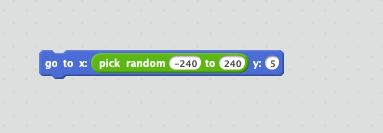
Replace the min and max with whatever the boundaries are for the sprite, and replace the y with whatever you want. If you want to keep the same y value, just use the y position reporter in the y input.
Replace the min and max with whatever the boundaries are for the sprite, and replace the y with whatever you want. If you want to keep the same y value, just use the y position reporter in the y input.
Last edited by medians (Jan. 5, 2023 23:46:51)
- Discussion Forums
- » Help with Scripts
-
» How to make a sprite go to a random x position?