Discuss Scratch

- Discussion Forums
- » Help with Scripts
- » Move and zoom camera to keep sprites on screen
![[RSS Feed]](//cdn.scratch.mit.edu/scratchr2/static/__ff7229f036c458728e45c39b0751aa44__//djangobb_forum/img/feed-icon-small.png "[RSS Feed]")
![[RSS Feed]](http://cdn.scratch.mit.edu/scratchr2/static/__ff7229f036c458728e45c39b0751aa44__//djangobb_forum/img/feed-icon-small.png "[RSS Feed]")
- AndreiFren64
-
 Scratcher

100+ posts
Move and zoom camera to keep sprites on screen
In this game, I have a custom camera system that works quite well for keeping focus on the player, however as I intend to make it a fighting game, I need to keep multiple sprites on screen at any given time. How would I make it so that it places the camera at a point where any sprites I want to be visible are visible, and zoom it accordingly?
Examples of how I want it to act:
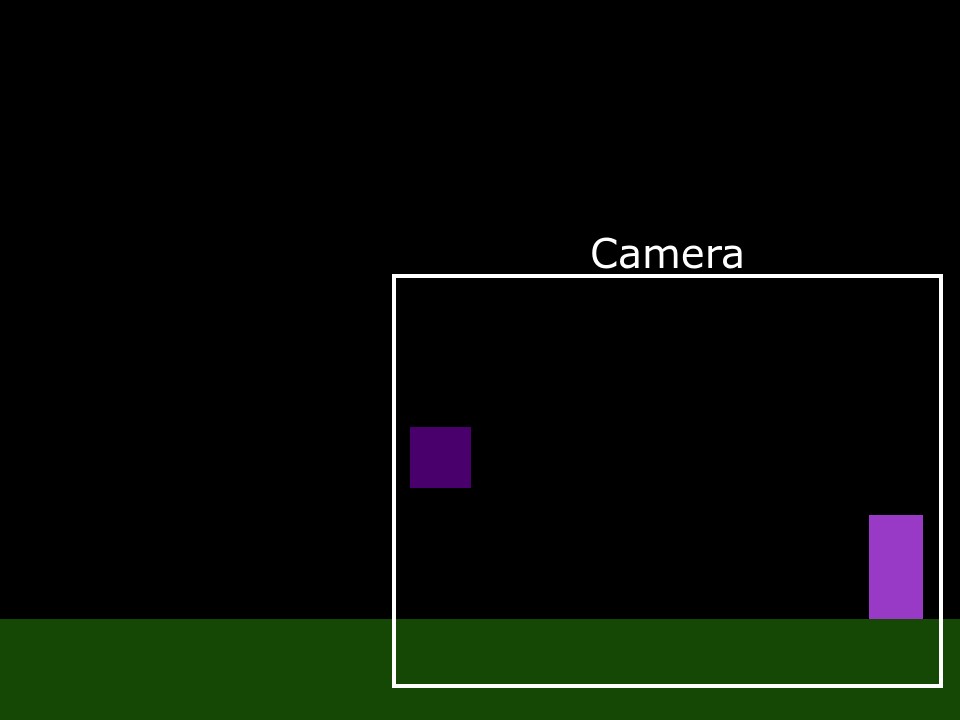
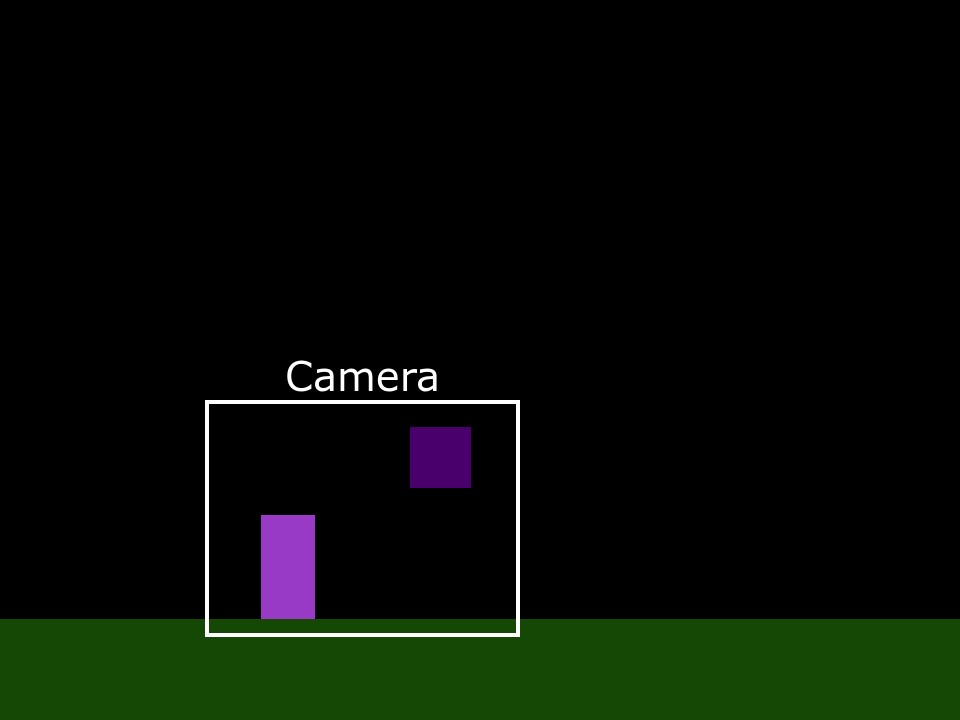
But preferrably, I'd like it to work with any number of sprites.
Examples of how I want it to act:
But preferrably, I'd like it to work with any number of sprites.
- crumbthehog
-
 Scratcher

92 posts
Move and zoom camera to keep sprites on screen
In this game, I have a custom camera system that works quite well for keeping focus on the player, however as I intend to make it a fighting game, I need to keep multiple sprites on screen at any given time. How would I make it so that it places the camera at a point where any sprites I want to be visible are visible, and zoom it accordingly?your link isn't working, but if its a standerd scrolling engine, you are likely setting the cam x/y
Examples of how I want it to act:
But preferrably, I'd like it to work with any number of sprites.
to the player x/y. you will need to set it the player x/y - the enemy x/y this will get the cam. in the middle of the two.

zooming it will take some more math, and will require some translating. it will also cause some scrolling issues if not done right.

Last edited by crumbthehog (Oct. 18, 2022 02:19:30)
- AndreiFren64
-
Scratcher
100+ posts
Move and zoom camera to keep sprites on screen
your link isn't working, but if its a standerd scrolling engine, you are likely setting the cam x/yOh, thank you, I thought I'd shared it. I'll share it now.
to the player x/y. you will need to set it the player x/y - the enemy x/y this will get the cam. in the middle of the two.
zooming it will take some more math, and will require some translating. it will also cause some scrolling issues if not done right.
Last edited by AndreiFren64 (Oct. 18, 2022 08:36:24)
- crumbthehog
-
Scratcher
92 posts
Move and zoom camera to keep sprites on screen
I looked at it. I tried to add the scrolling, but you have some strange hit-box thing going on. I could add it if you are ok with a bit of a code re-right.your link isn't working, but if its a standerd scrolling engine, you are likely setting the cam x/yOh, thank you, I thought I'd shared it. I'll share it now.
to the player x/y. you will need to set it the player x/y - the enemy x/y this will get the cam. in the middle of the two.
zooming it will take some more math, and will require some translating. it will also cause some scrolling issues if not done right.
- griefercube
-
 Scratcher

500+ posts
Move and zoom camera to keep sprites on screen
I remember seeing something like this before, but the theory is something like this:
record both sprites x and y position
Find their size (rectangular hitbox)
Use math to find the centre of both sprites (assuming it’s (x1+x2)/2)
then set zoom to the size/2+x1+x2 (or something like that)
yeah
record both sprites x and y position
Find their size (rectangular hitbox)
Use math to find the centre of both sprites (assuming it’s (x1+x2)/2)
then set zoom to the size/2+x1+x2 (or something like that)
yeah
- TheFinalAndOnlyStuge
-
 Scratcher

1 post
Move and zoom camera to keep sprites on screen
Im having the exact same problem! i cant figure out how to make 2 characters stay on the same screen
- AndreiFren64
-
Scratcher
100+ posts
Move and zoom camera to keep sprites on screen
Im having the exact same problem! i cant figure out how to make 2 characters stay on the same screenI never finished this project but your best bet will probably be finding the point in between the two characters and then setting the zoom to be something divided by the distance between them
im not a genius though idk
- Discussion Forums
- » Help with Scripts
-
» Move and zoom camera to keep sprites on screen