Discuss Scratch
- Discussion Forums
- » Help with Scripts
- » Close button crashes project
![[RSS Feed]](//cdn.scratch.mit.edu/scratchr2/static/__5f750b17a17db0b5d7ffaf5afb2e7e2b__//djangobb_forum/img/feed-icon-small.png "[RSS Feed]")
![[RSS Feed]](http://cdn.scratch.mit.edu/scratchr2/static/__5f750b17a17db0b5d7ffaf5afb2e7e2b__//djangobb_forum/img/feed-icon-small.png "[RSS Feed]")
- lightning1999
-
 Scratcher

100+ posts
Close button crashes project
On the main menu of my game, if you select settings then select close, the game will crash. What is the issue here and how can I fix it?
Link: https://scratch.mit.edu/projects/743485573/
Link: https://scratch.mit.edu/projects/743485573/
- MeIzAwezomeDede
-
 Scratcher

1000+ posts
Close button crashes project
I figured out what was happening. Basically, the close button detects when the mouse is held down and touching it, and when it is, it will delete all clones and then spawn the next menu. The problem is, as soon as the next menu is spawned in, your mouse is still being held down, which re-activates the close button. This creates an infinite loop of clones being deleted and created, on the same frame, crashing Scratch. There is a very simple fix though. Just add a “wait until not mouse down” before the forever loop starts, like this:
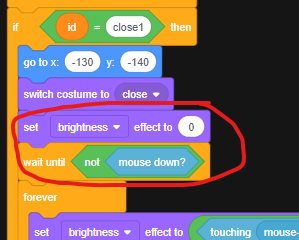
(The brightness block stops another minor glitch)
This prevents the glitch from happening. Add those blocks to both close1 and close2. Also, if you want, try adding that to all the other menu buttons in your project to prevent future glitches.
(The brightness block stops another minor glitch)
This prevents the glitch from happening. Add those blocks to both close1 and close2. Also, if you want, try adding that to all the other menu buttons in your project to prevent future glitches.
Last edited by MeIzAwezomeDede (Oct. 10, 2022 13:51:48)
- Discussion Forums
- » Help with Scripts
-
» Close button crashes project