Discuss Scratch

- Discussion Forums
- » Help with Scripts
- » How do you make perfectly curved squares?
![[RSS Feed]](//cdn.scratch.mit.edu/scratchr2/static/__ff7229f036c458728e45c39b0751aa44__//djangobb_forum/img/feed-icon-small.png "[RSS Feed]")
![[RSS Feed]](http://cdn.scratch.mit.edu/scratchr2/static/__ff7229f036c458728e45c39b0751aa44__//djangobb_forum/img/feed-icon-small.png "[RSS Feed]")
- 16bits1510
-
 Scratcher

83 posts
How do you make perfectly curved squares?
I know you can make curved squares with the reshape tool but can you make it perfect?
- awesome-llama
-
 Scratcher

1000+ posts
How do you make perfectly curved squares?
Try doing it in other vector editing software instead, scratch doesn't really provide much to allow you to be accurate. I can only mention that holding down shift when moving an object or point will snap it to 45 degree angles but you might know that already.
- B0o0lean
-
 Scratcher

1000+ posts
How do you make perfectly curved squares?
1. Draw a Square.
2. Draw up lines on the shown parts of the squares - you can use various methods to ensure the lines are on symmetrical spots.
3. Use the reshape tool to add two dots in the areas shown.
4. Delete the pivot in the corner.
5. Finished!
Image instructions below:
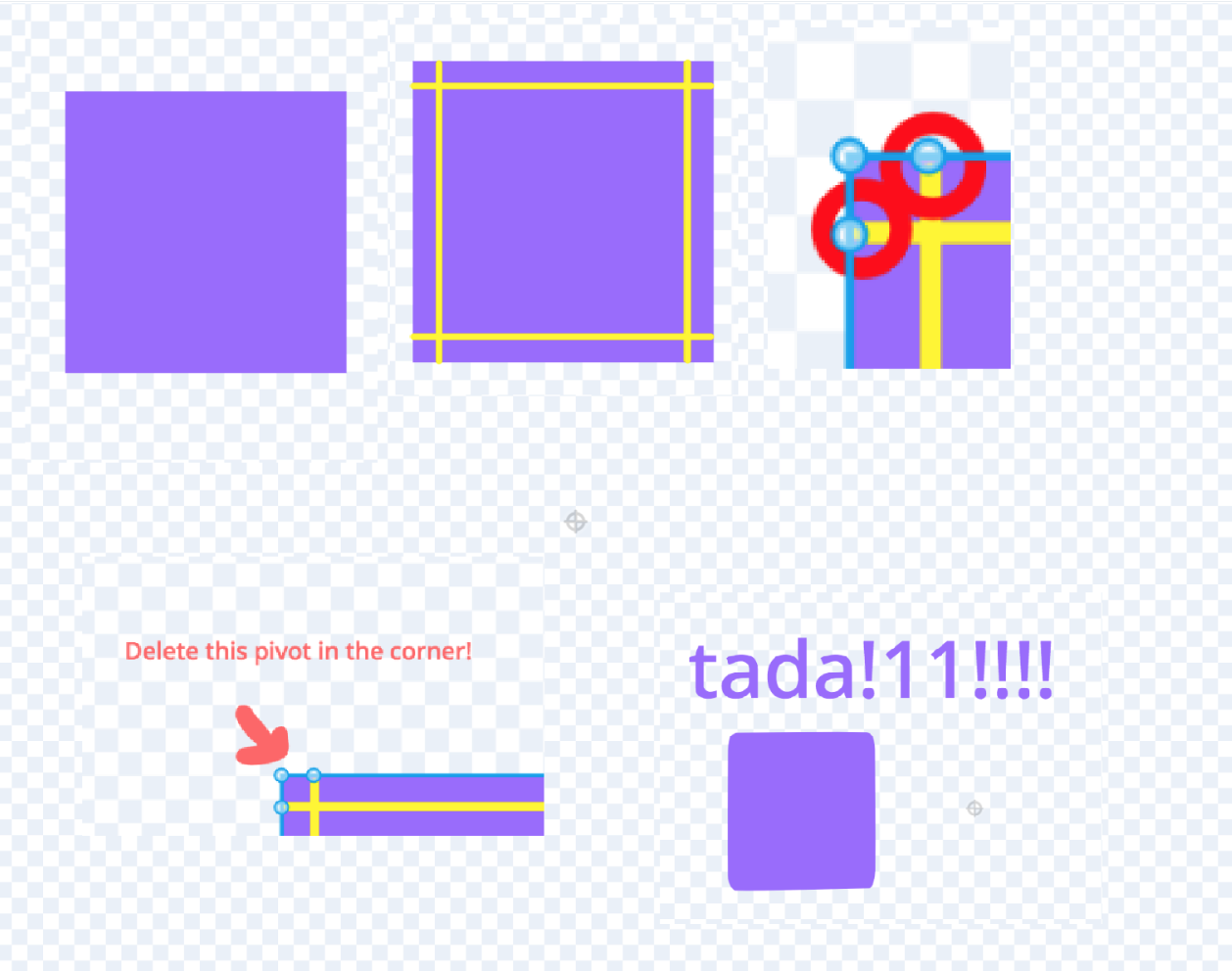
2. Draw up lines on the shown parts of the squares - you can use various methods to ensure the lines are on symmetrical spots.
3. Use the reshape tool to add two dots in the areas shown.
4. Delete the pivot in the corner.
5. Finished!
Image instructions below:
- Spentine
-
 Scratcher

1000+ posts
How do you make perfectly curved squares?
I use the gridlines to ensure that the points I put down are symmetrical. If I center the sprite then i can check which grid lines I could place a curve on.
- Discussion Forums
- » Help with Scripts
-
» How do you make perfectly curved squares?