Discuss Scratch
- Discussion Forums
- » Bugs and Glitches
- » It says it’s my Mac book for my system?
![[RSS Feed]](//cdn.scratch.mit.edu/scratchr2/static/__ff7229f036c458728e45c39b0751aa44__//djangobb_forum/img/feed-icon-small.png "[RSS Feed]")
![[RSS Feed]](http://cdn.scratch.mit.edu/scratchr2/static/__ff7229f036c458728e45c39b0751aa44__//djangobb_forum/img/feed-icon-small.png "[RSS Feed]")
- Prince_Wolf1
-
 Scratcher

1000+ posts
It says it’s my Mac book for my system?
My browser / operating system: MacOS Macintosh X 10.15.6, Safari 15.6.1, No Flash version detected
It’s says MacOS, but I rarely use my computer and I only used it for a few minutes or hours at most, when I use my iPad everyday and I signed up on my iPad and didn’t use my Mac book for scratch for months and now it says MacOS, and I don’ know if this affects stuff or if it does actually, and I know I can change it but it might affect other things if it uses my Mac’s browser information or whatever right?
Is there a way to fix this?
Sorry if my post is confusing, tell me if it is and I’ll try to fix it…
And I think this belongs in bugs and glitches but now I’m not sure if this should be in questions about scratch and sorry of it’s supposed to go there instead…..
It’s says MacOS, but I rarely use my computer and I only used it for a few minutes or hours at most, when I use my iPad everyday and I signed up on my iPad and didn’t use my Mac book for scratch for months and now it says MacOS, and I don’ know if this affects stuff or if it does actually, and I know I can change it but it might affect other things if it uses my Mac’s browser information or whatever right?
Is there a way to fix this?
Sorry if my post is confusing, tell me if it is and I’ll try to fix it…
And I think this belongs in bugs and glitches but now I’m not sure if this should be in questions about scratch and sorry of it’s supposed to go there instead…..
Last edited by Prince_Wolf1 (Sept. 12, 2022 01:13:19)
- asterskiies
-
 Scratcher

87 posts
It says it’s my Mac book for my system?
My browser / operating system: IPad iOS 15.5, Safari 604.1, No Flash version detected
not sure what’s happening to you, as I’m also on ipad
were you currently on your ipad while making this topic? if so, could you go on your macbook to post you os/browser to see if it has different results?
(edit: whoops I’m on my alt)
not sure what’s happening to you, as I’m also on ipad
were you currently on your ipad while making this topic? if so, could you go on your macbook to post you os/browser to see if it has different results?
(edit: whoops I’m on my alt)
Last edited by asterskiies (Sept. 12, 2022 11:42:58)
- Prince_Wolf1
-
Scratcher
1000+ posts
It says it’s my Mac book for my system?
My browser / operating system: IPad iOS 15.5, Safari 604.1, No Flash version detected(Wow…Sorry never saw this)
not sure what’s happening to you, as I’m also on ipad
were you currently on your ipad while making this topic? if so, could you go on your macbook to post you os/browser to see if it has different results?
(edit: whoops I’m on my alt)
I’ll try and see
- Prince_Wolf1
-
Scratcher
1000+ posts
It says it’s my Mac book for my system?
My sisters also on iPad and this is her
And she’s also used her MacBook on scratch
And she’s also used her MacBook on scratch
Last edited by Prince_Wolf1 (Sept. 25, 2022 02:10:48)
- Dogs-are-amazing1
-
 Scratcher

500+ posts
It says it’s my Mac book for my system?
My browser / operating system: MacOS Macintosh X 10.15.6, Safari 15.6.1, No Flash version detected
I haven’t used my MacBook signed in before/recently though
I haven’t used my MacBook signed in before/recently though
- Prince_Wolf1
-
Scratcher
1000+ posts
It says it’s my Mac book for my system?
My browser / operating system: MacOS Macintosh X 10.15.7, Safari 15.3, No Flash version detected
same thing
same thing

- BarelySmooth
-
 Scratcher

1000+ posts
It says it’s my Mac book for my system?
The “browser/operating system” string gets information from the device on which you created the post.
With each request, your browser sends a string called the “User Agent String”. Scratch uses this string to determine which operating system you are using. Scratch's user agent parser is fairly old at this point, so it might have trouble detecting newer browsers.
You might also want to make sure you are using the mobile version of the page. If you're using the desktop version of the site, Safari will tell scratch that you're using macOS. To fix this, click the Aa button on the address bar, click "Website Settings“, and then make sure ”Request Desktop Website" is turned off.
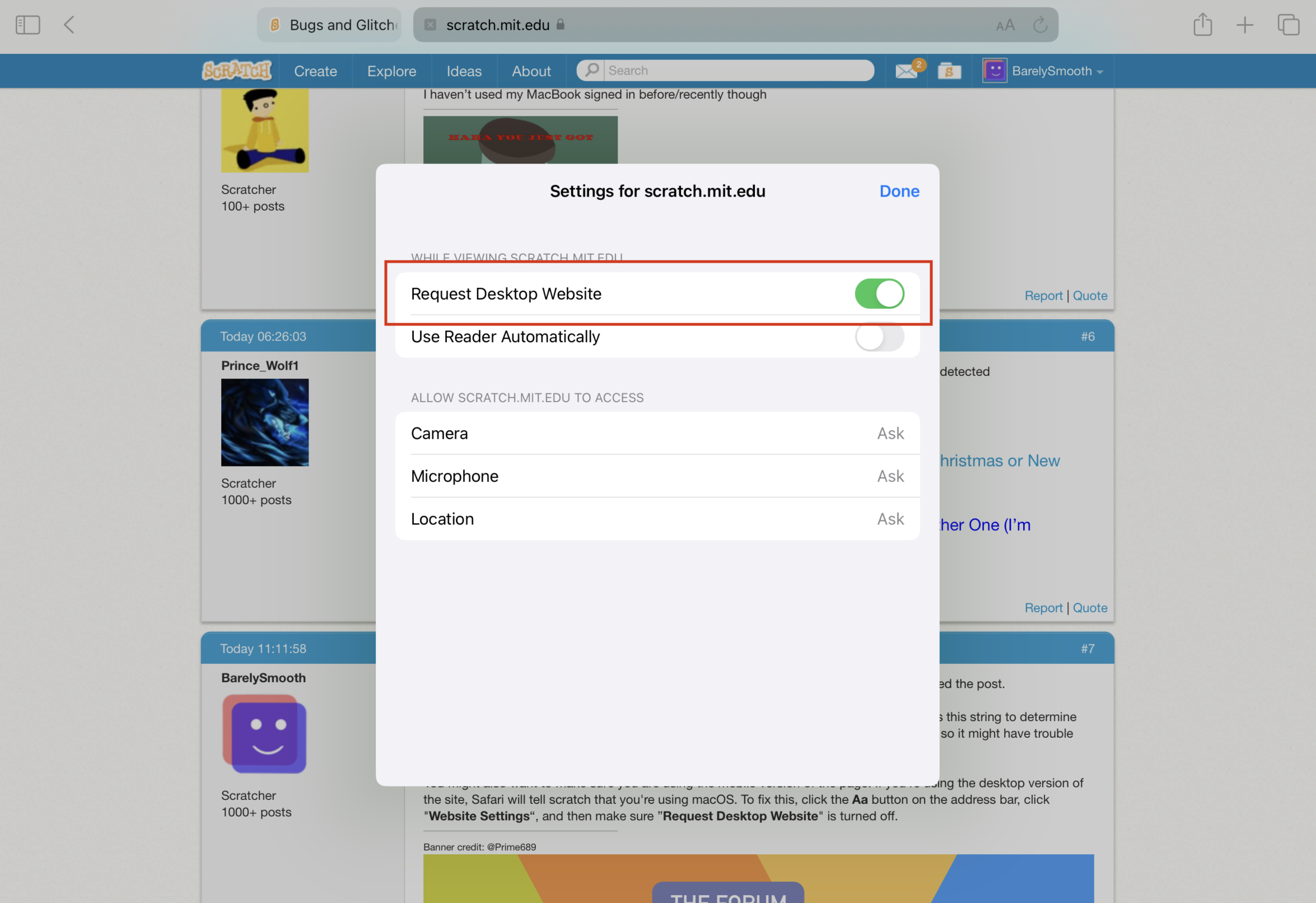
With each request, your browser sends a string called the “User Agent String”. Scratch uses this string to determine which operating system you are using. Scratch's user agent parser is fairly old at this point, so it might have trouble detecting newer browsers.
You might also want to make sure you are using the mobile version of the page. If you're using the desktop version of the site, Safari will tell scratch that you're using macOS. To fix this, click the Aa button on the address bar, click "Website Settings“, and then make sure ”Request Desktop Website" is turned off.
Last edited by BarelySmooth (Sept. 25, 2022 09:02:46)
- Prince_Wolf1
-
Scratcher
1000+ posts
It says it’s my Mac book for my system?
My browser / operating system: IPad iOS 15.6.1, Safari 15.6.1, No Flash version detected
Oh ok, thank you, I’ll close this now
I shouldn’t have put this in bugs and glitches, sorry
The “browser/operating system” string gets information from the device on which you created the post.
With each request, your browser sends a string called the “User Agent String”. Scratch uses this string to determine which operating system you are using. Scratch's user agent parser is fairly old at this point, so it might have trouble detecting newer browsers.
You might also want to make sure you are using the mobile version of the page. If you're using the desktop version of the site, Safari will tell scratch that you're using macOS. To fix this, click the Aa button on the address bar, click "Website Settings“, and then make sure ”Request Desktop Website" is turned off.
Oh ok, thank you, I’ll close this now
I shouldn’t have put this in bugs and glitches, sorry
- Discussion Forums
- » Bugs and Glitches
-
» It says it’s my Mac book for my system?