Discuss Scratch

- Discussion Forums
- » Help with Scripts
- » Player 1 somehow different to other players
![[RSS Feed]](//cdn.scratch.mit.edu/scratchr2/static/__5f750b17a17db0b5d7ffaf5afb2e7e2b__//djangobb_forum/img/feed-icon-small.png "[RSS Feed]")
![[RSS Feed]](http://cdn.scratch.mit.edu/scratchr2/static/__5f750b17a17db0b5d7ffaf5afb2e7e2b__//djangobb_forum/img/feed-icon-small.png "[RSS Feed]")
- Nuclear_Melon
-
 Scratcher

100+ posts
Player 1 somehow different to other players
In this project: https://scratch.mit.edu/projects/715577184 (First few scripts in ‘player(s!)’ sprite
All players are in one sprite, and each uses it's own script. This script contains controls (WASD/TFGH etc) but also the platform detection script (please don't bully my platforming code).
Each script for the players is identical except for the <when ( ) key pressed> blocks-
Or so I thought.
The players, when hit by the whale blowhole water, fly up into the air- but not the first player (bandana guy) when on the ground. He's pushed on the X axis, but not the Y.
What's different about player 1? (Look in the other code too, it may be something there)
Also for playtesters you can use the slider for blowhole strength
All players are in one sprite, and each uses it's own script. This script contains controls (WASD/TFGH etc) but also the platform detection script (please don't bully my platforming code).
Each script for the players is identical except for the <when ( ) key pressed> blocks-
Or so I thought.
The players, when hit by the whale blowhole water, fly up into the air- but not the first player (bandana guy) when on the ground. He's pushed on the X axis, but not the Y.
What's different about player 1? (Look in the other code too, it may be something there)
Also for playtesters you can use the slider for blowhole strength
- Alberknyis
-
 Scratcher

1000+ posts
Player 1 somehow different to other players
I recall someone asking about keyboard ghosting because they intended to make a 4 player game. Was that you?
I'm still analysing the game but I have noticed that if you make player 1 say anything, it will fall through the floor. What the heck?
I'm still analysing the game but I have noticed that if you make player 1 say anything, it will fall through the floor. What the heck?
- Nuclear_Melon
-
Scratcher
100+ posts
Player 1 somehow different to other players
I recall someone asking about keyboard ghosting because they intended to make a 4 player game. Was that you?I KNOW RIGHT??!!? And that person was me, by the way.
I'm still analysing the game but I have noticed that if you make player 1 say anything, it will fall through the floor. What the heck?
- Nuclear_Melon
-
Scratcher
100+ posts
Player 1 somehow different to other players
My code is so bad that it broke reality 
I made a fix that seems to work fine- Just made it so that when the player gets touched by the water, set Y movement to (Thing), then change Y position by (Thing). It's a fix I use a lot.
I may have to keep me eye on this one though- It may resurface.

I made a fix that seems to work fine- Just made it so that when the player gets touched by the water, set Y movement to (Thing), then change Y position by (Thing). It's a fix I use a lot.
I may have to keep me eye on this one though- It may resurface.
Last edited by Nuclear_Melon (July 25, 2022 10:09:51)
- Alberknyis
-
Scratcher
1000+ posts
Player 1 somehow different to other players
Lets talk about script order.
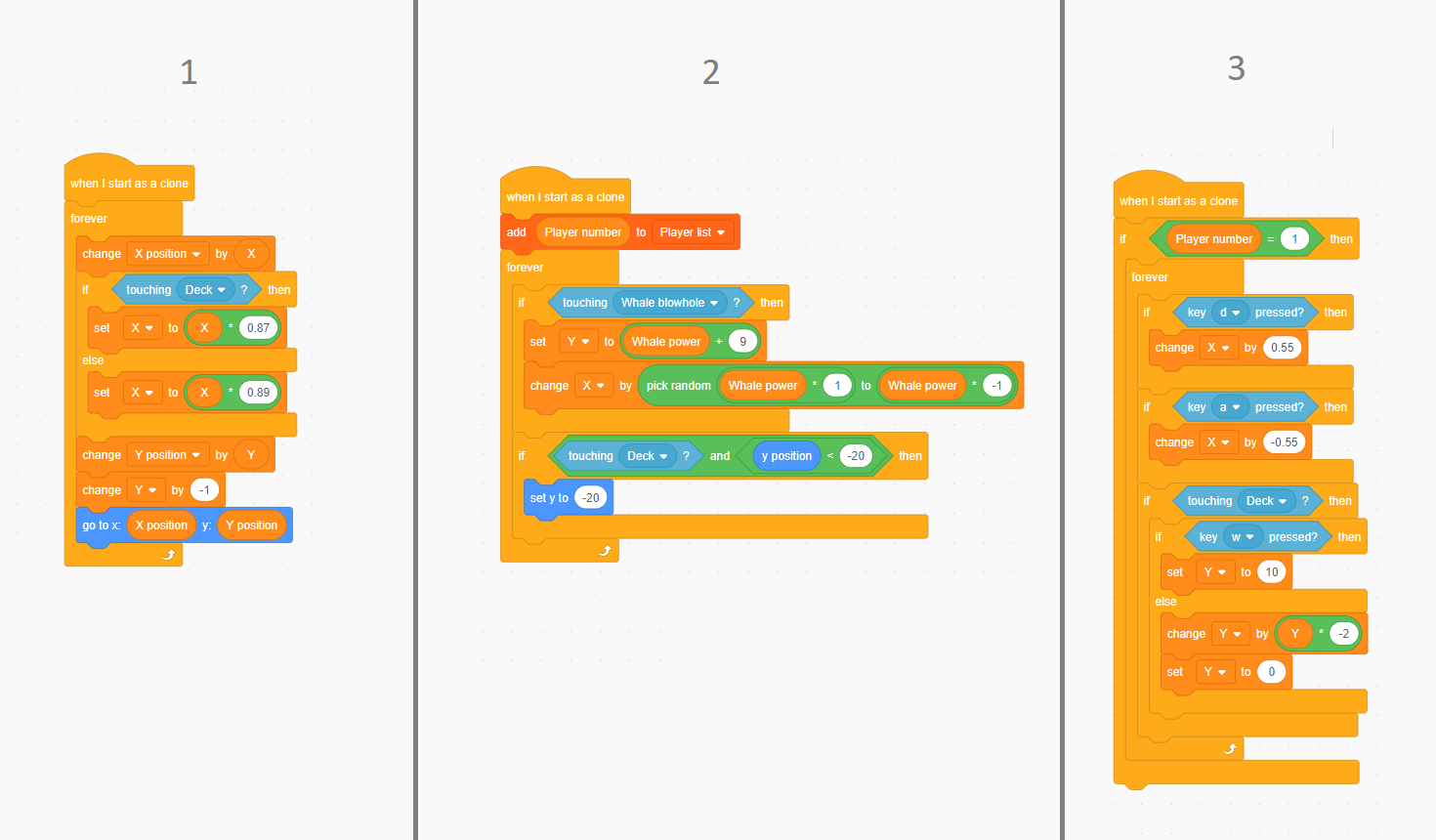
These are the three main scripts that affect a players movement. The third script is different for each player but only to detect different keys, so pretend script 3 is for whatever player we are focusing on. I have numbered them 1, 2 and 3, but if you think that is the order the scripts run in you'd be mistaken.
For players 2, 3 and 4 the scripts run in the order 1, 3, 2. Let's recreate a scenario of what this means, where player 2 is on the deck at y = -20 and is touching the whale blowhole:
So for players 2, 3 and 4 the platforming engine somewhat works. So what goes wrong for player 1?
The ‘“trick” is that for player 1, the script order is different. It goes 3, 1, 2. I have no idea why or how to change it. Let’s see how this becomes a problem. We'll put player 1 in the exact same scenario:
I recommend in the future that you combine scripts together when possible so that the order of the steps is clear, and don't split a simple procedure into multiple scripts that also are each doing their own thing. Scripts 1, 2 and 3 all separately check if the player is touching the deck and only do one part of a full job, when those checks could be combined together so that you can fix the X variable, set the y position and check for jumping all at once. If need be you can use custom blocks to avoid repetitiveness and to split long scripts into more understandable segments.
These are the three main scripts that affect a players movement. The third script is different for each player but only to detect different keys, so pretend script 3 is for whatever player we are focusing on. I have numbered them 1, 2 and 3, but if you think that is the order the scripts run in you'd be mistaken.
For players 2, 3 and 4 the scripts run in the order 1, 3, 2. Let's recreate a scenario of what this means, where player 2 is on the deck at y = -20 and is touching the whale blowhole:
- Script 1 runs first. Since it is already touching the deck Y is currently set to 0. Y gets changed by -1 and the player moves 1 pixel down.
- Script 3 runs second. It is touching the deck, and the player is not jumping, so Y gets set to 0.
- Script 2 runs third. It is touching the whale blowhole, so X and Y get set to values that will make the player go flying. It is also touching the deck, so the y position is set back to -20. Note that at y position = -20 it is still touching the deck.
- The game goes back to script 1. The players y position gets changed to go upwards and the blowhole mechanics work successfully.
So for players 2, 3 and 4 the platforming engine somewhat works. So what goes wrong for player 1?
The ‘“trick” is that for player 1, the script order is different. It goes 3, 1, 2. I have no idea why or how to change it. Let’s see how this becomes a problem. We'll put player 1 in the exact same scenario:
- Script 3 runs first. Because it is touching the deck and is not jumping Y gets set to 0
- Script 1 runs second. Y gets changed by -1 and the player moves down 1 pixel.
- Script 2 runs third. It is touching the whale blowhole, so X and Y get set to values that will make the player go flying. It is also touching the deck, so the y position is set back to -20.
- The game goes back to script 3. Remember, player 1 is still touching the deck, Y gets set back to 0, so even though it touched the whale blowhole, its Y variable immediately goes back to 0.
I recommend in the future that you combine scripts together when possible so that the order of the steps is clear, and don't split a simple procedure into multiple scripts that also are each doing their own thing. Scripts 1, 2 and 3 all separately check if the player is touching the deck and only do one part of a full job, when those checks could be combined together so that you can fix the X variable, set the y position and check for jumping all at once. If need be you can use custom blocks to avoid repetitiveness and to split long scripts into more understandable segments.
- Nuclear_Melon
-
Scratcher
100+ posts
Player 1 somehow different to other players
Dang. Good thing I fixed it the short way. Thanks for the advice, I'll use it at least a little. especially the part about custom blocks. : )
Last edited by Nuclear_Melon (July 26, 2022 01:23:55)
- Discussion Forums
- » Help with Scripts
-
» Player 1 somehow different to other players