Discuss Scratch

- Discussion Forums
- » Help with Scripts
- » slider code please
![[RSS Feed]](//cdn.scratch.mit.edu/scratchr2/static/__5f750b17a17db0b5d7ffaf5afb2e7e2b__//djangobb_forum/img/feed-icon-small.png "[RSS Feed]")
![[RSS Feed]](http://cdn.scratch.mit.edu/scratchr2/static/__5f750b17a17db0b5d7ffaf5afb2e7e2b__//djangobb_forum/img/feed-icon-small.png "[RSS Feed]")
- CornDati
-
 Scratcher

12 posts
slider code please
i am doing a music project and need help with the slider code for the volume please?
i'll add you in the credit section
i'll add you in the credit section

- cs2861142
-
 Scratcher

100+ posts
slider code please
Create a variable named “Volume” or something similar. Ensure it is visible on the stage.
Right-click on the variable on the stage and select “slider” from the drop-down.
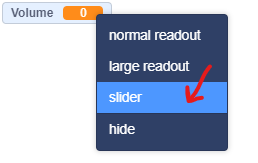
The variable should now look like this:

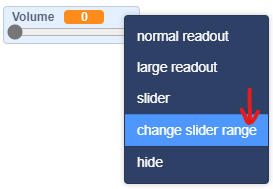
If you want to change the minimum and maximum slider values, right-click on the slider and press “change slider range”.
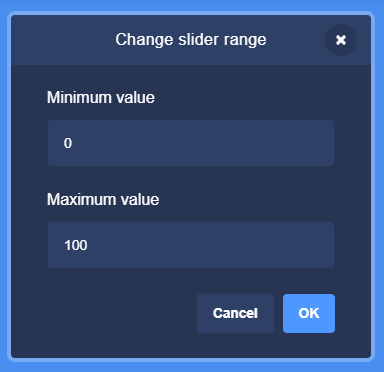
Change the slider range using the popup, then press OK. If you want to use decimals, enter the number along with .00
Right-click on the variable on the stage and select “slider” from the drop-down.
The variable should now look like this:
If you want to change the minimum and maximum slider values, right-click on the slider and press “change slider range”.
Change the slider range using the popup, then press OK. If you want to use decimals, enter the number along with .00
- Jlerpy
-
 Scratcher

1000+ posts
slider code please
Here's how I handled it:
https://scratch.mit.edu/projects/692307400/
https://scratch.mit.edu/projects/692307400/
- Scratch-Minion
-
 Scratcher

1000+ posts
slider code please
If you make a slider variable from 0 to 100 called My Volume, then the code would be:
As you move the slider the volume will change.
Note: You can call your variable Volume rather than My Volume.
I just wanted to avoid confusion in the example code.
when green flag clicked
forever
set volume to (My Volume) %
end
As you move the slider the volume will change.
Note: You can call your variable Volume rather than My Volume.
I just wanted to avoid confusion in the example code.
- CornDati
-
Scratcher
12 posts
slider code please
If you make a slider variable from 0 to 100 called My Volume, then the code would be:when green flag clicked
forever
set volume to (My Volume) %
end
As you move the slider the volume will change.
Note: You can canIf you make a slider variable from 0 to 100 called My Volume, then the code would be:Thanks,when green flag clicked
forever
set volume to (My Volume) %
end
As you move the slider the volume will change.
Note: You can call your variable Volume rather than My Volume.
I just wanted to avoid confusion in the example code.
That's what I would want to know,
But how can I covert it to a sprite?
- CoconutGator
-
 Scratcher

1000+ posts
slider code please
Thanks,Convert what to a sprite? Like make a slider sprite?
That's what I would want to know,
But how can I covert it to a sprite?
- legendary34678
-
 Scratcher

1000+ posts
slider code please
I think that what they're asking about is how to use sprites to mimic the slider effect without using the (honestly kind of glaring) orange variable slider. I recall that the project called Merge had a slider in it. You could go into the project's script to see how it was handled. (Warning: It may be a little laggy because of the sheer amount of code in it.)
I hope this helps you!
I hope this helps you!
- helloworldbyeworld
-
 Scratcher

1000+ posts
slider code please
You can make a small circular sprite as the thing that can be dragged around in a slider. Then, you can use something like this to make the sprite draggable in the x axis with boundaries:
To make it look more like a slider than a x-draggable circle, you should make a line in the background behind the circle. Also, keep in mind the slider value’s range is 0 to the difference between the start x and the end x, so unless the slider width is exactly 100, you might want to do some mapping.
when green flag clicked
forever
if <<mouse down?> and <<(mouse x) > (start x)> and <(mouse x) < (end x)>>> then
set x to (mouse x)
set [Slider value v] to ((x position) - (start x))
end
end
To make it look more like a slider than a x-draggable circle, you should make a line in the background behind the circle. Also, keep in mind the slider value’s range is 0 to the difference between the start x and the end x, so unless the slider width is exactly 100, you might want to do some mapping.
Last edited by helloworldbyeworld (May 30, 2022 04:15:18)
- RT_Borg
-
 Scratcher

1000+ posts
slider code please
Hi CornDati,
Something like this should work for you. I hard-coded it for a Range image that's 100 pixels tall (and “centered” at the bottom). If you need a specific image height, you should be able to scale the math in Slider. (Let me know if you need help scaling–maybe I'll generalize the demo to use a variable for the costume height. Same if you need it horizontal and can't figure out how to change it.)
Demo: Simple Slider
https://scratch.mit.edu/projects/698432536
I hope this helps. Happy to answer any questions.
– RT_Borg
Something like this should work for you. I hard-coded it for a Range image that's 100 pixels tall (and “centered” at the bottom). If you need a specific image height, you should be able to scale the math in Slider. (Let me know if you need help scaling–maybe I'll generalize the demo to use a variable for the costume height. Same if you need it horizontal and can't figure out how to change it.)
Demo: Simple Slider
https://scratch.mit.edu/projects/698432536
I hope this helps. Happy to answer any questions.
– RT_Borg
- CornDati
-
Scratcher
12 posts
slider code please
Hi CornDati,Tnx
Something like this should work for you. I hard-coded it for a Range image that's 100 pixels tall (and “centered” at the bottom). If you need a specific image height, you should be able to scale the math in Slider. (Let me know if you need help scaling–maybe I'll generalize the demo to use a variable for the costume height. Same if you need it horizontal and can't figure out how to change it.)
Demo: Simple Slider
https://scratch.mit.edu/projects/698432536
I hope this helps. Happy to answer any questions.
– RT_Borg
I'll give this a try and let you know
- CornDati
-
Scratcher
12 posts
slider code please
You can make a small circular sprite as the thing that can be dragged around in a slider. Then, you can use something like this to make the sprite draggable in the x axis with boundaries:Thankswhen green flag clicked
forever
if <<mouse down?> and <<(mouse x) > (start x)> and <(mouse x) < (end x)>>> then
set x to (mouse x)
set [Slider value v] to ((x position) - (start x))
end
end
To make it look more like a slider than a x-draggable circle, you should make a line in the background behind the circle. Also, keep in mind the slider value’s range is 0 to the difference between the start x and the end x, so unless the slider width is exactly 100, you might want to do some mapping.
Much appreciated
- Discussion Forums
- » Help with Scripts
-
» slider code please